



Realtek RTL9201 Firmware 1.32.7 / 9.32.74 / 1.33.3 / 1.33.88 / 9.34.11 / 1.34.29
- Shonk
-
 Topic Author
- Offline
- The Best Poster
-

Enregistré
- Posts: 185
- Thanks: 92
Re: Realtek RTL9201R Firmware 1.32.7 / 9.34.11
3 months 2 hours ago - 3 months 1 minute ago
I have worked out how to extract a firmware thats flashable with MPtoolLite from an SPI dump
I just did 1.34.29 and it works great
will do all the other spi dumps i have and release a package in a few hours
I just did 1.34.29 and it works great
will do all the other spi dumps i have and release a package in a few hours
Last edit: 3 months 1 minute ago by Shonk.
Please Log in or Create an account to join the conversation.
- Shonk
-
Topic Author
- Offline
- The Best Poster
-
Enregistré
- Posts: 185
- Thanks: 92
Re: Realtek RTL9201R Firmware 1.32.7 / 9.34.11
3 months 2 minutes ago - 2 months 4 weeks ago
I have extracted and tested all SPI backups i have
all flash fine on a 4Mbit SPI
I also Extracted the ShuoLe LCD 1.33.3.bin its in the Other folder
i also put a brief text file explaining how to extract a flashable bin from a SPI backup in the other folder
Firmware Bin
RTL9201VB_v1.32.7.112522_signed.bin (Requires 2Mbit SPI)
RTL9201VB_v9.32.74_071723_dbg.bin (Requires 4Mbit SPI)
RTL9201VB_v1.33.3.092723_signed.bin (Requires 4Mbit SPI)
RTL9201VB_v1.33.88.071824_signed.bin (Requires 4Mbit SPI)
RTL9201VB_v9.34.11.102524_dbg.bin (Requires 4Mbit SPI)
RTL9201VB_v1.34.29.011325_signed.bin (Requires 4Mbit SPI)
LED Bin
Cofre Disco Duro 1.33.88_LED_41_00.bin
Cofre Disco Duro 9.32.74_LED_41_00.bin
JEYI RTL9201 2280 LED_sleep_green_35_02_01.bin
UTHAI U25N-L_LED_41_02.bin
mega.nz/file/d3Z2hL6Q#6vNEedyKFVP6lX6FGz..._AXrWZtrbrJyhnS0HA4E
My RTL9201's
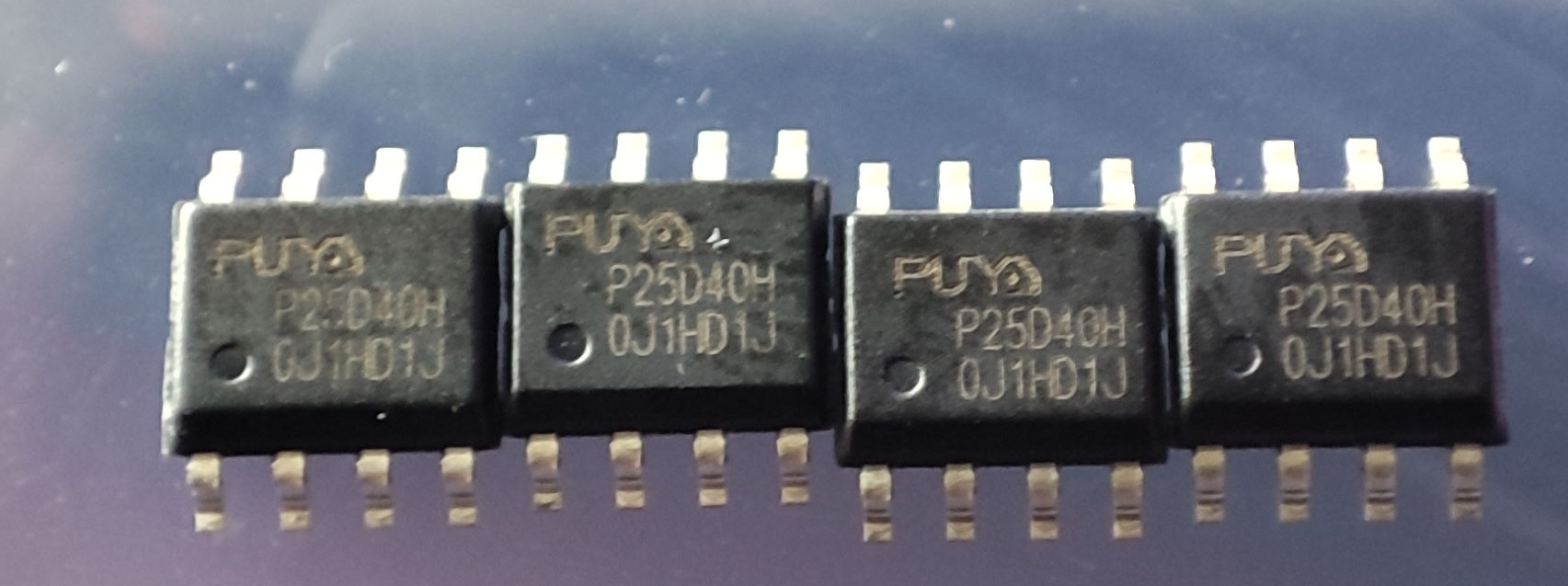
I Have 50 Puya 4 Mbit SPI chips from aliexpress i think i paid about £1.50 for them about a year ago when i needed one and ordered a pile due to how cheap they where
I will replace the 2Mbit SPI's when im bored on the 17 i have with 2Mbit SPI's
I may do a few later
4 x UTHAI Q5 Firmware 1.32.7 2 Mbit SPI
6 x UTHAI Q6 Firmware 1.32.7 2 Mbit SPI
7 x UTHAI Q7 Firmware 1.32.7 2 Mbit SPI (Fitted a 4Mbit SPI to one of them as a test Updated to 1.34.29 Fine)
5 x Cofre Disco Duro Firmware 1.33.88 4 Mbit SPI (Updated to 1.34.29 Fine)
2 x UTHAI U25N-L Firmware 1.34.29 4 Mbit SPI
If the SPI is only 2Mbit the updater will only show 1.32.7 in the pulldown
e.g. you wont be able to select anything newer
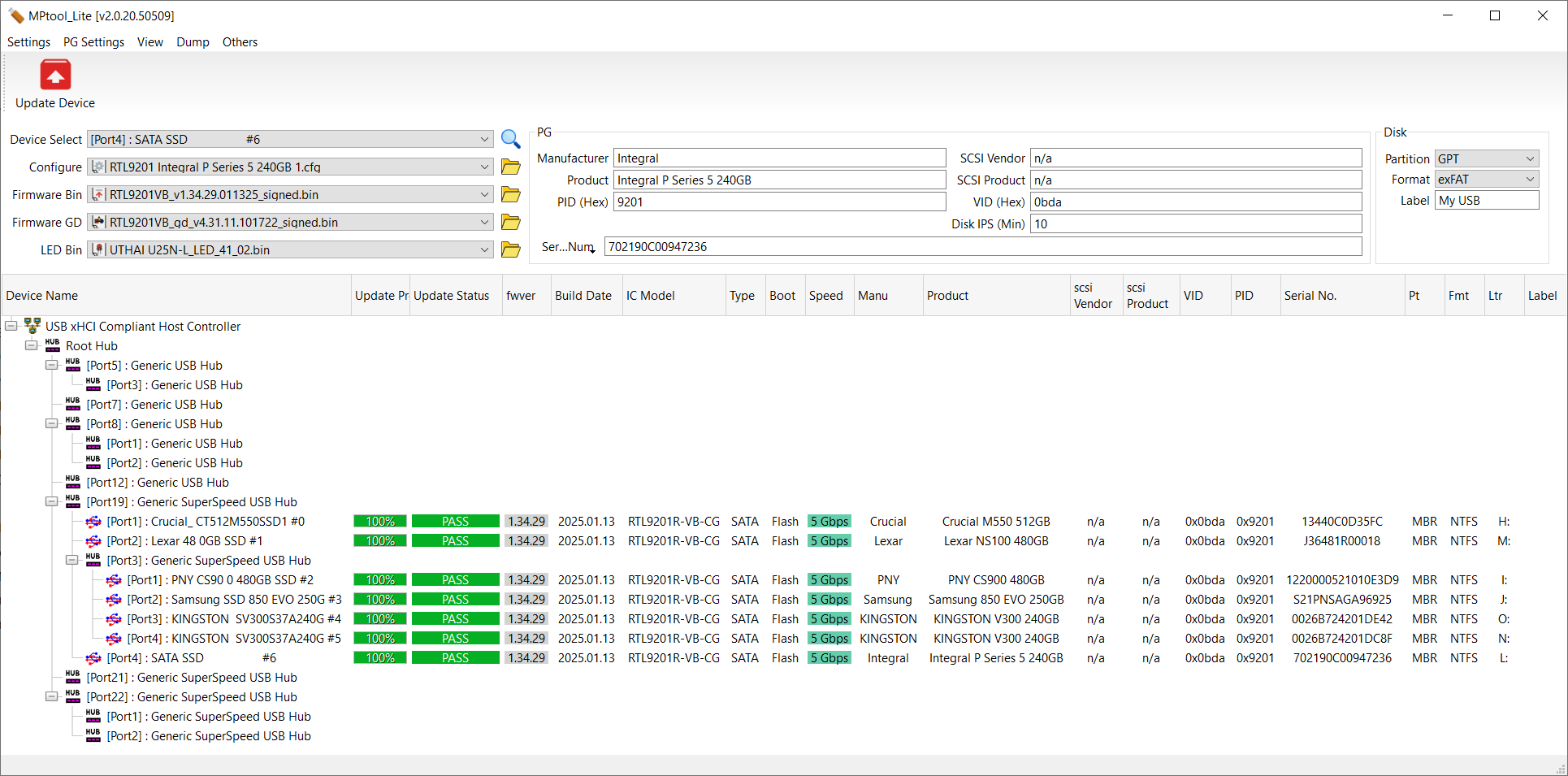
all flash fine on a 4Mbit SPI
I also Extracted the ShuoLe LCD 1.33.3.bin its in the Other folder
i also put a brief text file explaining how to extract a flashable bin from a SPI backup in the other folder
Firmware Bin
RTL9201VB_v1.32.7.112522_signed.bin (Requires 2Mbit SPI)
RTL9201VB_v9.32.74_071723_dbg.bin (Requires 4Mbit SPI)
RTL9201VB_v1.33.3.092723_signed.bin (Requires 4Mbit SPI)
RTL9201VB_v1.33.88.071824_signed.bin (Requires 4Mbit SPI)
RTL9201VB_v9.34.11.102524_dbg.bin (Requires 4Mbit SPI)
RTL9201VB_v1.34.29.011325_signed.bin (Requires 4Mbit SPI)
LED Bin
Cofre Disco Duro 1.33.88_LED_41_00.bin
Cofre Disco Duro 9.32.74_LED_41_00.bin
JEYI RTL9201 2280 LED_sleep_green_35_02_01.bin
UTHAI U25N-L_LED_41_02.bin
mega.nz/file/d3Z2hL6Q#6vNEedyKFVP6lX6FGz..._AXrWZtrbrJyhnS0HA4E
My RTL9201's
I Have 50 Puya 4 Mbit SPI chips from aliexpress i think i paid about £1.50 for them about a year ago when i needed one and ordered a pile due to how cheap they where
I will replace the 2Mbit SPI's when im bored on the 17 i have with 2Mbit SPI's
I may do a few later
4 x UTHAI Q5 Firmware 1.32.7 2 Mbit SPI
6 x UTHAI Q6 Firmware 1.32.7 2 Mbit SPI
7 x UTHAI Q7 Firmware 1.32.7 2 Mbit SPI (Fitted a 4Mbit SPI to one of them as a test Updated to 1.34.29 Fine)
5 x Cofre Disco Duro Firmware 1.33.88 4 Mbit SPI (Updated to 1.34.29 Fine)
2 x UTHAI U25N-L Firmware 1.34.29 4 Mbit SPI
If the SPI is only 2Mbit the updater will only show 1.32.7 in the pulldown
e.g. you wont be able to select anything newer
Last edit: 2 months 4 weeks ago by Shonk.
The following user(s) said Thank You: Stasiz, abhishekt295
Please Log in or Create an account to join the conversation.
- Shonk
-
Topic Author
- Offline
- The Best Poster
-
Enregistré
- Posts: 185
- Thanks: 92
Re: Realtek RTL9201R Firmware 1.32.7 / 9.34.11
2 months 4 weeks agoCode:
================================================================================
REALTEK RTL9201 / RTL9201R FIRMWARE EXTRACTION GUIDE
How to convert a raw SPI Hardware Dump into an MPTool-Flashable .bin
================================================================================
[IMPORTANT PREPARATION]
Always work on a COPY of your original SPI dump. Never edit your only backup.
--------------------------------------------------------------------------------
METHOD A: USING ABSOLUTE OFFSETS (Recommended - No reloading required)
--------------------------------------------------------------------------------
Open your raw SPI dump in a Hex Editor (e.g., HxD) and perform these 3 actions:
1. REMOVE EMBEDDED LED BLOCK
• Select from offset: 00000000
• To offset: 00003FFF
• Action: DELETE (This removes the 16KB LED block)
2. REMOVE ALIGNMENT PADDING
• Select from offset: 00001000
• To offset: 00001FFF
• Action: DELETE (This shifts 00002000 down to 00001000)
3. TRIM THE TRAILING CODE TO SIZE
Keep only the exact bytes required for your specific firmware trunk. Select
from the starting offset below all the way to the very END of the file, and
DELETE everything selected.
• For 1.34.x / 452KB Trunks: Delete everything AFTER offset 00070FFF
• For 1.33.x / 388KB Trunks: Delete everything AFTER offset 00060FFF
(Includes 1.33.88, 1.33.3, and 9.32.74)
4. SAVE YOUR COMPLETED FILE
• Save as: [Your_Firmware_Name]_signed.bin
• It is now ready to load directly into MPTool Lite / Mini.
--------------------------------------------------------------------------------
METHOD B: STEP-BY-STEP SHIFT METHOD
--------------------------------------------------------------------------------
If you prefer to save and reload the file to reset the editor's counter:
1. Delete from 00000000 to 00003FFF.
2. SAVE, CLOSE, and RE-OPEN the file.
3. Delete from 00001000 to 00001FFF.
4. Trim the file tail to its final exact size and delete everything after:
• For 452KB size (e.g., 1.34.29): Keep up to 00070FFF. Delete after.
• For 400KB size: Keep up to 00063FFF. Delete after.
• For 388KB size (e.g., 1.33.x): Keep up to 00060FFF. Delete after.
--------------------------------------------------------------------------------
[OPTIONAL] INJECTING STOCK DEFAULT IDENTIFICATION AREA
--------------------------------------------------------------------------------
To set the device profile/ID area from being modified, you can
inject a clean signature segment from a known working stock binary file:
1. Open a known good, working stock generic firmware .bin file.
2. Copy the exact block from offset 00000800 through to 00008DFF.
3. Open your newly created custom firmware .bin file.
4. Select the identical region (00000800 to 00008DFF).
5. Paste-Write (Overwrite) the copied block directly over it.
6. Save the file.
--------------------------------------------------------------------------------
[TROUBLESHOOTING FLASH PERCENTAGE STATUS]
• If the binary is under-trimmed (too large): The updater utility will still
flash successfully, but the progress bar will prematurely finish and close
out when it hits roughly ~80%.
• If the binary is over-trimmed (too small): The flash operation will fail
entirely, and the controller will drop into a "GD Firmware" loop recovery state.
================================================================================
The following user(s) said Thank You: Stasiz, abhishekt295
Please Log in or Create an account to join the conversation.
- Shonk
-
Topic Author
- Offline
- The Best Poster
-
Enregistré
- Posts: 185
- Thanks: 92
Re: Realtek RTL9201R Firmware 1.32.7 / 9.34.11
2 months 4 weeks ago - 2 months 3 weeks ago
I just replaced a 2Mbit SPI (PUYA P25D22H) on a UTHAI Q7 with a 4Mbit SPI (FENTECH 25VQ40)
My Programmer Had a FENTECH That i pulled from a PCB the other week so i just used that instead of one
of my PUYA P25D40H's
I programmed it with a Factory 1.34.29 SPI image before fitting it just to ensure i didnt get any problems
All went fine and you can update it from windows just fine with any version
If the SPI is only 2Mbit the updater will only show 1.32.7 in the pulldown
e.g. you wont be able to select anything newer
UTHAI Q5/Q6/Q7 2Mbit SPI
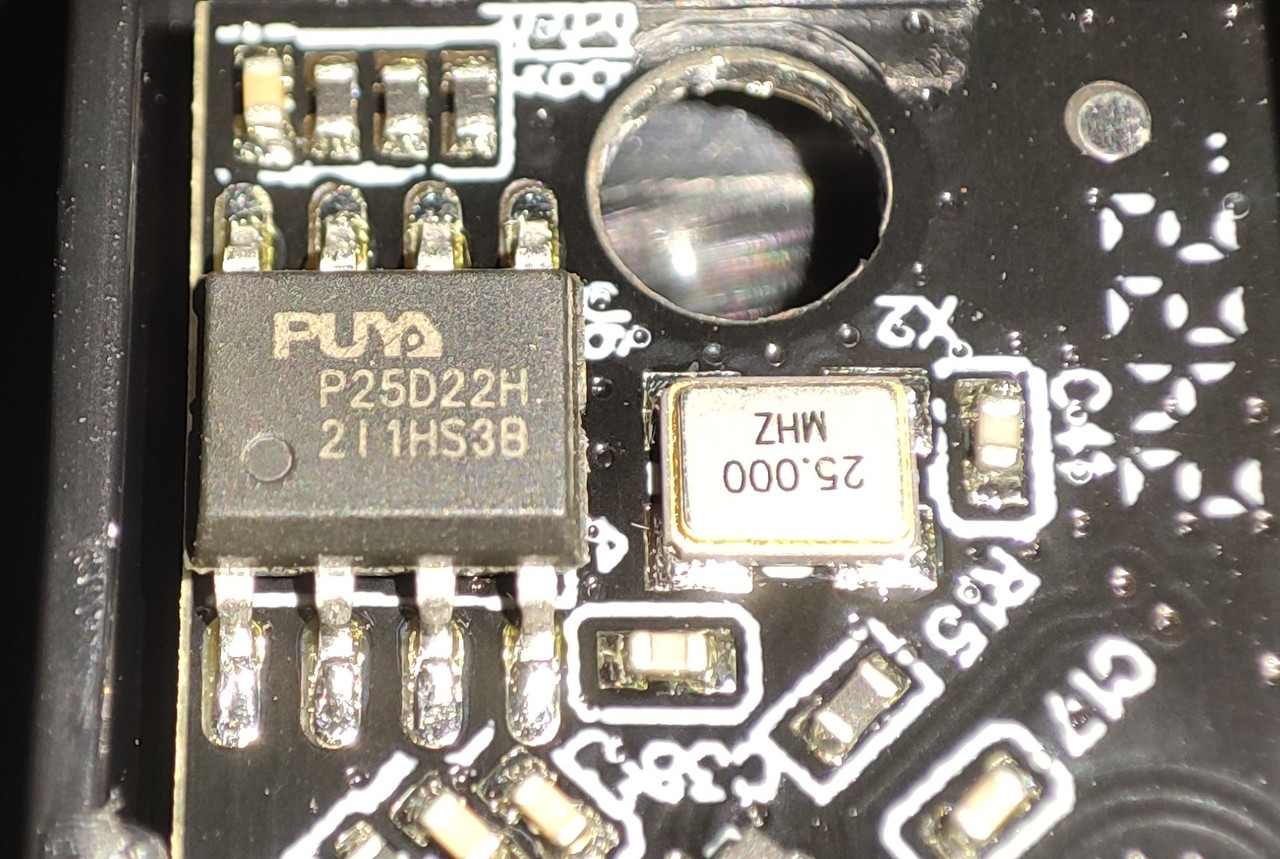
UTHAI Q7 4Mbit SPI Fitted
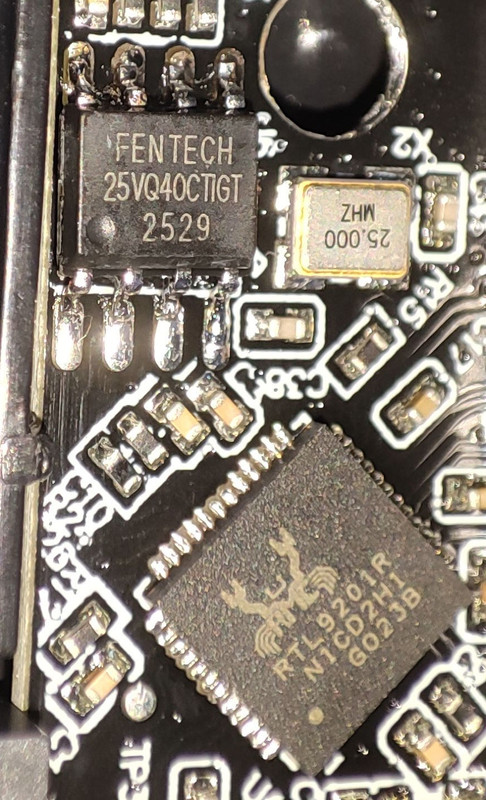
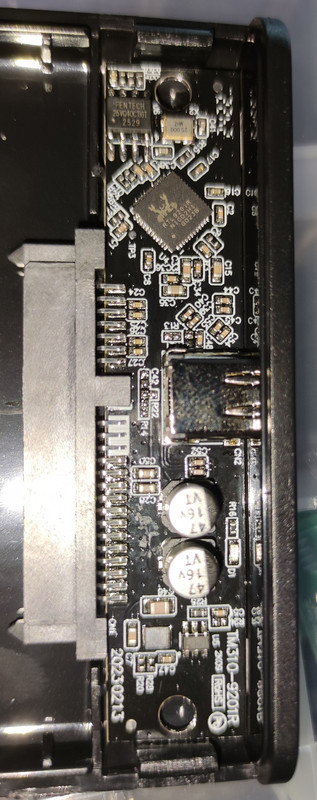
PUYA 4Mbit SPI Chips
My Programmer Had a FENTECH That i pulled from a PCB the other week so i just used that instead of one
of my PUYA P25D40H's
I programmed it with a Factory 1.34.29 SPI image before fitting it just to ensure i didnt get any problems
All went fine and you can update it from windows just fine with any version
If the SPI is only 2Mbit the updater will only show 1.32.7 in the pulldown
e.g. you wont be able to select anything newer
UTHAI Q5/Q6/Q7 2Mbit SPI
UTHAI Q7 4Mbit SPI Fitted
PUYA 4Mbit SPI Chips
Last edit: 2 months 3 weeks ago by Shonk.
The following user(s) said Thank You: 604000335
Please Log in or Create an account to join the conversation.
- Stasiz
-

- Offline
- poster 5
-

Enregistré
- Posts: 20
- Thanks: 9
Re: Realtek RTL9201R Firmware 1.32.7 / 9.34.11
2 months 4 weeks ago
@Shonk
Great job. You're a genius. I updated the firmware on both enclosures to 1.34.29. Everything works fine.
Great job. You're a genius. I updated the firmware on both enclosures to 1.34.29. Everything works fine.
Please Log in or Create an account to join the conversation.
Time to create page: 0.083 seconds