



NVME USB drives Realtek RTL9210/RTL9220 Firmware Version 1.xx
- Tsepetian
-

- Offline
- Newbie
-

Enregistré
- 게시물: 3
- Thanks: 1
Re: NVME USB drives Realtek RTL9210/RTL9220 Firmware Version 1.xx
3 월 3 주 전
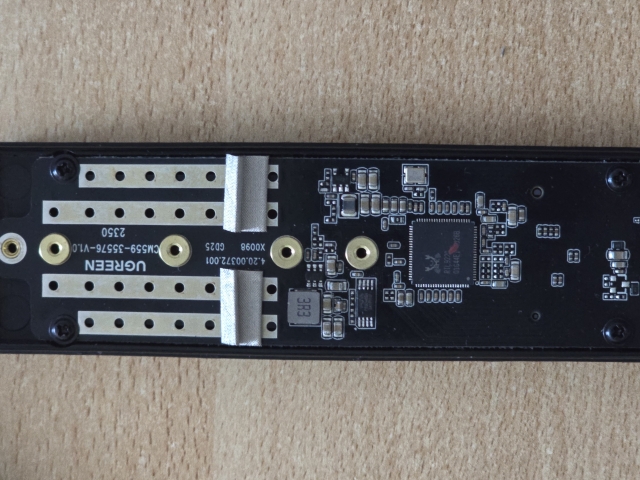
Hello guys, I have a Ugreen enclosure with RTL9220 chip, when I tried to firmware update it, I bricked it so Windows stopped recognizing it. I opened the case and used tweezers and tried to unbrick it, when I connect certain pins with tweezer, Windows sees it as USB-Drive and on device manager I see RTL9220 but it is unusable (it just shows on explorer but cant do anything and after few seconds it unplugs automatically. Does anyone knows how to reset it so I can firmware it again and make it work?
Where should I put my tweezers in this picture?
Where should I put my tweezers in this picture?
Please Log in or 회원가입하기! to join the conversation.
- admin
-
 Topic Author
- Offline
- Admin
-

Administrateur
- Fdrsoft (Admin)
- 게시물: 671
- Thanks: 421
Re: NVME USB drives Realtek RTL9210/RTL9220 Firmware Version 1.xx
3 월 3 주 전 - 3 월 3 주 전
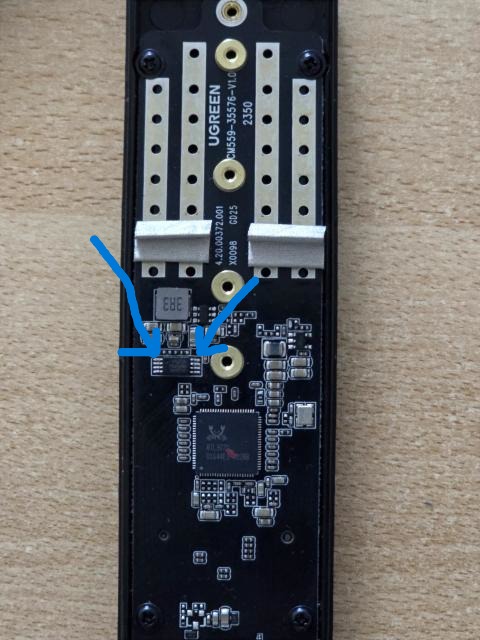
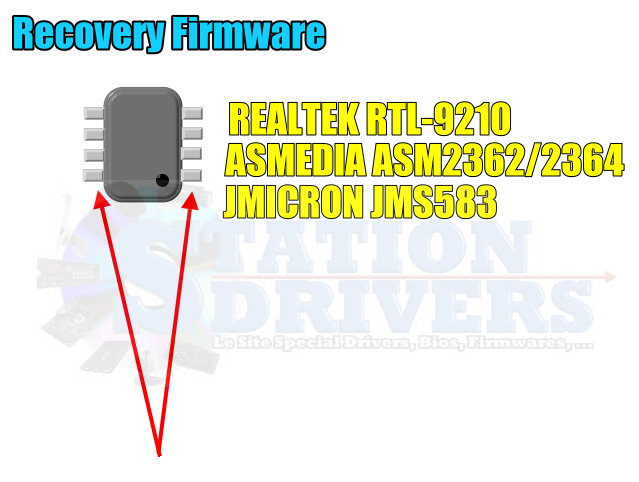
Carefully check that the marker is at the top, then, while maintaining the short circuit, wait for the box to appear via MPTool, then release.
Asus Z890 ProArt, Intel Cpu Core Ultra 7 265K, Memoires 32Go Corsair DDR5 (6000Mhz CL30), Water-cooling Thermaright, nVidia Geforce RTX4060, Alimentation Gigabyte 850W, Samsung SSD 990 Pro, SSD9100 Pro, Steelserie Pro , Souris Razer, Boitier HUMMER, HP Steelserie, Free Fibre Ultra (8Go/8Go), Lan 10Gb, Cable CAT8/7, Switch 10/5/2.5Gbps, Casque Philips Fedelis.
Last edit: 3 월 3 주 전 by admin.
The following user(s) said Thank You: Tsepetian
Please Log in or 회원가입하기! to join the conversation.
- Tsepetian
-
- Offline
- Newbie
-
Enregistré
- 게시물: 3
- Thanks: 1
Re: NVME USB drives Realtek RTL9210/RTL9220 Firmware Version 1.xx
3 월 3 주 전
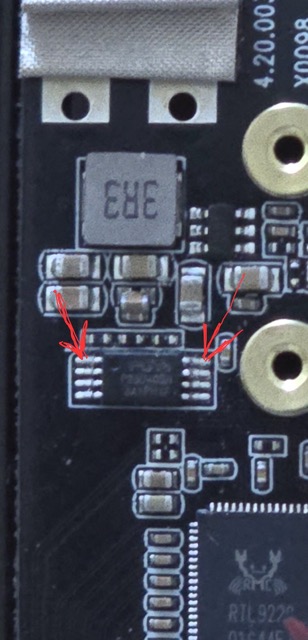
Oh...this is how I tried to do. Once I touch these 2 pins with tweezer, I hear the sound on my PC that something got connected, I see the drive as USB-Drive (also in Device manager under Disks it says RTL9220), but I cant see it on MPTool and it also automatically gets disconnected and I have to remove and put the cable back to PC.
Please Log in or 회원가입하기! to join the conversation.
- Shonk
-

- Offline
- The Best Poster
-

Enregistré
- 게시물: 185
- Thanks: 90
Re: NVME USB drives Realtek RTL9210/RTL9220 Firmware Version 1.xx
3 월 3 주 전
you just have to hold the tweezers on until you hear windows detect it
to stop it booting from that chip
once its booted you have to remove the tweezers so its detectable so you can flash it
to stop it booting from that chip
once its booted you have to remove the tweezers so its detectable so you can flash it
The following user(s) said Thank You: admin, Tsepetian
Please Log in or 회원가입하기! to join the conversation.
- admin
-
Topic Author
- Offline
- Admin
-
Administrateur
- Fdrsoft (Admin)
- 게시물: 671
- Thanks: 421
Re: NVME USB drives Realtek RTL9210/RTL9220 Firmware Version 1.xx
3 월 3 주 전
Yes, as Shonk said, you have to leave the short circuit for up to 5 seconds until it's erased.

Asus Z890 ProArt, Intel Cpu Core Ultra 7 265K, Memoires 32Go Corsair DDR5 (6000Mhz CL30), Water-cooling Thermaright, nVidia Geforce RTX4060, Alimentation Gigabyte 850W, Samsung SSD 990 Pro, SSD9100 Pro, Steelserie Pro , Souris Razer, Boitier HUMMER, HP Steelserie, Free Fibre Ultra (8Go/8Go), Lan 10Gb, Cable CAT8/7, Switch 10/5/2.5Gbps, Casque Philips Fedelis.
Please Log in or 회원가입하기! to join the conversation.
페이지 생성 시간: 0.081 초