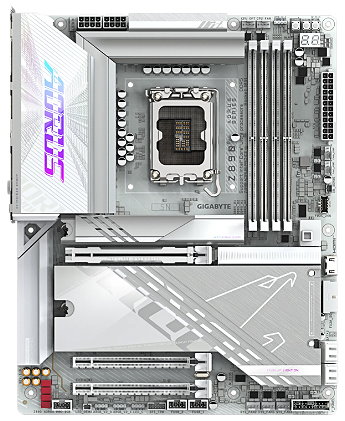
Information__________________
  • Format: ATX
  • Chipset: Intel Z890 15e génération
  • Nom de code: Arrow Lake
  • Socket: 1851
  • Memoires: DDR5
  • Cpus: Intel Core I3/5/7/9 (15e Gen)
  • Audio (1): Realtek HDA ALC1220
  • Sata (1): Intel Z890 Sata III
  • Graphique: Intel Xe UHD Graphics
  • USB 4.x (1): Intel Z890 
  • Reseau (1): Realtek RTL8126BG (5Gb)
  • Reseau (2):
  • Thunderbolt: 
  • Wlan/Bluetooth: Intel Wifi-7 BE200
  • Wlan/Bluetooth: 
  • Lien officiel: https://www.gigabyte.com/


📀Bios___________________________________
Version Descriptif Date DL
F18
  1. Checksum: 506D
  2. Update SIC version: 0D .00 .F6 .50 (M.R.C : 2.10.8.4)
  3. Update CPU microcode: m_82_c0662_0000011B
  4. Update CSME version: 19.0.5.2018v2.2
  5. Update GOP version: 1067
  6. Update RST VMD version: 20.2.0.5866
  7. Ready for upcoming Core Ultra 2-series processors
  8. Improves platform security by making Secure Boot enabled as system default
01/12/25
F17
  1. Checksum : 0B32
  2. Enhance platform security by enable Pre-boot DMA Protection, VT-d, and IOMMU Pre-boot as default
  3. Added V-COLOR XFinity+ support
  4. Added support for AI TOP Utility v4.1.1
24/09/25
F17h
  1. Checksum : B0B1
  2. Improve memory compatibility
  3. Support V-Color new generation OLED memory
  4. Introduce Ultra Turbo Mode, a feature based on Intel® 200S Boost and enhances even greater gaming and general performance with a pre-configured overclocking profile built by GIGABYTE. Feature and support details please refer: https://www.gigabyte.com/Press/News/2300
  5. Based on Intel MR3* ingredients and support Intel® 200S Boost, a feature designed to boost gaming performance with a pre-configured overclocking profile built by Intel. Limitations and Warranty Disclaimers details please refer: https://www.gigabyte.com/Press/News/2271
  6. * MR3 details:
  7. - uCode version m_82_c0662_00000118
  8. - MRC version 2.10.4.0
  9. - CSME version 19.0.5.1992v2
  10. - GOP version 1064
  11. - RST VMD version 20.1.6.5864
09/09/25
F17f
  1. Checksum : 6F63
  2. Introduce Ultra Turbo Mode, a feature based on Intel® 200S Boost and enhances even greater gaming and general performance with a pre-configured overclocking profile built by GIGABYTE. Feature and support details please refer: https://www.gigabyte.com/Motherboard/All-Series?fid=3071
  3. Based on Intel MR3* ingredients and support Intel® 200S Boost, a feature designed to boost gaming performance with a pre-configured overclocking profile built by Intel. Limitations and Warranty Disclaimers details please refer: https://www.gigabyte.com/Press/News/2271
  4. MR3 details:
  5. uCode version m_82_c0662_00000118
  6. MRC version 2.10.4.0
  7. CSME version 19.0.5.1992v2
  8. GOP version 1064
  9. RST VMD version 20.1.6.5864
11/07/25
F17e
  1. Checksum : 6F63
  2. Introduce Ultra Turbo Mode, a feature based on Intel® 200S Boost and enhances even greater gaming and general performance with a pre-configured overclocking profile built by GIGABYTE. Feature and support details please refer: https://www.gigabyte.com/Motherboard/All-Series?fid=3071
  3. Based on Intel MR3* ingredients and support Intel® 200S Boost, a feature designed to boost gaming performance with a pre-configured overclocking profile built by Intel. Limitations and Warranty Disclaimers details please refer: https://www.gigabyte.com/Press/News/2271
  4. MR3 details:
  5. uCode version m_82_c0662_00000118
  6. MRC version 2.10.4.0
  7. CSME version 19.0.5.1992v2
  8. GOP version 1064
  9. RST VMD version 20.1.6.5864
26/06/25
F17b
  1. Checksum : 141B
  2. Introduce Intel® 200S Boost, a feature designed to boost gaming performance with a pre-configured overclocking profile built by Intel.
  3. Limitations and Warranty Disclaimers details please refer: https://www.gigabyte.com/Press/News/2271
18/05/25
F16
  1. Checksum : 5821
  2. Based on Intel MR1* ingredients and supports Resource Priority Feature
  3. Please use Windows 11 24H2 Ent 26100.2454 or after to get optimal performance
  4. Improves BIOS Advanced mode user experience (smoothness & broken picture fix)
  5. Optimizes memory compatibility
    * MR1 details:
    - SIC version 0D.00.D8.30 (M.R.C.: 2.10.0.0)
    - uCode version m_82_c0662_00000117
    - CSME version 19.0.5.1948 (please update Intel Management Engine Driver to 2507.7.10.0)
    - Platform Power Management (PPM) driver version 1007.20250118
    - PPM Provisioning Package version 1.0.00000.97
    - NPU driver version 32.0.100.3717
12/03/25
F16b
  1. Checksum : 344B
  2. Based on Intel Planned Release 5 (PR5) ingredients and enable Resource Priority Feature
  3. Add Select MCU option, now user can switch CPU microcode between 0x113 and 0x114
  4. Please use Windows 11 24H2 Ent 26100.2454 or after to get optimal performance
09/01/25
F15
  1. Checksum : B872
  2. The BIOS contains massive code base update, please expect BIOS update time will be longer, do not interrupt BIOS update process
  3. Low Latency will be enabled automatically when XMP profile is applied
  4. Add 80 Port Display Mode option, now 80 port can display temp. info. in O.S.
  5. Incorporate Intel Planned Release 5 (PR5) ingredients
  6. Update processor microcode to c0662_00000114
  7. Update RC code 0D.00.CC.50
  8. Update Intel® HD Graphics GOP Version to 22.0.1057
  9. Update Intel CSME version to 19.0.0.1854v2.2
  10. Change Re-Size BAR Support & VT-d default values to "Enabled"
  11. Allow max voltage setting of CPU System Agent Voltage to be set to 1.35v
  12. Address potential OS hangup after first time driver installation (graphics related)
  13. Address DDR timing setting incorrectly displays as "0" when manually adjust value above 40
03/01/25
F10g
  1. Checksum : 8FEF
  2. The BIOS contains massive code base update, please expect BIOS update time will be longer, do not interrupt BIOS update process
  3. Low Latency will be enabled automatically when XMP profile is applied
  4. Add 80 Port Display Mode option, now 80 port can display temp. info. in O.S.
  5. Incorporate Intel Planned Release 5 (PR5) ingredients
  6. Update processor microcode to c0662_00000114
  7. Update RC code 0D.00.CC.50
  8. Update Intel® HD Graphics GOP Version to 22.0.1057
  9. Update Intel CSME version to 19.0.0.1854v2.2
  10. Change Re-Size BAR Support & VT-d default values to "Enabled"
  11. Allow max voltage setting of CPU System Agent Voltage to be set to 1.35v
  12. Address potential OS hangup after first time driver installation (graphics related)
  13. Address DDR timing setting incorrectly displays as "0" when manually adjust value above 40
23/12/24
F10e
  1. Checksum : 5280
  2. Incorporate Intel Planned Release 4 (PR4) ingredients
  3. Update processor microcode to c0662_00000113
  4. Update RC code 0D.00.C9.40
  5. Update Intel® HD Graphics GOP Version to 22.0.1057
  6. Update Intel CSME version to 19.0.0.1827
  7. Change Re-Size BAR Support & VT-d default values to "Enabled"
  8. Allow max voltage setting of CPU System Agent Voltage to be set to 1.35v
  9. Address potential OS hangup after first time driver installation (graphics related)
  10. Address DDR timing setting incorrectly displays as "0" when manually adjust value above 40
29/11/24
F9
  1. Checksum : 179D
  2. Improve memory performance and compatibility
  3. Add GIGABYTE AI PerfDrive support
  4. Add AORUS AI SNATCH – XMP AI BOOST support.
18/10/24


💿Drivers____________________________________
 
➡️CHIPSET
Description Version OS Date
Intel Chipset Device Software (Serie 800)  10.1.20266.8668 Windows 10/11 24/07/25

➡️CHIPSET
Description Version OS Date
Intel Dynamic Tuning Technology (Serie 800) 9.1.10001.173 Windows 10/11 03/12/25

➡️CHIPSET
Description Version OS Date
Intel NPU AI Boost  (Serie 800) 32.0.100.4511 Windows 10/11 10/12/25

➡️VGA
Description Version OS Date
Intel Xe UHD Graphics (Serie 800) 32.0.101.8331 Windows 10/11 04/12/25

➡️CHIPSET
Description Version OS Date
Intel GNA Scoring Accelerator (Serie 800) 3.05.00.1611 Windows 10/11 22/11/25

➡️CHIPSET
Description Version OS Date
Intel HID Event Filter (Serie 800)  2.2.2.17 Windows 10/11 13/10/25

➡️CHIPSET
Description Version OS Date
Intel Management Engine Interface (Serie 800) 2541.8.41.0 Windows 10/11 04/12/25
Intel Management Engine (Firmware) 19.0.5.2095 Windows 04/12/25

➡️SATA/RAID
Description Version OS Date
Intel Rapid Storage Technology (Serie 800) 20.2.8.1028.1 Windows 10/11 20/08/25

➡️CHIPSET
Description Version OS Date
Intel Serial IO (Serie 800) 30.100.2529.2 Windows 10/11 28/10/25

➡️CHIPSET
Description Version OS Date
Intel Processor Power Management (Series 800) 1.0.00000.175 Windows 10/11 27/10/25

Realtek Generic drivers (HDA) or Manufacturer (UAD) (Gigabyte)(Forum Realtek💬) 14/10/25
WINDOWS 10 Version 6.0.9879.1 (UAD) WINDOWS 11 Version 6.0.9879.1 (UAD)
Version 6.0.9239.1 (HDA) Version 6.0.9239.1 (HDA)
 UTILITIES Realtek Audio Console (UWP)    WINDOWS 12

➡️LAN
Description Version OS Date
Realtek RTL8126 (5Gbps) & RTL8125 (2.5Gbps)
1079.50.1003 Windows 10 24/11/25
11027.10282025 Windows 11 24/11/25

Realtek RTS5436 USB-C Power Delivery Controller 26/09/25
WINDOWS 10 WINDOWS 11
FIRMWARES 20250917 WINDOWS 12  

➡️WLAN/BLUETOOTH
Description Version OS Date
Mediatek MT7925/MT7927/RZ738 Wi-Fi 7   5.7.0.4755 Windows 10/11 20/10/25

➡️WLAN/BLUETOOTH
Description Version OS Date
Intel BE2xx/BE4xx 24.10.0.4 Windows 10/11 24/11/25

➡️LAN
Description Version OS Date
Realtek Dragon Software Utility for RTL8125BG, RTL8126, RTL8127, .. 6.10.3301.2 Windows 10/11 01/05/24

➡️CPU
Description Version OS Date
Intel Extreme Tuning Utility 10.0.1.31/7.14.2.67 Windows 10/11 23/10/25

➡️CHIPSET
Description Version OS Date
Intel Converged Security and Management Engine 12.0.4 Windows 10/11 11/02/25

➡️CPU
Description Version OS Date
Intel Processor Diagnostic Tool 4.1.9.41 Windows 10/11 11/01/24

➡️CPU
Description Version OS Date
Intel Processor Identification Utility 8.0.43 Windows 10/11 21/03/25