



Intel Management Engine Firmware 11.8
- africabloe
-

- Çevrim dışı
- Poster 2
-

Enregistré
- İletiler: 7
- Thanks: 10
Re: Intel Management Engine Firmware 11.8
1 yıl 1 ay önce - 1 yıl 1 ay önce
Latest firmware ⬇️
11.8.98.4781
19.FEB.2025
SKU: Consumer LP Chipset: SPT/KBP-LP C
11.8.98.4781_CON_LP_C_NPDM_PRD_RGN_B70B0DD9.bin
⬇️ winraid.level1techs 20.SEP.2025
⬇️ mega.nz 21.SEP.2025
🔗 MEAnalyzer r373 21.SEP.2025
🔗 Intel® CSMEVDT 13.0.2.0008 31.JUL.2025
SKU: Consumer LP Chipset: SPT/KBP-LP C
11.8.98.4781_CON_LP_C_NPDM_PRD_RGN_B70B0DD9.bin
⬇️ winraid.level1techs 20.SEP.2025
⬇️ mega.nz 21.SEP.2025
🔗 MEAnalyzer r373 21.SEP.2025
🔗 Intel® CSMEVDT 13.0.2.0008 31.JUL.2025
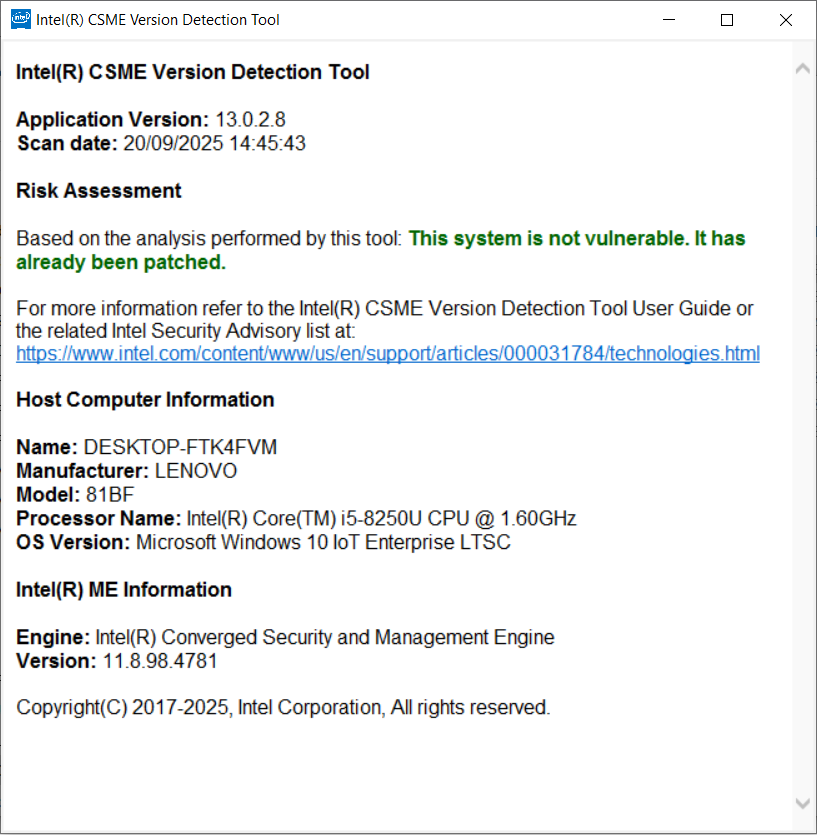
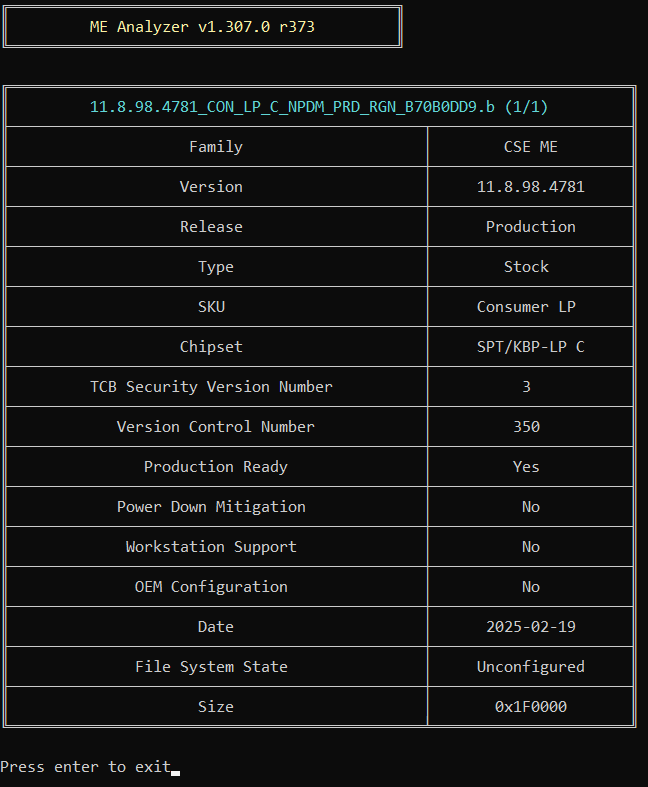
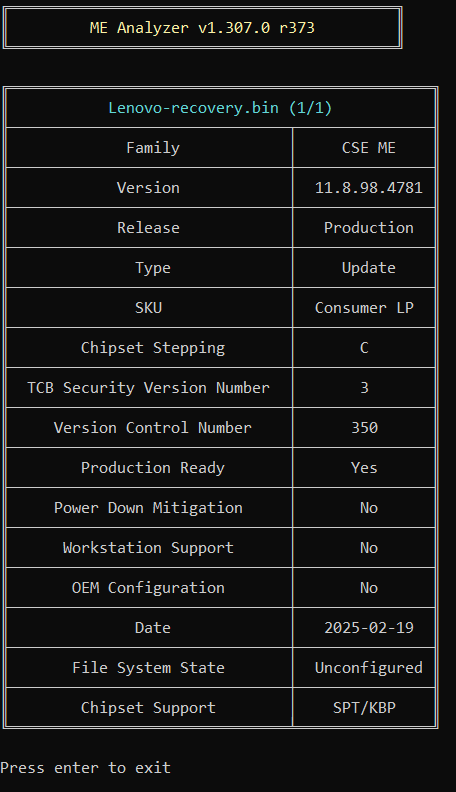
Son düzenleme: 1 yıl 1 ay önce Düzenleyen:africabloe
Şu kullanıcı(lar) teşekkür etti: duttyend, fikotr74
Lütfen sohbete katılmak için Giriş yap ya da Hesap açın.
- africabloe
-
- Çevrim dışı
- Poster 2
-
Enregistré
- İletiler: 7
- Thanks: 10
Re: Intel Management Engine Firmware 11.8
8 ay 1 hafta önce
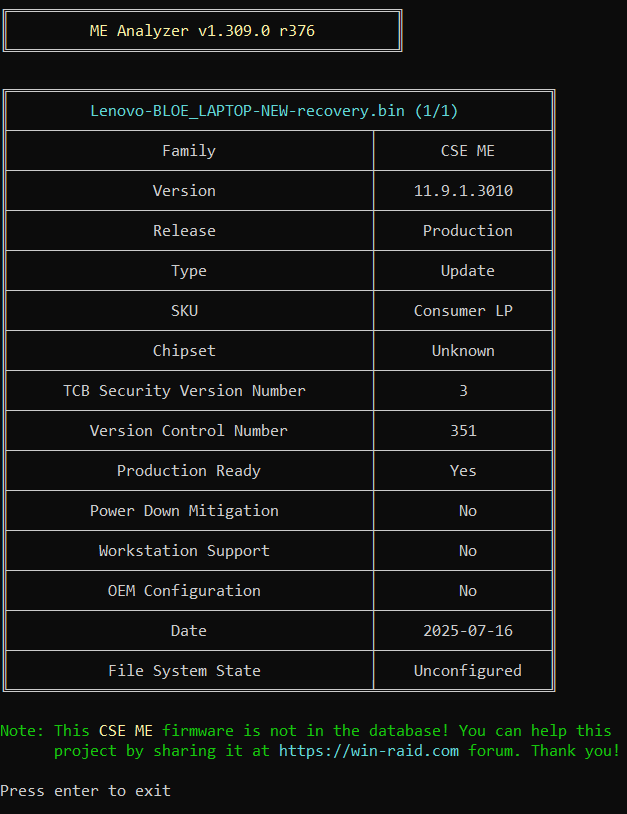
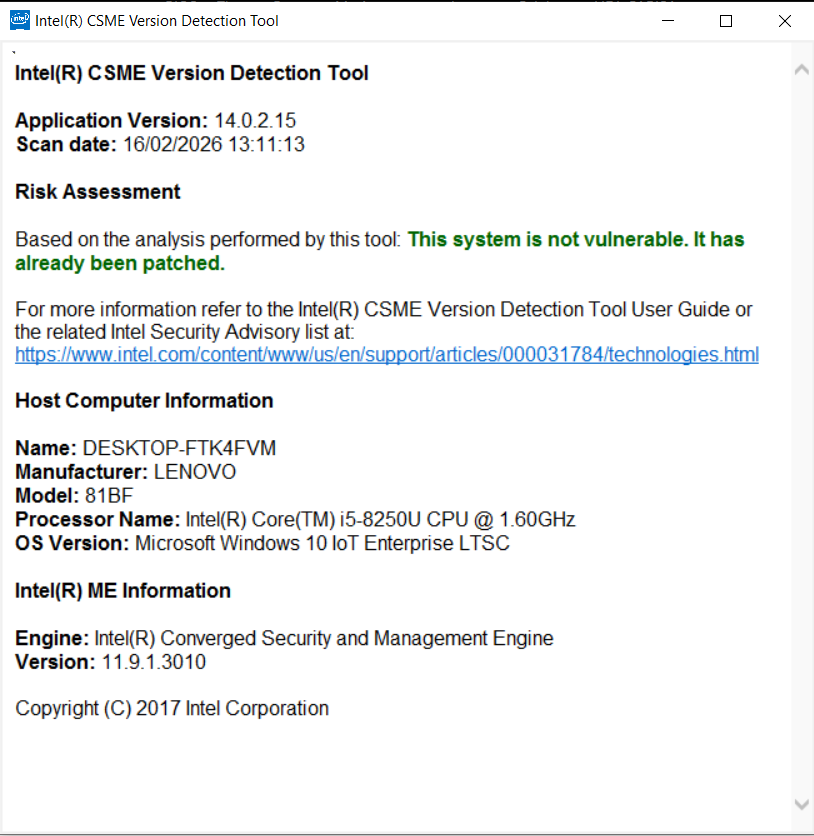
11.9.1.3010 16.JUL.2025
SKU: Consumer LP Chipset: SPT/KBP-LP C
11.9.1.3010_CON_LP_C_NPDM_PRD_RGN_900C40C5.bin
⬇️ mega.nz 07.FEB.2026
🔗 MEAnalyzer r376 22.DEC.2025
🔗 Intel® CSMEVDT 14.0.2.0015 31.JUL.2025
SKU: Consumer LP Chipset: SPT/KBP-LP C
11.9.1.3010_CON_LP_C_NPDM_PRD_RGN_900C40C5.bin
⬇️ mega.nz 07.FEB.2026
🔗 MEAnalyzer r376 22.DEC.2025
🔗 Intel® CSMEVDT 14.0.2.0015 31.JUL.2025
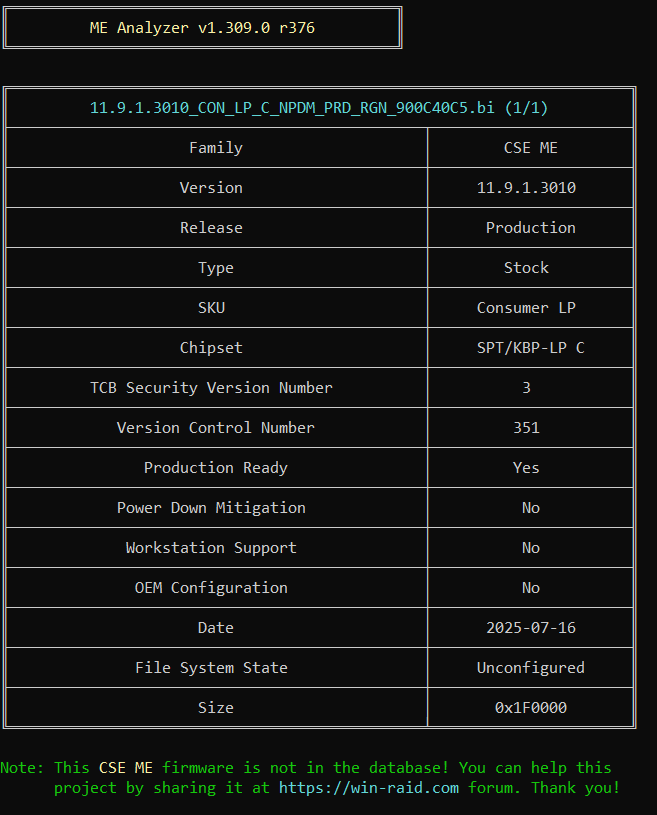
Şu kullanıcı(lar) teşekkür etti: admin, fikotr74
Lütfen sohbete katılmak için Giriş yap ya da Hesap açın.
- africabloe
-
- Çevrim dışı
- Poster 2
-
Enregistré
- İletiler: 7
- Thanks: 10
Re: Intel Management Engine Firmware 11.8
2 ay 4 gün önce - 1 ay 1 hafta önce
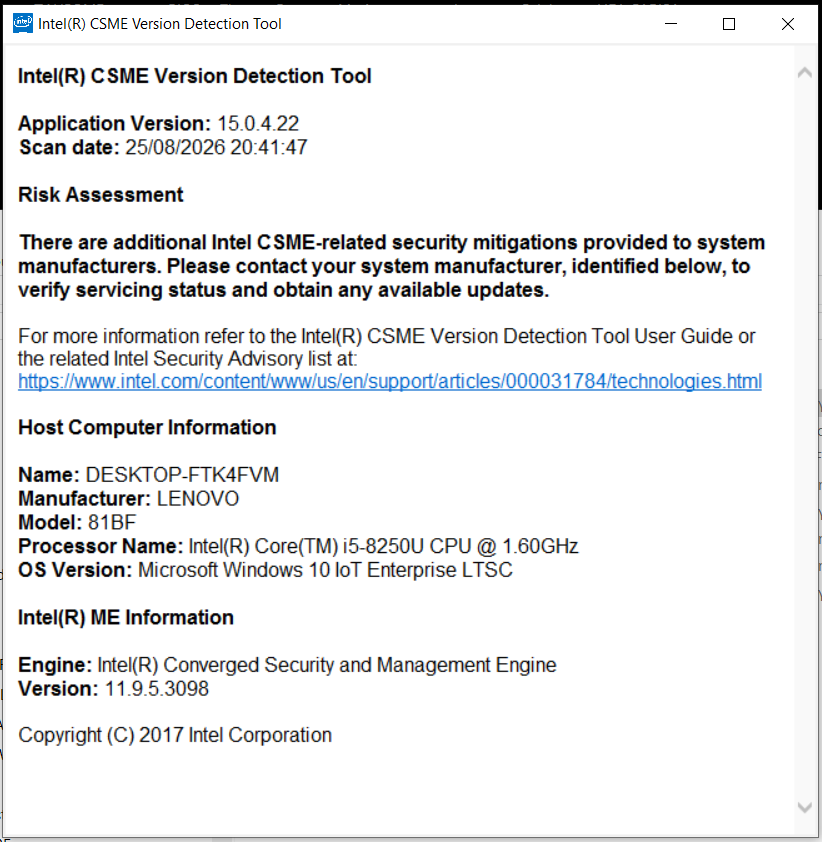
Intel® Converged Security and Management Engine Version Detection Tool (Intel® CSMEVDT) 15.04.22
Latest MEAnalyzer (MEA v1.311.0 r377)
winraid.level1techs.com Original post
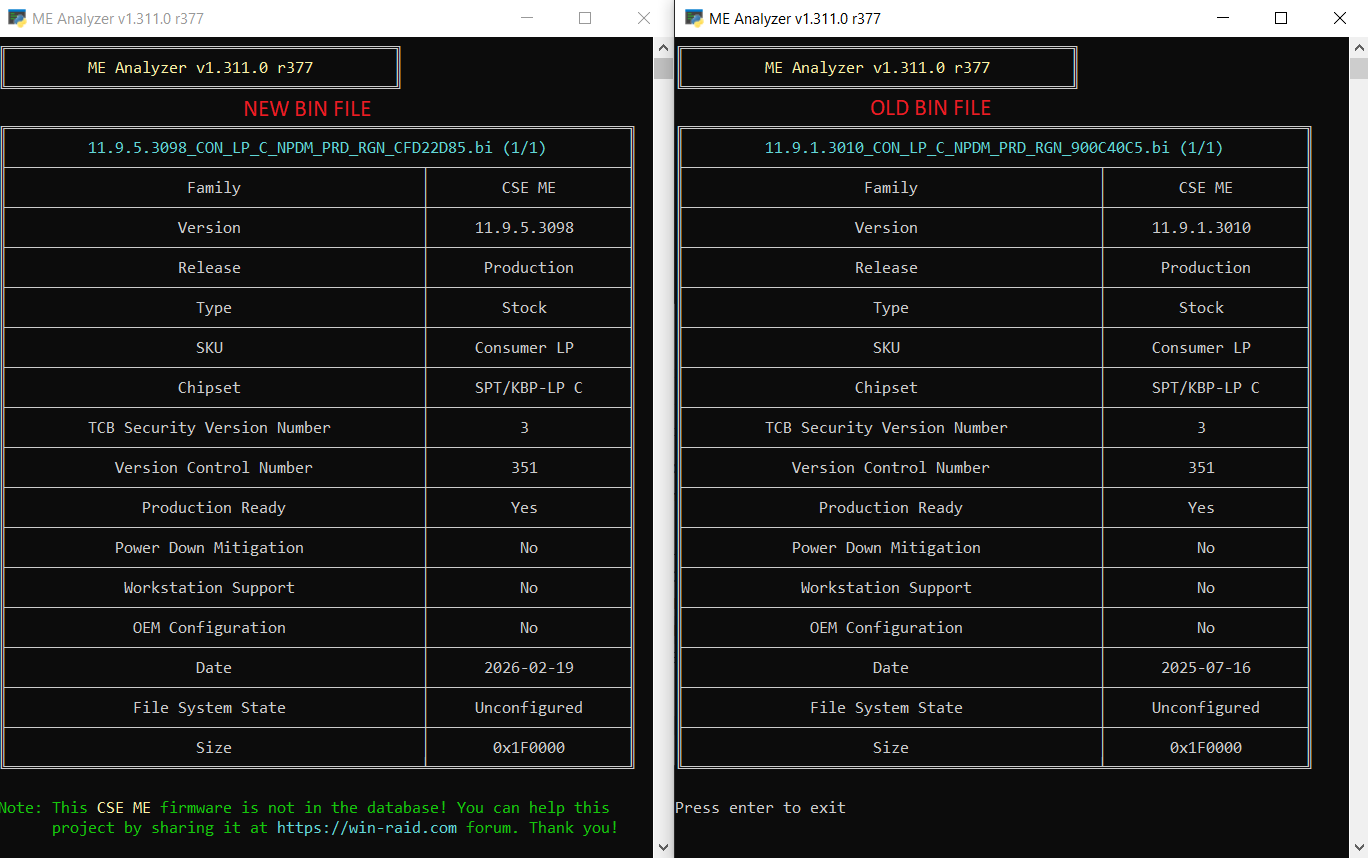
winraid.level1techs.com 11.9.5.3098_CON_LP_C_NPDM_PRD_RGN_CFD22D85.rar
winraid.level1techs.com MEA.dat
station-drivers.com Intel Management Engine (ME/AMT) Firmware Version 11.9.5.3098 (LP)(1.5Mo)
Date & Version: 2026/02/19, 11.9.5.3098 (1.5Mo)
Release: Production
SKU: Consumer LP 1.5Mo
Region: Stock
Chipset: SPT/KBP-LP C
For: Intel 100/200/300-series LP chipsets
Includes: Firmware 1.5 & Utilities
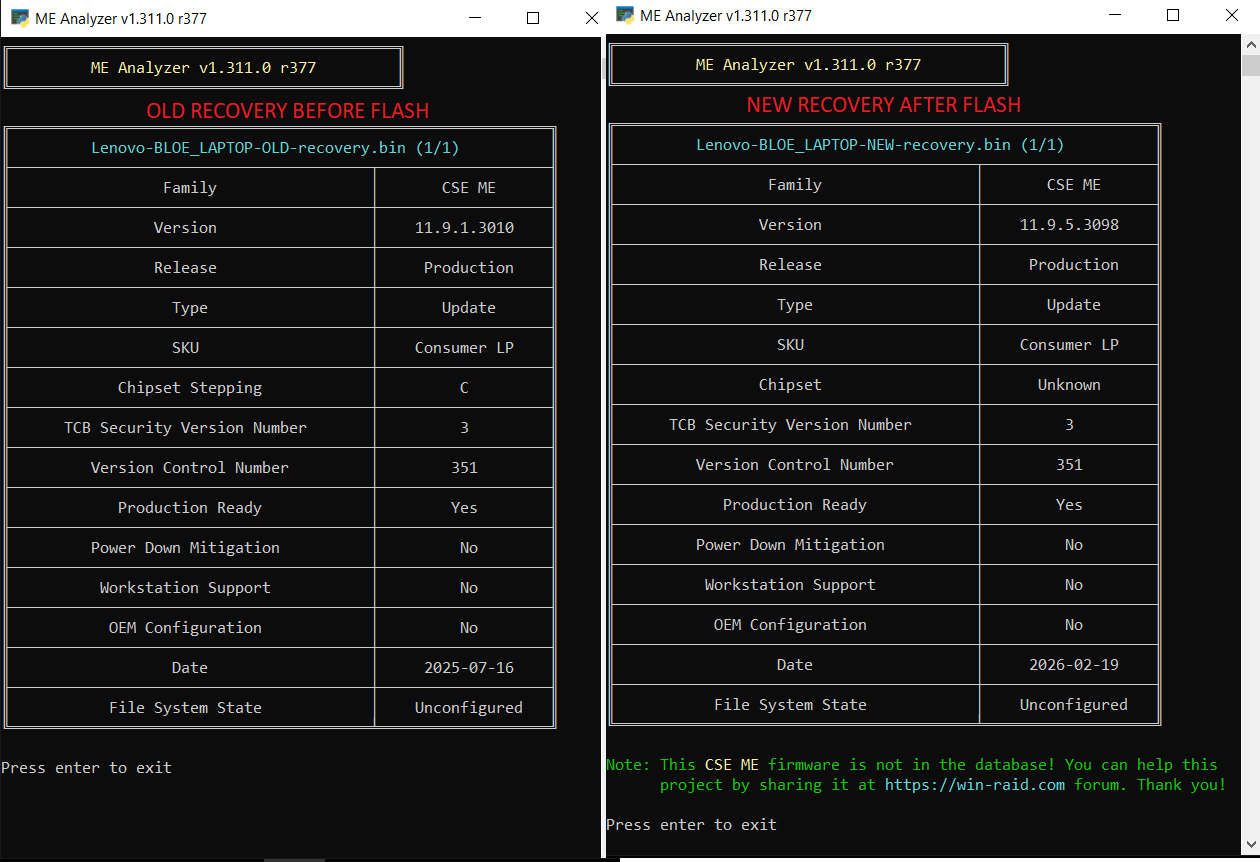
Firmware Backup Instructions
1. Open Command Prompt / Terminal as Administrator and navigate to the folder containing FWUpdLcl64.exe.
2. Save the current firmware by running:
Firmware Update Instructions
1.Make sure the new firmware file is in the same folder as FWUpdLcl64.exe.
2. Again, open Command Prompt / Terminal as Administrator in that folder and run:
4. Reboot
Important: Make sure you have a valid backup (recovery.bin) before proceeding with the firmware flash.
Latest MEAnalyzer (MEA v1.311.0 r377)
winraid.level1techs.com Original post
winraid.level1techs.com 11.9.5.3098_CON_LP_C_NPDM_PRD_RGN_CFD22D85.rar
winraid.level1techs.com MEA.dat
station-drivers.com Intel Management Engine (ME/AMT) Firmware Version 11.9.5.3098 (LP)(1.5Mo)
Date & Version: 2026/02/19, 11.9.5.3098 (1.5Mo)
Release: Production
SKU: Consumer LP 1.5Mo
Region: Stock
Chipset: SPT/KBP-LP C
For: Intel 100/200/300-series LP chipsets
Includes: Firmware 1.5 & Utilities
Firmware Backup Instructions
1. Open Command Prompt / Terminal as Administrator and navigate to the folder containing FWUpdLcl64.exe.
2. Save the current firmware by running:
3. This will save a backup of the current firmware as recovery.bin.FWUpdLcl64 -save recovery.bin
Firmware Update Instructions
1.Make sure the new firmware file is in the same folder as FWUpdLcl64.exe.
2. Again, open Command Prompt / Terminal as Administrator in that folder and run:
3. This will flash the new firmware to the device. Do not interrupt the process or power off the system while the firmware is being updated.FWUpdLcl64 -F 11.9.5.3098_CON_LP_C_NPDM_PRD_RGN_CFD22D85.bin
4. Reboot
Important: Make sure you have a valid backup (recovery.bin) before proceeding with the firmware flash.
🔐 CSME Firmware Update
The 11.9.5.3098 firmware is a security update that fixes INTEL-SA-01371, INTEL-SA-01372, and several previous vulnerabilities.
However, the new CSMEVDT 15.04.22 still reports that there are additional CSME security mitigations provided to system manufacturers.
This is expected with an older laptop:
🔵 Intel releases new CSME security fixes
↓
🏭 The OEM adapts and tests the firmware for the specific laptop
↓
💻 11.9.5.3098 is now installed ✅
↓
🛡️ CSMEVDT 15.04.22 detects additional OEM mitigations
↓
⏳ Waiting for a newer OEM firmware release
So, the 11.9.5.3098 update was successful and fixes the vulnerabilities listed in its release notes.
The CSMEVDT message simply means that additional mitigations may still require a newer firmware release from the laptop manufacturer.
Son düzenleme: 1 ay 1 hafta önce Düzenleyen:africabloe
Şu kullanıcı(lar) teşekkür etti: admin, Tom, nanchuci
Lütfen sohbete katılmak için Giriş yap ya da Hesap açın.
- africabloe
-
- Çevrim dışı
- Poster 2
-
Enregistré
- İletiler: 7
- Thanks: 10
Re: Intel Management Engine Firmware 11.8
1 ay 1 hafta önce - 8 saat 51 dakika önce
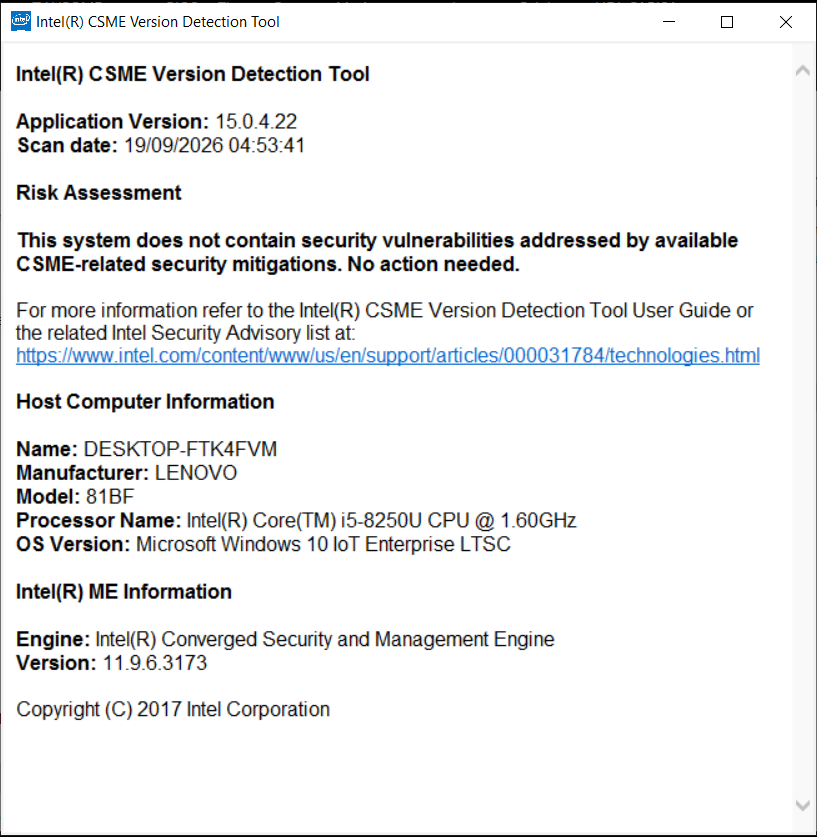
Intel® Converged Security and Management Engine Version Detection Tool (Intel® CSMEVDT) 15.04.22
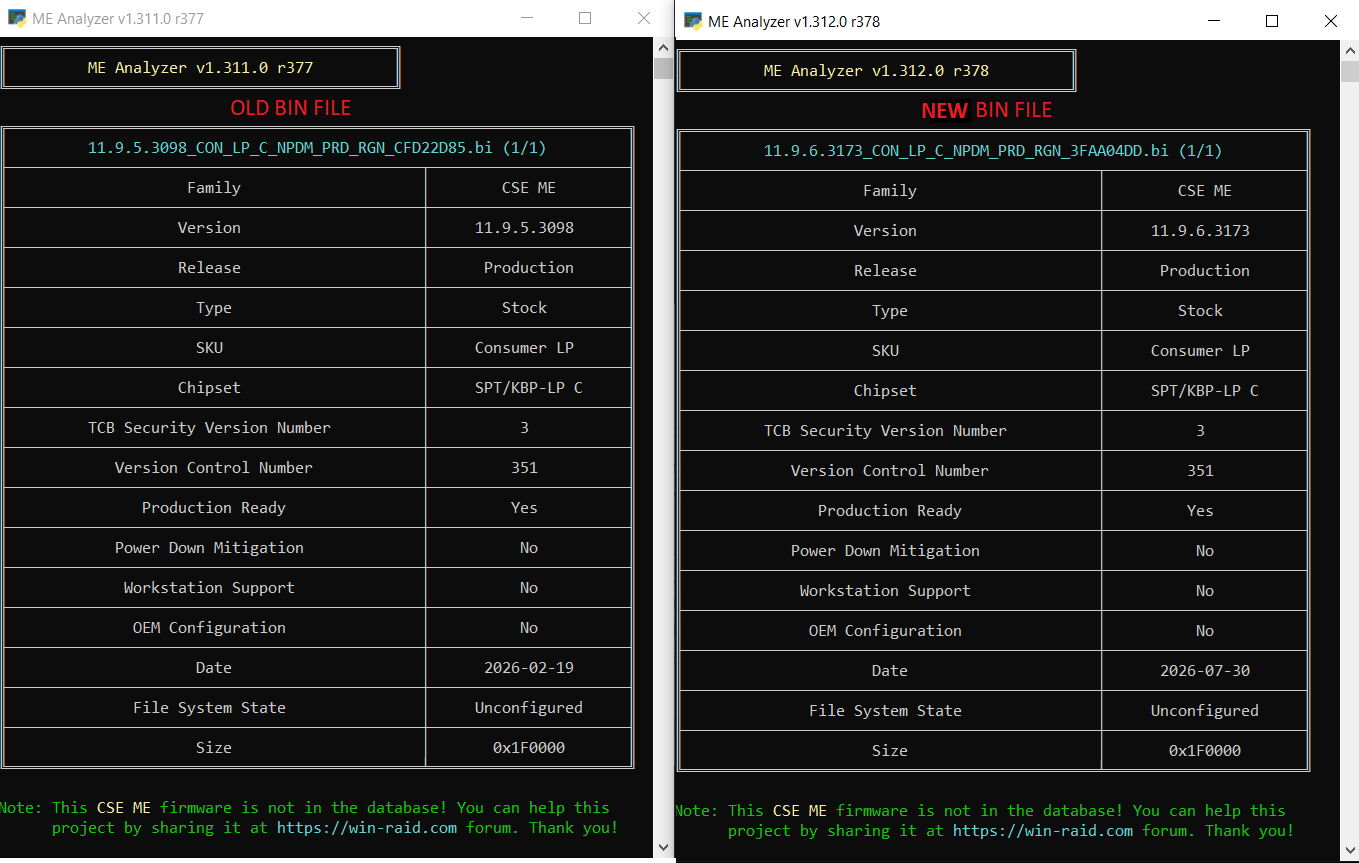
Latest MEAnalyzer (MEA v1.312.0 r378)
winraid.level1techs.com Original post
winraid.level1techs.com 11.9.6.3173_CON_LP_C_NPDM_PRD_RGN_3FAA04DD.rar
station-drivers.com Intel Management Engine (ME/AMT) Firmware Version 11.9.6.3173 (LP)(1.5Mo)
Date & Version: 2026/07/30, 11.9.6.3173 (1.5Mo)
Release: Production
SKU: Consumer LP 1.5Mo
Region: Stock
Chipset: SPT/KBP-LP C
For: Intel 100/200/300-series LP chipsets
Includes: Firmware 1.5 & Utilities
Firmware Backup Instructions
1. Open Command Prompt / Terminal as Administrator and navigate to the folder containing FWUpdLcl64.exe.
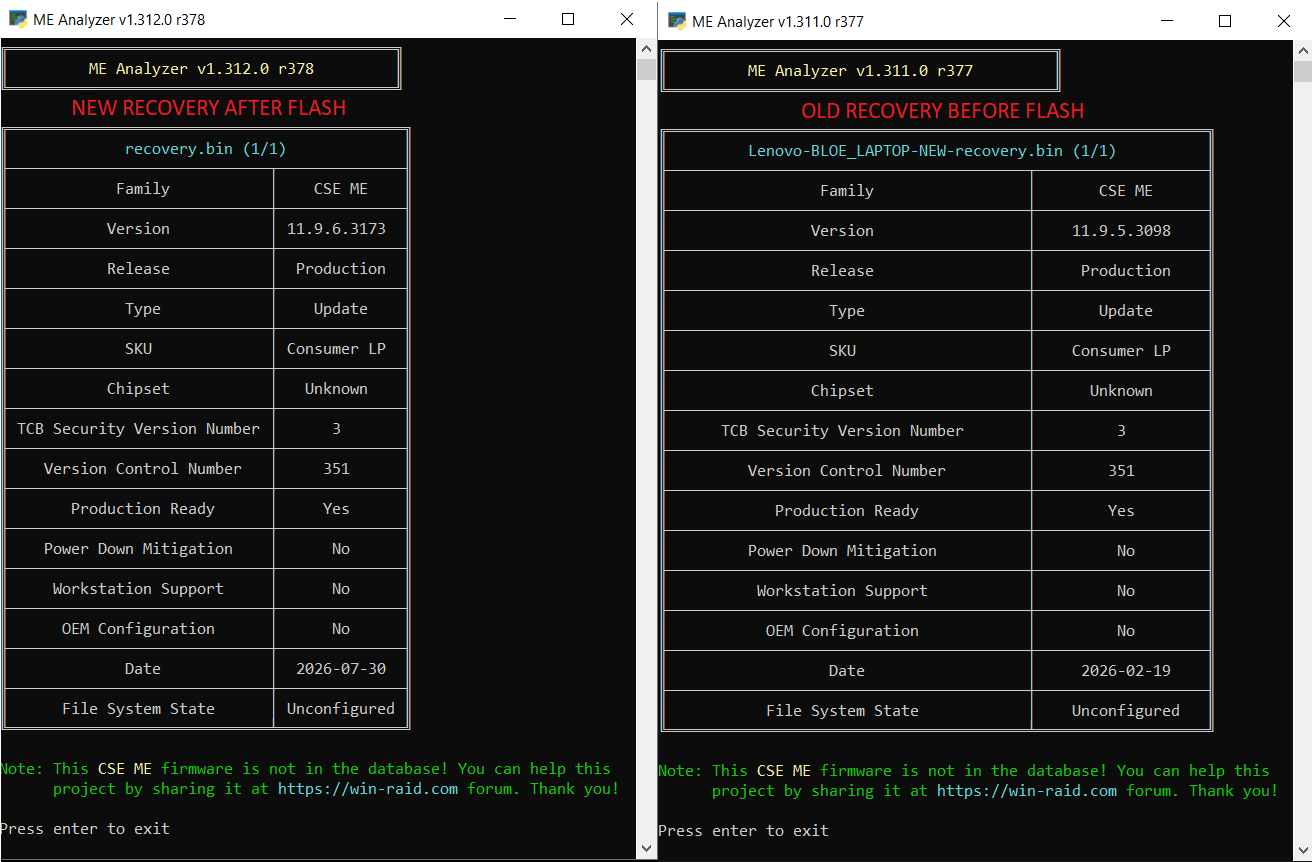
2. Save the current firmware by running:
Firmware Update Instructions
1.Make sure the new firmware file is in the same folder as FWUpdLcl64.exe.
2. Again, open Command Prompt / Terminal as Administrator in that folder and run:
4. Reboot
Important: Make sure you have a valid backup (recovery.bin) before proceeding with the firmware flash.
Latest MEAnalyzer (MEA v1.312.0 r378)
winraid.level1techs.com Original post
winraid.level1techs.com 11.9.6.3173_CON_LP_C_NPDM_PRD_RGN_3FAA04DD.rar
station-drivers.com Intel Management Engine (ME/AMT) Firmware Version 11.9.6.3173 (LP)(1.5Mo)
Date & Version: 2026/07/30, 11.9.6.3173 (1.5Mo)
Release: Production
SKU: Consumer LP 1.5Mo
Region: Stock
Chipset: SPT/KBP-LP C
For: Intel 100/200/300-series LP chipsets
Includes: Firmware 1.5 & Utilities
Firmware Backup Instructions
1. Open Command Prompt / Terminal as Administrator and navigate to the folder containing FWUpdLcl64.exe.
2. Save the current firmware by running:
3. This will save a backup of the current firmware as recovery.bin.FWUpdLcl64 -save recovery.bin
Firmware Update Instructions
1.Make sure the new firmware file is in the same folder as FWUpdLcl64.exe.
2. Again, open Command Prompt / Terminal as Administrator in that folder and run:
3. This will flash the new firmware to the device. Do not interrupt the process or power off the system while the firmware is being updated.FWUpdLcl64 -F 11.9.6.3173_CON_LP_C_NPDM_PRD_RGN_3FAA04DD.bin
4. Reboot
Important: Make sure you have a valid backup (recovery.bin) before proceeding with the firmware flash.
Son düzenleme: 8 saat 51 dakika önce Düzenleyen:africabloe Neden: Incorrect link for the firmware leads to the page for the (S&H) versions instead of the (LP) versions.
Şu kullanıcı(lar) teşekkür etti: admin, Tom
Lütfen sohbete katılmak için Giriş yap ya da Hesap açın.
Sayfa oluşturma süresi: 0.080 saniye