



Intel® Wireless Bluetooth Drivers v24.xxx
- FirstEver
-

- Offline
- The Best Poster
-

Enregistré
- 帖子: 116
- Thanks: 201
Re: Intel® Wireless Bluetooth Drivers v24.xxx
3 个月 2 周 � - 3 个月 2 周 �
Intel's dual‑INF packaging explained – my updater now shows the real driver version per device
Hi everyone,
Some of you may have noticed that my Universal Intel WiFi/BT Updater would sometimes report a version like 24.50.0.4 for your Bluetooth adapter, but after installation Windows showed a different version (e.g. 24.40.10.3 for AX201). This wasn't a bug in the updater itself – it was caused by the way Intel packages their Bluetooth drivers.
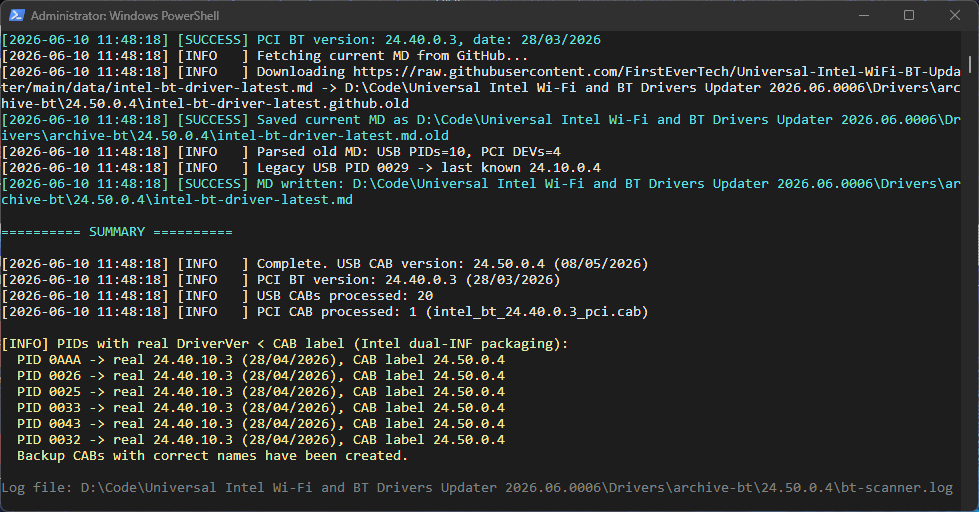
What Intel does:
Since around early 2025, Intel started bundling multiple Bluetooth controller families into a single CAB file, but with only one version number on the file name. Inside that CAB there are several INF files, each with its own DriverVer. For example, the CAB labelled 24.50.0.4 contains:
The fix:
I have completely rewritten the scanner that generates the intel-bt-driver-latest.md database (the updater script itself is unchanged). The new scanner (version 4.6) does this:
Example: For AX201 (PID 0026), the updater will now show 24.40.10.3 instead of 24.50.0.4. No more false upgrade prompts.
Thanks to everyone who reported the confusion – this should finally clear it up.
Best regards,
Marcin
Hi everyone,
Some of you may have noticed that my Universal Intel WiFi/BT Updater would sometimes report a version like 24.50.0.4 for your Bluetooth adapter, but after installation Windows showed a different version (e.g. 24.40.10.3 for AX201). This wasn't a bug in the updater itself – it was caused by the way Intel packages their Bluetooth drivers.
What Intel does:
Since around early 2025, Intel started bundling multiple Bluetooth controller families into a single CAB file, but with only one version number on the file name. Inside that CAB there are several INF files, each with its own DriverVer. For example, the CAB labelled 24.50.0.4 contains:
- One INF for newer controllers (FMP, GAP, MTP) with version 24.50.0.4
- Another INF for older controllers (GFP, HRP, JFP, TH – including AX201/AX200/AX210 etc.) with version 24.40.10.3
The fix:
I have completely rewritten the scanner that generates the intel-bt-driver-latest.md database (the updater script itself is unchanged). The new scanner (version 4.6) does this:
- Downloads each USB CAB
- Extracts the ibtusb.inf file using expand.exe
- Parses the INF to find which DriverVer actually matches each PID (e.g. PID_0026 for AX201)
- Creates per-PID entries in the MD file with the real installed version – not the CAB label
Example: For AX201 (PID 0026), the updater will now show 24.40.10.3 instead of 24.50.0.4. No more false upgrade prompts.
Thanks to everyone who reported the confusion – this should finally clear it up.
Best regards,
Marcin
Last edit: 3 个月 2 周 � by FirstEver.
The following user(s) said Thank You: admin, duttyend
Please 登录 or 注册一个帐号 to join the conversation.
- atplsx
-

- Offline
- Big Poster
-

Enregistré
- 帖子: 70
- Thanks: 222
Re: Intel® Wireless Bluetooth Drivers v24.xxx
3 个月 1 周 �
@FirstEver
ibtpci.inf
DriverVer = 05/08/2026,24.50.0.4
download.windowsupdate.com/d/msdownload/...b2a0b33be11ed999.cab
ibtpci.inf
DriverVer = 05/08/2026,24.50.0.4
download.windowsupdate.com/d/msdownload/...b2a0b33be11ed999.cab
The following user(s) said Thank You: admin, duttyend, FirstEver
Please 登录 or 注册一个帐号 to join the conversation.
- FirstEver
-
- Offline
- The Best Poster
-
Enregistré
- 帖子: 116
- Thanks: 201
Re: Intel® Wireless Bluetooth Drivers v24.xxx
3 个月 1 周 � - 3 个月 1 周 �
Updated - thank you!
The latest Intel Wi-Fi and Bluetooth driver database: Now my updater has all the latest drivers.
The latest Intel Wi-Fi and Bluetooth driver database: Now my updater has all the latest drivers.
Last edit: 3 个月 1 周 � by FirstEver.
The following user(s) said Thank You: duttyend
Please 登录 or 注册一个帐号 to join the conversation.
- Hockey-Pockey
-

- Offline
- Newbie
-

Enregistré
- 帖子: 4
- Thanks: 2
Re: Intel® Wireless Bluetooth Drivers v24.xxx
3 个月 6 天 � - 3 个月 6 天 �
Curious situation from
Intel PROSET/Wireless WiFi/Bluetooth Software Version 24.45.0.1/24.45.0.3 WHQL
Bluetooth Version Inclus: 03/28/2026,24.45.0.3 (GAP,GFP,HRP,MTP)
Bluetooth Version Inclus: 03/28/2026,24.45.0.3 (JFP,THP,TYP,CCP)
Older versions, but numbers are higher.
Bluetooth Version Inclus: 03/28/2026,24.45.0.3 (GAP,GFP,HRP,MTP)
Bluetooth Version Inclus: 03/28/2026,24.45.0.3 (JFP,THP,TYP,CCP)
Older versions, but numbers are higher.
Last edit: 3 个月 6 天 � by Hockey-Pockey.
Please 登录 or 注册一个帐号 to join the conversation.
- admin
-

- Offline
- Admin
-

Administrateur
- Fdrsoft (Admin)
- 帖子: 676
- Thanks: 434
Re: Intel® Wireless Bluetooth Drivers v24.xxx
3 个月 6 天 �
Yes, sometimes there are inconsistencies with Intel.

Asus Z890 ProArt, Intel Cpu Core Ultra 7 265K, Memoires 32Go Corsair DDR5 (6000Mhz CL30), Water-cooling Thermaright, nVidia Geforce RTX4060, Alimentation Gigabyte 850W, Samsung SSD 990 Pro, SSD9100 Pro, Steelserie Pro , Souris Razer, Boitier HUMMER, HP Steelserie, Free Fibre Ultra (8Go/8Go), Lan 10Gb, Cable CAT8/7, Switch 10/5/2.5Gbps, Casque Philips Fedelis.
Please 登录 or 注册一个帐号 to join the conversation.
创建页面时间:0.084秒