



Universal Intel Chipset Drivers Updater
- rvail
-

- Не в сети
- regular poster
-

Enregistré
- Сообщений: 35
- Thanks: 33
Re: Universal Intel Chipset Drivers Updater
1 мес. 3 нед. назад - 1 мес. 3 нед. назад
The free version of Driver Genius detects 3 Intel Chipset driver updates, while your utility is showing that everything is fully updated.
So: how to decide whether the driver date is more important, or that the driver version is more important?
Note: this is for an Intel Z270 desktop ATX motherboard system running Windows 10 22H2, build 19045.7548.
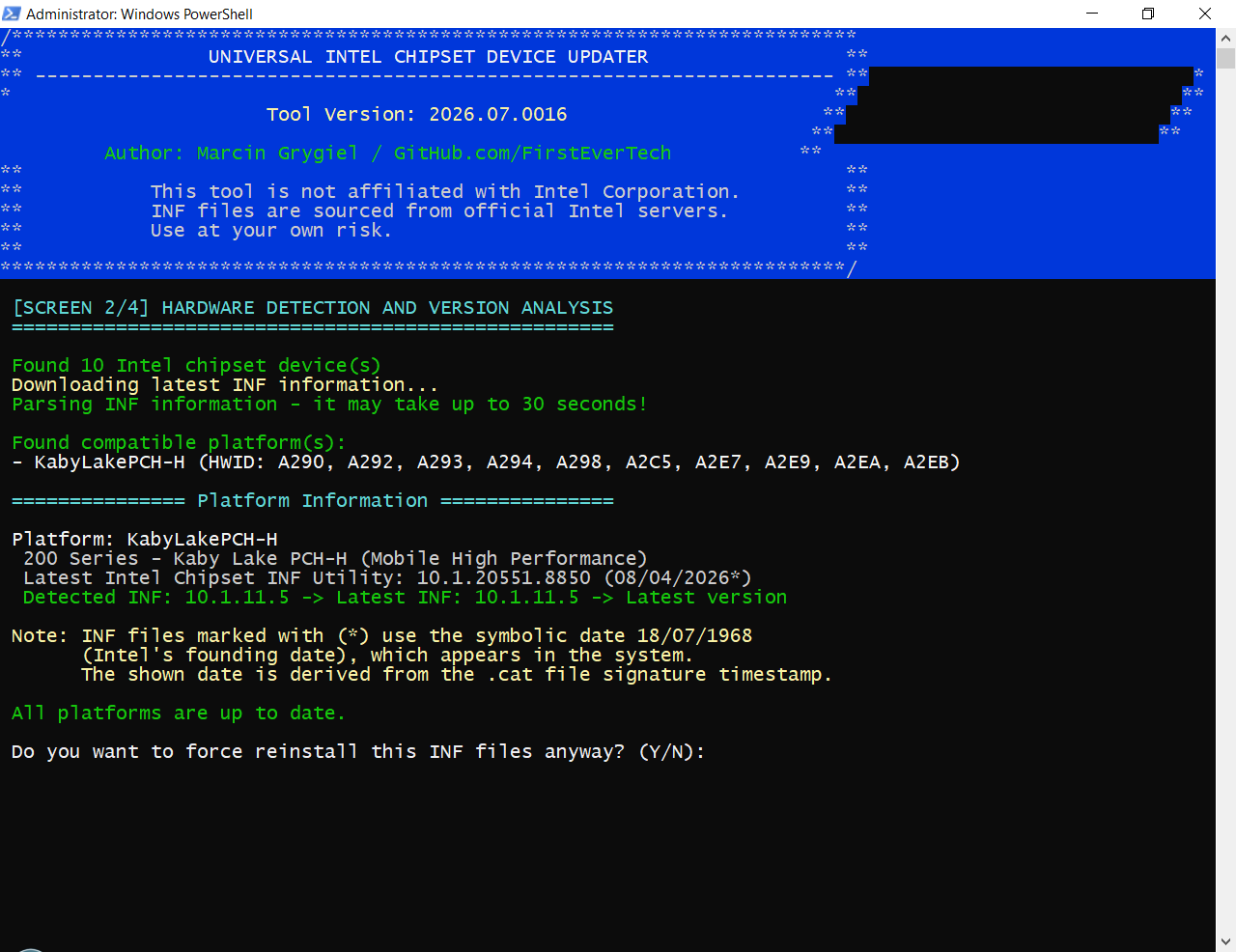
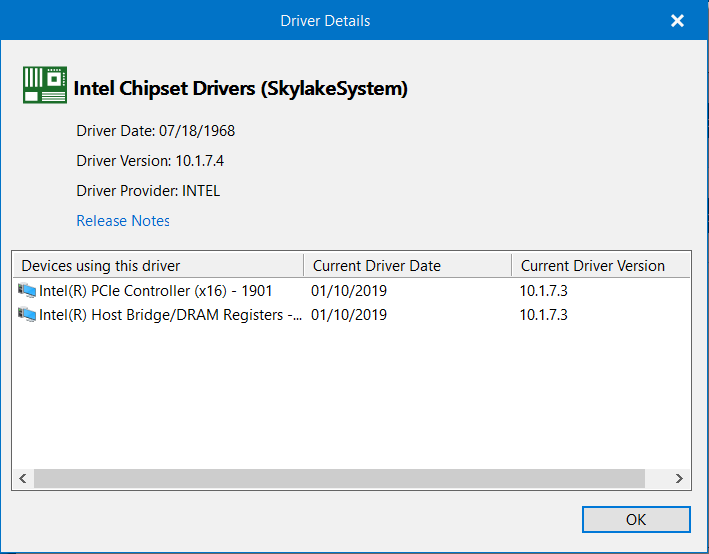
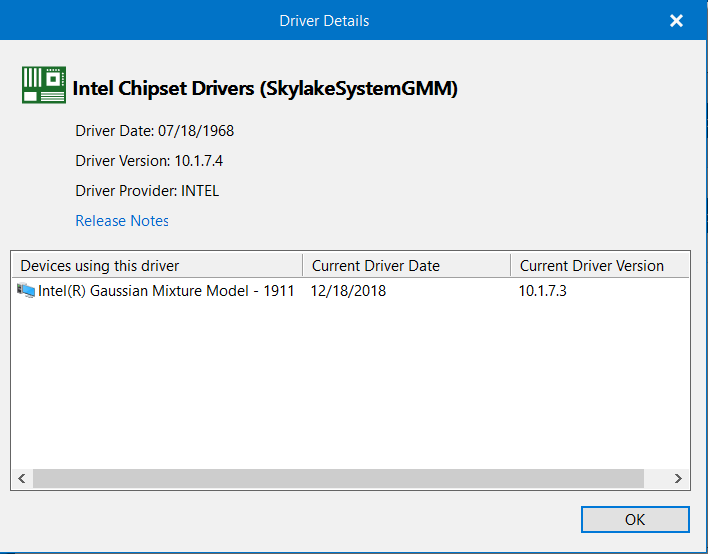
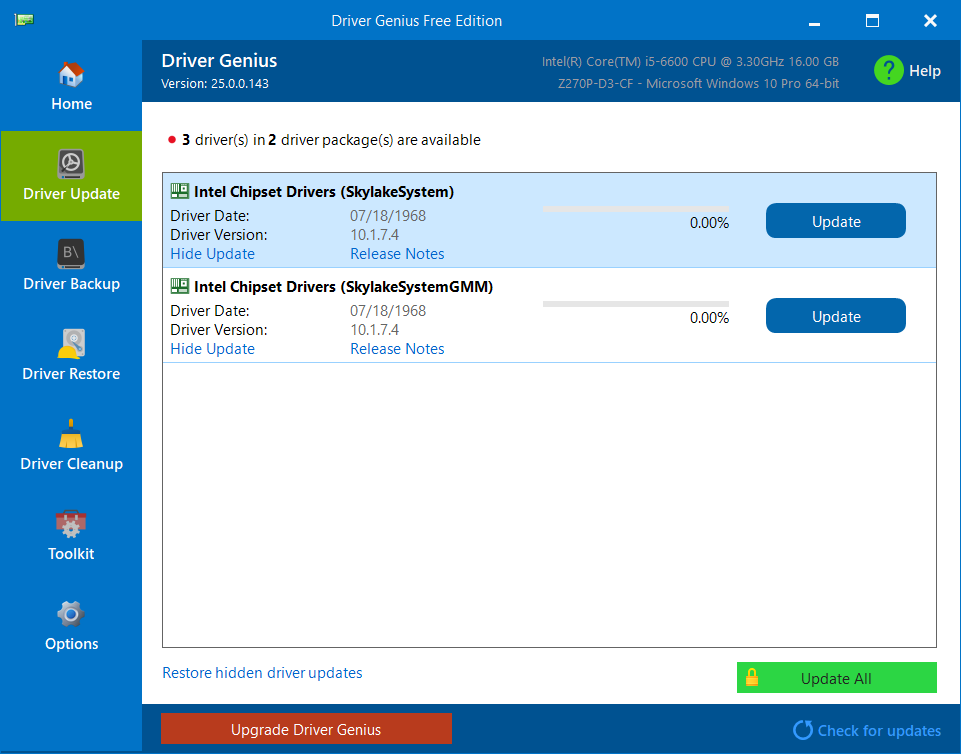
So: how to decide whether the driver date is more important, or that the driver version is more important?
Note: this is for an Intel Z270 desktop ATX motherboard system running Windows 10 22H2, build 19045.7548.
Последнее редактирование: 1 мес. 3 нед. назад пользователем rvail.
Спасибо сказали: duttyend
Пожалуйста Войти или Регистрация, чтобы присоединиться к беседе.
- FirstEver
-
 Автор темы
- Не в сети
- The Best Poster
-

Enregistré
- Сообщений: 114
- Thanks: 198
Re: Universal Intel Chipset Drivers Updater
1 мес. 3 нед. назад - 1 мес. 3 нед. назадThe free version of Driver Genius detects 3 Intel Chipset driver updates, while your utility is showing that everything is fully updated.
So: how to decide whether the driver date is more important, or that the driver version is more important?
Note: this is for an Intel Z270 desktop ATX motherboard system running Windows 10 22H2, build 19045.7548.
Thank you for reporting this.
I have created a copy of this report as an issue in my GitHub repository, where I've documented the full technical investigation and analysis of the discrepancy.
github.com/FirstEverTech/Universal-Intel...et-Updater/issues/26
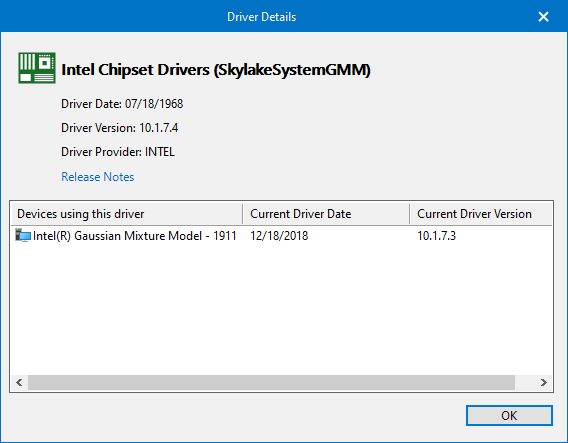
My tool enumerates only live Plug and Play devices (Get-PnpDevice) with Status = OK, then matches the detected Hardware IDs against Intel's INF database before launching Intel's official SetupChipset installer. Driver Genius reports three additional Skylake-related devices (1901, 1911 and Host Bridge), but I currently have no evidence that these devices actually exist in the live PnP tree. During my analysis I also corrected one of my earlier assumptions: the A29x hardware IDs detected by my updater identify Intel 200 Series PCH devices, not the CPU generation itself. Therefore, the remaining question is no longer why my updater did not install those INF files, but why Driver Genius reports three Skylake CPU-integrated devices that are absent from live Plug and Play enumeration.
At this point I cannot conclude which tool is correct without additional evidence.
Could you please provide:
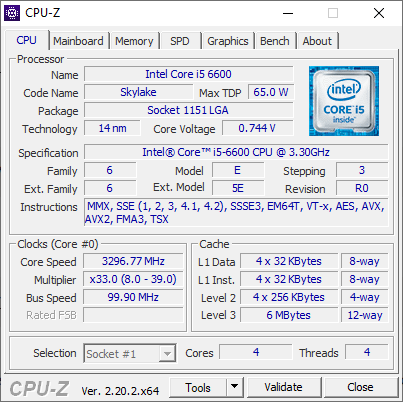
- CPU-Z (CPU tab)
- Device Manager → View → Show hidden devices → System devices
- the output of:
PowerShell:
Get-PnpDevice -PresentOnly:$false | Where-Object InstanceId -like 'PCI\VEN_8086*'
- or
PowerShell:
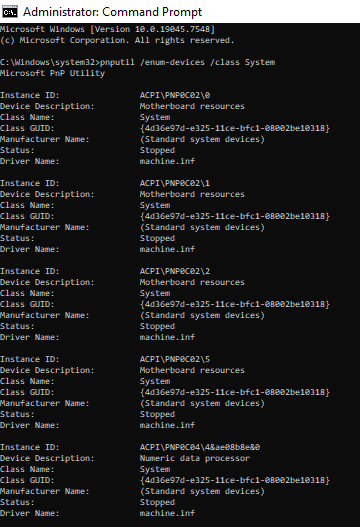
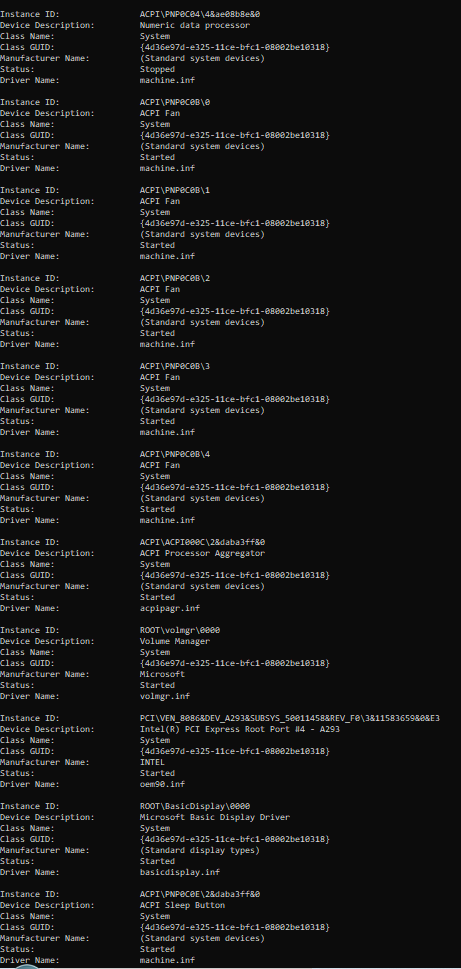
pnputil /enum-devices /class System
This will allow us to determine whether Driver Genius is reporting non-present devices, cached entries, or whether my live enumeration is missing something.
Последнее редактирование: 1 мес. 3 нед. назад пользователем FirstEver.
Спасибо сказали: duttyend
Пожалуйста Войти или Регистрация, чтобы присоединиться к беседе.
- rvail
-
- Не в сети
- regular poster
-
Enregistré
- Сообщений: 35
- Thanks: 33
Re: Universal Intel Chipset Drivers Updater
1 мес. 3 нед. назад - 1 мес. 3 нед. назад
Since my previous post, only the "Gaussian Mixture Model" driver is still detected as being outdated by Driver Genius.
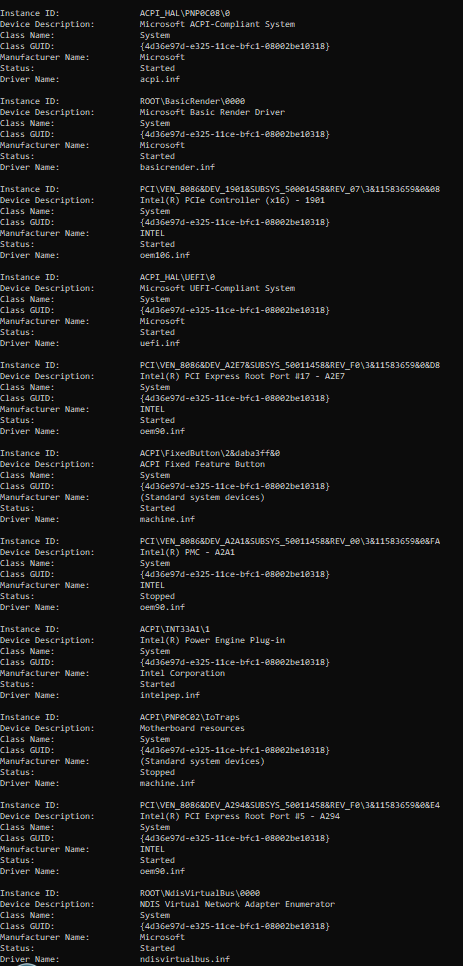
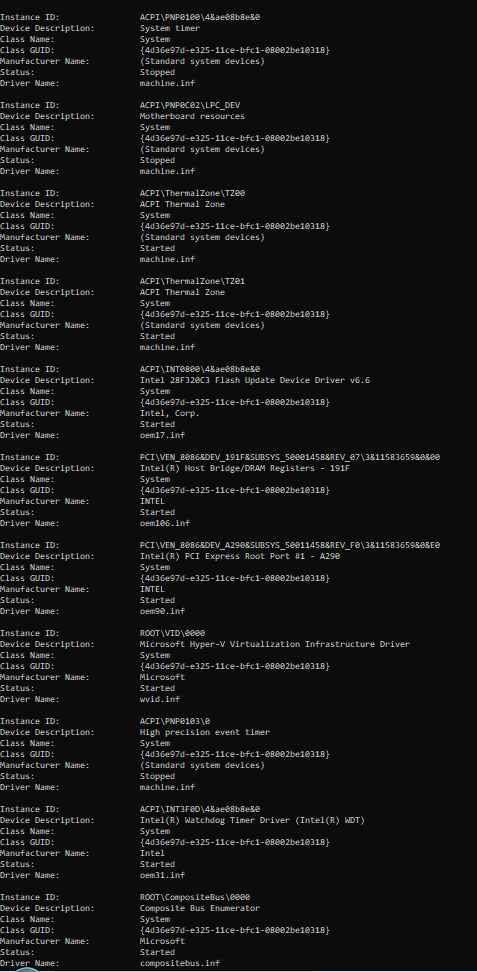
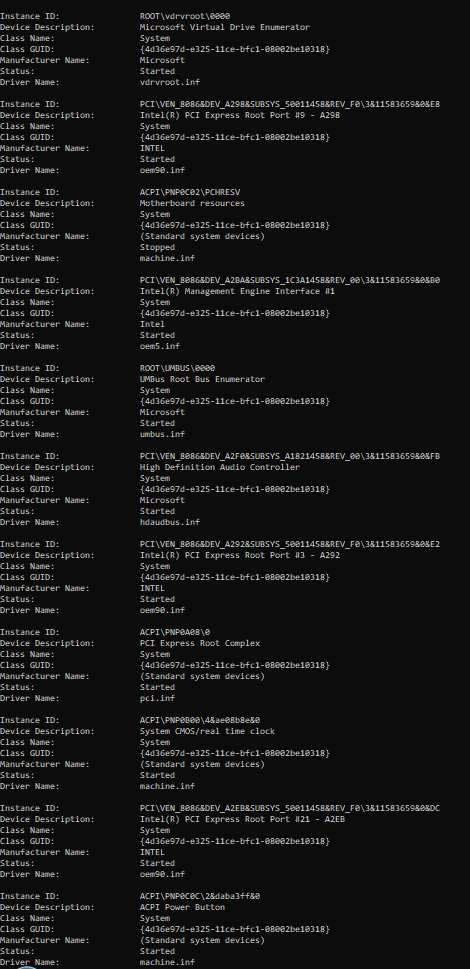
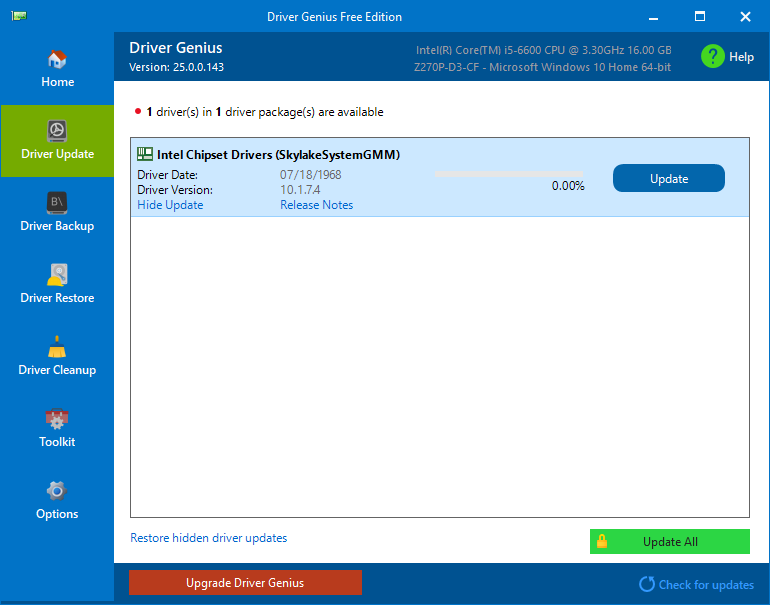
Последнее редактирование: 1 мес. 3 нед. назад пользователем rvail.
Спасибо сказали: duttyend
Пожалуйста Войти или Регистрация, чтобы присоединиться к беседе.
- FirstEver
-
Автор темы
- Не в сети
- The Best Poster
-
Enregistré
- Сообщений: 114
- Thanks: 198
Re: Universal Intel Chipset Drivers Updater
1 мес. 3 нед. назад - 1 мес. 3 нед. назад
Download and run this script as a file on your PC (don't paste it into a one-liner command, it needs to know its own location to save the report):
raw.githubusercontent.com/FirstEverTech/.../get-intel-hwids.ps1
Right-click the page → Save As → save it as get-intel-hwids.ps1 anywhere you like.
Then open PowerShell as Administrator, go to that folder, and run:
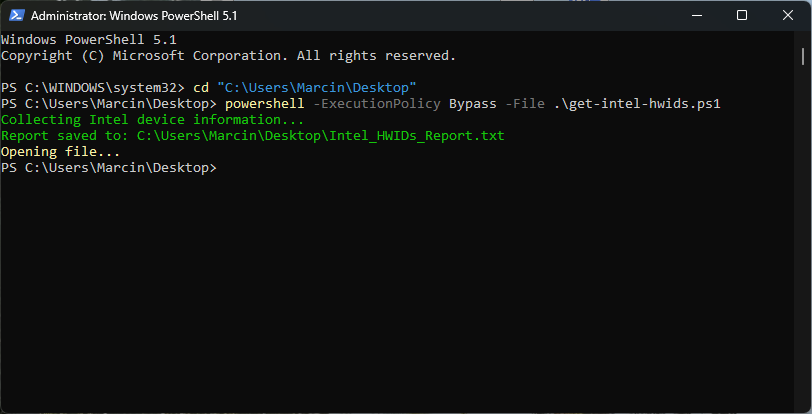
Notepad will pop up automatically with the results. Paste the full contents here, especially anything with DEV_1901, DEV_191F, or DEV_1911.
raw.githubusercontent.com/FirstEverTech/.../get-intel-hwids.ps1
Right-click the page → Save As → save it as get-intel-hwids.ps1 anywhere you like.
Then open PowerShell as Administrator, go to that folder, and run:
powershell -ExecutionPolicy Bypass -File .\get-intel-hwids.ps1
Notepad will pop up automatically with the results. Paste the full contents here, especially anything with DEV_1901, DEV_191F, or DEV_1911.
Последнее редактирование: 1 мес. 3 нед. назад пользователем FirstEver.
Спасибо сказали: duttyend
Пожалуйста Войти или Регистрация, чтобы присоединиться к беседе.
- rvail
-
- Не в сети
- regular poster
-
Enregistré
- Сообщений: 35
- Thanks: 33
Re: Universal Intel Chipset Drivers Updater
1 мес. 3 нед. назад
=== INTEL DEVICES REPORT ===
Created: 07/28/2026 19:43:02
INTEL DEVICES (VEN_8086):
=========================
Name: Intel(R) USB 3.0 eXtensible Host Controller - 1.0 (Microsoft)
Instance ID: PCI\VEN_8086&DEV_A2AF&SUBSYS_50071458&REV_00\3&11583659&0&A0
Class: USB
Status: OK
Driver Version: 10.0.19041.7548
DEV_ID: A2AF
Name: Intel(R) PCI Express Root Port #4 - A293
Instance ID: PCI\VEN_8086&DEV_A293&SUBSYS_50011458&REV_F0\3&11583659&0&E3
Class: System
Status: OK
Driver Version: 10.1.11.5
DEV_ID: A293
Name: Intel(R) Host Bridge/DRAM Registers - 191F
Instance ID: PCI\VEN_8086&DEV_191F&SUBSYS_50001458&REV_07\3&11583659&0&00
Class: System
Status: OK
Driver Version: 10.1.7.3
DEV_ID: 191F
Name: Intel(R) PCI Express Root Port #1 - A290
Instance ID: PCI\VEN_8086&DEV_A290&SUBSYS_50011458&REV_F0\3&11583659&0&E0
Class: System
Status: OK
Driver Version: 10.1.11.5
DEV_ID: A290
Name: Intel(R) PCI Express Root Port #9 - A298
Instance ID: PCI\VEN_8086&DEV_A298&SUBSYS_50011458&REV_F0\3&11583659&0&E8
Class: System
Status: OK
Driver Version: 10.1.11.5
DEV_ID: A298
Name: Intel(R) Management Engine Interface #1
Instance ID: PCI\VEN_8086&DEV_A2BA&SUBSYS_1C3A1458&REV_00\3&11583659&0&B0
Class: System
Status: OK
Driver Version: 2603.9.4.0
DEV_ID: A2BA
Name: High Definition Audio Controller
Instance ID: PCI\VEN_8086&DEV_A2F0&SUBSYS_A1821458&REV_00\3&11583659&0&FB
Class: System
Status: OK
Driver Version: 10.0.19041.7548
DEV_ID: A2F0
Name: Intel(R) PCI Express Root Port #3 - A292
Instance ID: PCI\VEN_8086&DEV_A292&SUBSYS_50011458&REV_F0\3&11583659&0&E2
Class: System
Status: OK
Driver Version: 10.1.11.5
DEV_ID: A292
Name: Intel(R) PCI Express Root Port #21 - A2EB
Instance ID: PCI\VEN_8086&DEV_A2EB&SUBSYS_50011458&REV_F0\3&11583659&0&DC
Class: System
Status: OK
Driver Version: 10.1.11.5
DEV_ID: A2EB
Name: Intel(R) PCIe Controller (x16) - 1901
Instance ID: PCI\VEN_8086&DEV_1901&SUBSYS_50001458&REV_07\3&11583659&0&08
Class: System
Status: OK
Driver Version: 10.1.7.3
DEV_ID: 1901
Name: Intel(R) PCI Express Root Port #17 - A2E7
Instance ID: PCI\VEN_8086&DEV_A2E7&SUBSYS_50011458&REV_F0\3&11583659&0&D8
Class: System
Status: OK
Driver Version: 10.1.11.5
DEV_ID: A2E7
Name: Intel(R) PMC - A2A1
Instance ID: PCI\VEN_8086&DEV_A2A1&SUBSYS_50011458&REV_00\3&11583659&0&FA
Class: System
Status: OK
Driver Version: 10.1.11.5
DEV_ID: A2A1
Name: Intel(R) PCI Express Root Port #5 - A294
Instance ID: PCI\VEN_8086&DEV_A294&SUBSYS_50011458&REV_F0\3&11583659&0&E4
Class: System
Status: OK
Driver Version: 10.1.11.5
DEV_ID: A294
Name: Intel(R) 300 Series Chipset Family SATA AHCI Controller
Instance ID: PCI\VEN_8086&DEV_A282&SUBSYS_B0051458&REV_00\3&11583659&0&B8
Class: HDC
Status: OK
Driver Version: 18.37.7.
DEV_ID: A282
Name: Intel(R) Gaussian Mixture Model - 1911
Instance ID: PCI\VEN_8086&DEV_1911&SUBSYS_50001458&REV_00\3&11583659&0&40
Class: System
Status: OK
Driver Version: 10.1.7.3
DEV_ID: 1911
Name: Intel(R) PCI Express Root Port #19 - A2E9
Instance ID: PCI\VEN_8086&DEV_A2E9&SUBSYS_50011458&REV_F0\3&11583659&0&DA
Class: System
Status: OK
Driver Version: 10.1.11.5
DEV_ID: A2E9
Name: Synaptics SMBus Driver
Instance ID: PCI\VEN_8086&DEV_A2A3&SUBSYS_50011458&REV_00\3&11583659&0&FC
Class: System
Status: OK
Driver Version: 19.5.45.29
DEV_ID: A2A3
Name: Intel(R) PCI Express Root Port #20 - A2EA
Instance ID: PCI\VEN_8086&DEV_A2EA&SUBSYS_50011458&REV_F0\3&11583659&0&DB
Class: System
Status: OK
Driver Version: 10.1.11.5
DEV_ID: A2EA
Name: Intel(R) 200 Series Chipset Family LPC Controller (Z270) - A2C5
Instance ID: PCI\VEN_8086&DEV_A2C5&SUBSYS_50011458&REV_00\3&11583659&0&F8
Class: System
Status: OK
Driver Version: 10.1.11.5
DEV_ID: A2C5
CHIPSET/PCI BRIDGE/ROOT PORT DEVICES:
=====================================
Name: Intel(R) USB 3.0 eXtensible Host Controller - 1.0 (Microsoft)
Instance ID: PCI\VEN_8086&DEV_A2AF&SUBSYS_50071458&REV_00\3&11583659&0&A0
Class: USB
DEV_ID: A2AF
Name: Intel(R) PCI Express Root Port #4 - A293
Instance ID: PCI\VEN_8086&DEV_A293&SUBSYS_50011458&REV_F0\3&11583659&0&E3
Class: System
DEV_ID: A293
Name: Intel(R) Host Bridge/DRAM Registers - 191F
Instance ID: PCI\VEN_8086&DEV_191F&SUBSYS_50001458&REV_07\3&11583659&0&00
Class: System
DEV_ID: 191F
Name: Intel(R) PCI Express Root Port #1 - A290
Instance ID: PCI\VEN_8086&DEV_A290&SUBSYS_50011458&REV_F0\3&11583659&0&E0
Class: System
DEV_ID: A290
Name: Intel(R) PCI Express Root Port #9 - A298
Instance ID: PCI\VEN_8086&DEV_A298&SUBSYS_50011458&REV_F0\3&11583659&0&E8
Class: System
DEV_ID: A298
Name: Intel(R) Management Engine Interface #1
Instance ID: PCI\VEN_8086&DEV_A2BA&SUBSYS_1C3A1458&REV_00\3&11583659&0&B0
Class: System
DEV_ID: A2BA
Name: High Definition Audio Controller
Instance ID: PCI\VEN_8086&DEV_A2F0&SUBSYS_A1821458&REV_00\3&11583659&0&FB
Class: System
DEV_ID: A2F0
Name: Intel(R) PCI Express Root Port #3 - A292
Instance ID: PCI\VEN_8086&DEV_A292&SUBSYS_50011458&REV_F0\3&11583659&0&E2
Class: System
DEV_ID: A292
Name: Intel(R) PCI Express Root Port #21 - A2EB
Instance ID: PCI\VEN_8086&DEV_A2EB&SUBSYS_50011458&REV_F0\3&11583659&0&DC
Class: System
DEV_ID: A2EB
Name: Intel(R) PCIe Controller (x16) - 1901
Instance ID: PCI\VEN_8086&DEV_1901&SUBSYS_50001458&REV_07\3&11583659&0&08
Class: System
DEV_ID: 1901
Name: Intel(R) PCI Express Root Port #17 - A2E7
Instance ID: PCI\VEN_8086&DEV_A2E7&SUBSYS_50011458&REV_F0\3&11583659&0&D8
Class: System
DEV_ID: A2E7
Name: Intel(R) PMC - A2A1
Instance ID: PCI\VEN_8086&DEV_A2A1&SUBSYS_50011458&REV_00\3&11583659&0&FA
Class: System
DEV_ID: A2A1
Name: Intel(R) PCI Express Root Port #5 - A294
Instance ID: PCI\VEN_8086&DEV_A294&SUBSYS_50011458&REV_F0\3&11583659&0&E4
Class: System
DEV_ID: A294
Name: Intel(R) 300 Series Chipset Family SATA AHCI Controller
Instance ID: PCI\VEN_8086&DEV_A282&SUBSYS_B0051458&REV_00\3&11583659&0&B8
Class: HDC
DEV_ID: A282
Name: Intel(R) Gaussian Mixture Model - 1911
Instance ID: PCI\VEN_8086&DEV_1911&SUBSYS_50001458&REV_00\3&11583659&0&40
Class: System
DEV_ID: 1911
Name: Intel(R) PCI Express Root Port #19 - A2E9
Instance ID: PCI\VEN_8086&DEV_A2E9&SUBSYS_50011458&REV_F0\3&11583659&0&DA
Class: System
DEV_ID: A2E9
Name: Synaptics SMBus Driver
Instance ID: PCI\VEN_8086&DEV_A2A3&SUBSYS_50011458&REV_00\3&11583659&0&FC
Class: System
DEV_ID: A2A3
Name: Intel(R) PCI Express Root Port #20 - A2EA
Instance ID: PCI\VEN_8086&DEV_A2EA&SUBSYS_50011458&REV_F0\3&11583659&0&DB
Class: System
DEV_ID: A2EA
Name: Intel(R) 200 Series Chipset Family LPC Controller (Z270) - A2C5
Instance ID: PCI\VEN_8086&DEV_A2C5&SUBSYS_50011458&REV_00\3&11583659&0&F8
Class: System
DEV_ID: A2C5
Created: 07/28/2026 19:43:02
INTEL DEVICES (VEN_8086):
=========================
Name: Intel(R) USB 3.0 eXtensible Host Controller - 1.0 (Microsoft)
Instance ID: PCI\VEN_8086&DEV_A2AF&SUBSYS_50071458&REV_00\3&11583659&0&A0
Class: USB
Status: OK
Driver Version: 10.0.19041.7548
DEV_ID: A2AF
Name: Intel(R) PCI Express Root Port #4 - A293
Instance ID: PCI\VEN_8086&DEV_A293&SUBSYS_50011458&REV_F0\3&11583659&0&E3
Class: System
Status: OK
Driver Version: 10.1.11.5
DEV_ID: A293
Name: Intel(R) Host Bridge/DRAM Registers - 191F
Instance ID: PCI\VEN_8086&DEV_191F&SUBSYS_50001458&REV_07\3&11583659&0&00
Class: System
Status: OK
Driver Version: 10.1.7.3
DEV_ID: 191F
Name: Intel(R) PCI Express Root Port #1 - A290
Instance ID: PCI\VEN_8086&DEV_A290&SUBSYS_50011458&REV_F0\3&11583659&0&E0
Class: System
Status: OK
Driver Version: 10.1.11.5
DEV_ID: A290
Name: Intel(R) PCI Express Root Port #9 - A298
Instance ID: PCI\VEN_8086&DEV_A298&SUBSYS_50011458&REV_F0\3&11583659&0&E8
Class: System
Status: OK
Driver Version: 10.1.11.5
DEV_ID: A298
Name: Intel(R) Management Engine Interface #1
Instance ID: PCI\VEN_8086&DEV_A2BA&SUBSYS_1C3A1458&REV_00\3&11583659&0&B0
Class: System
Status: OK
Driver Version: 2603.9.4.0
DEV_ID: A2BA
Name: High Definition Audio Controller
Instance ID: PCI\VEN_8086&DEV_A2F0&SUBSYS_A1821458&REV_00\3&11583659&0&FB
Class: System
Status: OK
Driver Version: 10.0.19041.7548
DEV_ID: A2F0
Name: Intel(R) PCI Express Root Port #3 - A292
Instance ID: PCI\VEN_8086&DEV_A292&SUBSYS_50011458&REV_F0\3&11583659&0&E2
Class: System
Status: OK
Driver Version: 10.1.11.5
DEV_ID: A292
Name: Intel(R) PCI Express Root Port #21 - A2EB
Instance ID: PCI\VEN_8086&DEV_A2EB&SUBSYS_50011458&REV_F0\3&11583659&0&DC
Class: System
Status: OK
Driver Version: 10.1.11.5
DEV_ID: A2EB
Name: Intel(R) PCIe Controller (x16) - 1901
Instance ID: PCI\VEN_8086&DEV_1901&SUBSYS_50001458&REV_07\3&11583659&0&08
Class: System
Status: OK
Driver Version: 10.1.7.3
DEV_ID: 1901
Name: Intel(R) PCI Express Root Port #17 - A2E7
Instance ID: PCI\VEN_8086&DEV_A2E7&SUBSYS_50011458&REV_F0\3&11583659&0&D8
Class: System
Status: OK
Driver Version: 10.1.11.5
DEV_ID: A2E7
Name: Intel(R) PMC - A2A1
Instance ID: PCI\VEN_8086&DEV_A2A1&SUBSYS_50011458&REV_00\3&11583659&0&FA
Class: System
Status: OK
Driver Version: 10.1.11.5
DEV_ID: A2A1
Name: Intel(R) PCI Express Root Port #5 - A294
Instance ID: PCI\VEN_8086&DEV_A294&SUBSYS_50011458&REV_F0\3&11583659&0&E4
Class: System
Status: OK
Driver Version: 10.1.11.5
DEV_ID: A294
Name: Intel(R) 300 Series Chipset Family SATA AHCI Controller
Instance ID: PCI\VEN_8086&DEV_A282&SUBSYS_B0051458&REV_00\3&11583659&0&B8
Class: HDC
Status: OK
Driver Version: 18.37.7.
DEV_ID: A282
Name: Intel(R) Gaussian Mixture Model - 1911
Instance ID: PCI\VEN_8086&DEV_1911&SUBSYS_50001458&REV_00\3&11583659&0&40
Class: System
Status: OK
Driver Version: 10.1.7.3
DEV_ID: 1911
Name: Intel(R) PCI Express Root Port #19 - A2E9
Instance ID: PCI\VEN_8086&DEV_A2E9&SUBSYS_50011458&REV_F0\3&11583659&0&DA
Class: System
Status: OK
Driver Version: 10.1.11.5
DEV_ID: A2E9
Name: Synaptics SMBus Driver
Instance ID: PCI\VEN_8086&DEV_A2A3&SUBSYS_50011458&REV_00\3&11583659&0&FC
Class: System
Status: OK
Driver Version: 19.5.45.29
DEV_ID: A2A3
Name: Intel(R) PCI Express Root Port #20 - A2EA
Instance ID: PCI\VEN_8086&DEV_A2EA&SUBSYS_50011458&REV_F0\3&11583659&0&DB
Class: System
Status: OK
Driver Version: 10.1.11.5
DEV_ID: A2EA
Name: Intel(R) 200 Series Chipset Family LPC Controller (Z270) - A2C5
Instance ID: PCI\VEN_8086&DEV_A2C5&SUBSYS_50011458&REV_00\3&11583659&0&F8
Class: System
Status: OK
Driver Version: 10.1.11.5
DEV_ID: A2C5
CHIPSET/PCI BRIDGE/ROOT PORT DEVICES:
=====================================
Name: Intel(R) USB 3.0 eXtensible Host Controller - 1.0 (Microsoft)
Instance ID: PCI\VEN_8086&DEV_A2AF&SUBSYS_50071458&REV_00\3&11583659&0&A0
Class: USB
DEV_ID: A2AF
Name: Intel(R) PCI Express Root Port #4 - A293
Instance ID: PCI\VEN_8086&DEV_A293&SUBSYS_50011458&REV_F0\3&11583659&0&E3
Class: System
DEV_ID: A293
Name: Intel(R) Host Bridge/DRAM Registers - 191F
Instance ID: PCI\VEN_8086&DEV_191F&SUBSYS_50001458&REV_07\3&11583659&0&00
Class: System
DEV_ID: 191F
Name: Intel(R) PCI Express Root Port #1 - A290
Instance ID: PCI\VEN_8086&DEV_A290&SUBSYS_50011458&REV_F0\3&11583659&0&E0
Class: System
DEV_ID: A290
Name: Intel(R) PCI Express Root Port #9 - A298
Instance ID: PCI\VEN_8086&DEV_A298&SUBSYS_50011458&REV_F0\3&11583659&0&E8
Class: System
DEV_ID: A298
Name: Intel(R) Management Engine Interface #1
Instance ID: PCI\VEN_8086&DEV_A2BA&SUBSYS_1C3A1458&REV_00\3&11583659&0&B0
Class: System
DEV_ID: A2BA
Name: High Definition Audio Controller
Instance ID: PCI\VEN_8086&DEV_A2F0&SUBSYS_A1821458&REV_00\3&11583659&0&FB
Class: System
DEV_ID: A2F0
Name: Intel(R) PCI Express Root Port #3 - A292
Instance ID: PCI\VEN_8086&DEV_A292&SUBSYS_50011458&REV_F0\3&11583659&0&E2
Class: System
DEV_ID: A292
Name: Intel(R) PCI Express Root Port #21 - A2EB
Instance ID: PCI\VEN_8086&DEV_A2EB&SUBSYS_50011458&REV_F0\3&11583659&0&DC
Class: System
DEV_ID: A2EB
Name: Intel(R) PCIe Controller (x16) - 1901
Instance ID: PCI\VEN_8086&DEV_1901&SUBSYS_50001458&REV_07\3&11583659&0&08
Class: System
DEV_ID: 1901
Name: Intel(R) PCI Express Root Port #17 - A2E7
Instance ID: PCI\VEN_8086&DEV_A2E7&SUBSYS_50011458&REV_F0\3&11583659&0&D8
Class: System
DEV_ID: A2E7
Name: Intel(R) PMC - A2A1
Instance ID: PCI\VEN_8086&DEV_A2A1&SUBSYS_50011458&REV_00\3&11583659&0&FA
Class: System
DEV_ID: A2A1
Name: Intel(R) PCI Express Root Port #5 - A294
Instance ID: PCI\VEN_8086&DEV_A294&SUBSYS_50011458&REV_F0\3&11583659&0&E4
Class: System
DEV_ID: A294
Name: Intel(R) 300 Series Chipset Family SATA AHCI Controller
Instance ID: PCI\VEN_8086&DEV_A282&SUBSYS_B0051458&REV_00\3&11583659&0&B8
Class: HDC
DEV_ID: A282
Name: Intel(R) Gaussian Mixture Model - 1911
Instance ID: PCI\VEN_8086&DEV_1911&SUBSYS_50001458&REV_00\3&11583659&0&40
Class: System
DEV_ID: 1911
Name: Intel(R) PCI Express Root Port #19 - A2E9
Instance ID: PCI\VEN_8086&DEV_A2E9&SUBSYS_50011458&REV_F0\3&11583659&0&DA
Class: System
DEV_ID: A2E9
Name: Synaptics SMBus Driver
Instance ID: PCI\VEN_8086&DEV_A2A3&SUBSYS_50011458&REV_00\3&11583659&0&FC
Class: System
DEV_ID: A2A3
Name: Intel(R) PCI Express Root Port #20 - A2EA
Instance ID: PCI\VEN_8086&DEV_A2EA&SUBSYS_50011458&REV_F0\3&11583659&0&DB
Class: System
DEV_ID: A2EA
Name: Intel(R) 200 Series Chipset Family LPC Controller (Z270) - A2C5
Instance ID: PCI\VEN_8086&DEV_A2C5&SUBSYS_50011458&REV_00\3&11583659&0&F8
Class: System
DEV_ID: A2C5
Спасибо сказали: duttyend, FirstEver
Пожалуйста Войти или Регистрация, чтобы присоединиться к беседе.
Время создания страницы: 0.087 секунд