



Intel® Application Optimization User Interface
- admin
-
 Topic Author
- Online
- Admin
-

Administrateur
- Fdrsoft (Admin)
- 文章: 684
- Thanks: 451
Intel® Application Optimization User Interface
4 個月 1 星期 前 - 4 個月 1 星期 前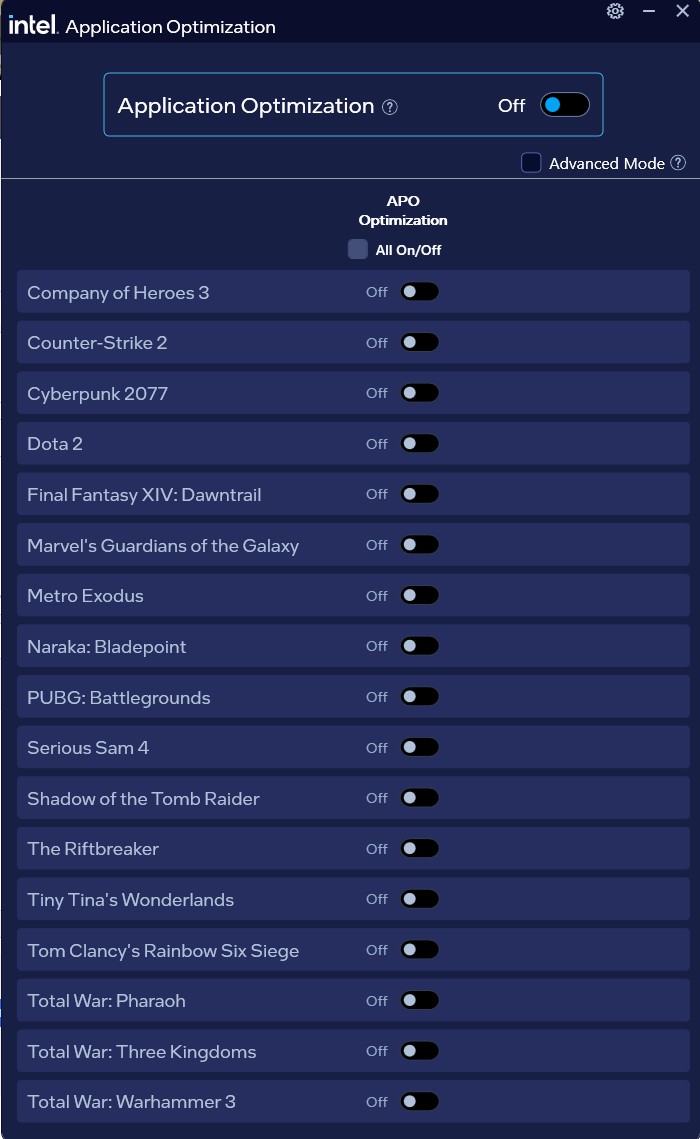
The Intel® Application Optimization UI (User Interface) requires Intel® DTT. You have two options:
- If you have a newer supported processor, it is best to get the Intel® Platform Performance Package , a single package solution that includes Intel® DTT/ Intel® IPF and above user interface.
- For all other processors with limited Advanced Mode support, obtain the latest Intel® DTT through your motherboard system manufacturer and proceed to download above user interface.
Supported Processors:
- Select Intel® Core™ Ultra Series 3 processors - Codename Panther Lake.
- Select Intel® Core™ Ultra processors (Series 2) - Codename Arrow Lake-S.
- Select Intel® Core™ Desktop and Mobile Processors (14th Gen) - Codename Raptor Lake.
- Intel® Core™ Ultra processors (Series 2) - Codename Arrow Lake-S.
- Intel® Core™ Desktop and Mobile Processors (14th Gen) - Codename Raptor Lake
- 13th Gen Intel® Core™ Desktop and Mobile Processors - Codename Raptor Lake.
- 12th Gen Intel® Core™ Desktop and Mobile Processors - Codename Alder Lake
Download
Intel® Application Optimization User Interface
Asus Z890 ProArt, Intel Cpu Core Ultra 7 265K, Memoires 32Go Corsair DDR5 (6000Mhz CL30), Water-cooling Thermaright, nVidia Geforce RTX4060, Alimentation Gigabyte 850W, Samsung SSD 990 Pro, SSD9100 Pro, Steelserie Pro , Souris Razer, Boitier HUMMER, HP Steelserie, Free Fibre Ultra (8Go/8Go), Lan 10Gb, Cable CAT8/7, Switch 10/5/2.5Gbps, Casque Philips Fedelis.
Last edit: 4 個月 1 星期 前 by admin.
Please 登錄 or 新增帳號 to join the conversation.
建立頁面時間:0.074 秒