



Universal Intel Chipset Drivers Updater
- FirstEver
-
 Topic Author
- Offline
- The Best Poster
-

Enregistré
- Posts: 116
- Thanks: 201
Re: Universal Intel Chipset Drivers Updater
6 months 4 weeks ago - 6 months 4 weeks ago
You saved it as an HTML document...
The bat file should look like this:
The bat file should look like this:
Code:
@echo off
setlocal enabledelayedexpansion
:: Intel Chipset Device Software Uninstaller
:: This batch file launches the PowerShell uninstall script with administrator privileges.
:: Set console window size
mode con: cols=75 lines=45
echo /**************************************************************************
echo ** INTEL CHIPSET DEVICE SOFTWARE UNINSTALLER **
echo ** --------------------------------------------------------------------- **
echo ** **
echo ** Removes all installed versions of Intel Chipset software **
echo ** including old EXE-based and new MSI-based packages. **
echo ** Note: This tool does not remove installed INF files. **
echo ** **
echo ** Author: Marcin Grygiel / www.firstever.tech **
echo ** **
echo ** --------------------------------------------------------------------- **
echo ** This tool is not affiliated with Intel Corporation. **
echo ** Use at your own risk. **
echo ** --------------------------------------------------------------------- **
echo ** **
echo ** Visit: github.com/FirstEverTech/Universal-Intel-Chipset-Updater **
echo ** **
echo *************************************************************************/
echo.
:: Get the directory where this batch file is located
set "SCRIPT_DIR=%~dp0"
:: Check if PowerShell script exists in the same directory
if not exist "!SCRIPT_DIR!uninstall-intel-chipset.ps1" (
echo Error: uninstall-intel-chipset.ps1 not found in current directory!
echo.
echo Please ensure the PowerShell script is in the same folder as this BAT file.
pause
exit /b 1
)
:: Check for administrator privileges
net session >nul 2>&1
if %errorLevel% neq 0 (
echo This script requires administrator privileges.
echo Requesting elevation...
echo.
:: Re-launch as administrator with the correct directory
powershell -Command "Start-Process -FilePath '%~f0' -Verb RunAs -WorkingDirectory '!SCRIPT_DIR!'"
exit /b
)
echo Running Intel Chipset uninstaller...
echo.
:: Change to script directory to ensure proper file access
cd /d "!SCRIPT_DIR!"
:: Run PowerShell script with execution policy bypass
powershell -ExecutionPolicy Bypass -File "uninstall-intel-chipset.ps1"
Last edit: 6 months 4 weeks ago by FirstEver.
The following user(s) said Thank You: duttyend
Please Anmelden or Create an account to join the conversation.
- rvail
-

- Offline
- regular poster
-

Enregistré
- Posts: 36
- Thanks: 34
Re: Universal Intel Chipset Drivers Updater
6 months 4 weeks ago - 6 months 4 weeks ago
Re: "You saved it as an HTML document".
No: simply opened the file in Notepad & saved the screen shot as a .png file.
So: copied "Code" that you just now posted, pasted that into Notepad & saved as uninstall-intel-chipset.bat.txt file.
Then re-named the .txt file to a .bat file.
Then ran the .bat file in an Admin. command prompt window & got this output:
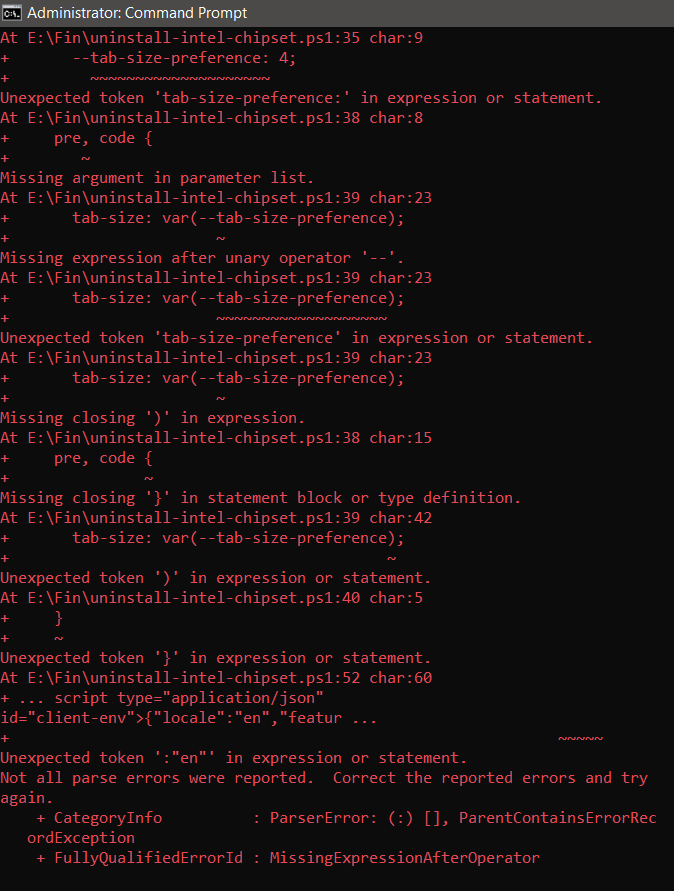
No: simply opened the file in Notepad & saved the screen shot as a .png file.
So: copied "Code" that you just now posted, pasted that into Notepad & saved as uninstall-intel-chipset.bat.txt file.
Then re-named the .txt file to a .bat file.
Then ran the .bat file in an Admin. command prompt window & got this output:
Last edit: 6 months 4 weeks ago by rvail.
Please Anmelden or Create an account to join the conversation.
- FirstEver
-
Topic Author
- Offline
- The Best Poster
-
Enregistré
- Posts: 116
- Thanks: 201
Re: Universal Intel Chipset Drivers Updater
6 months 4 weeks ago - 6 months 4 weeks ago
No offense, but this thread is starting to become cluttered with screenshots, and the issue you're describing is 100% related to your specific computer setup, not the Updater itself.
If you'd like, I can still try to help you fix it – but let's not make a mess here. Please continue the discussion on the project's Discussions page. I'll be happy to assist you there.
👉 github.com/FirstEverTech/Universal-Intel...-Updater/discussions
(You'll need a GitHub account to post.)
Cheers,
Marcin
If you'd like, I can still try to help you fix it – but let's not make a mess here. Please continue the discussion on the project's Discussions page. I'll be happy to assist you there.
👉 github.com/FirstEverTech/Universal-Intel...-Updater/discussions
(You'll need a GitHub account to post.)
Cheers,
Marcin
Last edit: 6 months 4 weeks ago by FirstEver.
The following user(s) said Thank You: dev.asb
Please Anmelden or Create an account to join the conversation.
- Tom
-

- Away
- The Best Poster
-
Enregistré
- Posts: 503
- Thanks: 672
Re: Universal Intel Chipset Drivers Updater
6 months 4 weeks agoNot strange, what you see are so called "Inbox drivers" which are bundled/shipped with the media. Microsoft is not updating them.Today I updated my Windows 11 build 28020.1619 to version 29531.1000 (Canary Channel)
and noticed that the system had restored older versions of the INF files.
It's strange that Windows would do something like this...
Small correction, Intel didn't stop embedding valid timestamps, the reason is more simple:The 1968/1970 dates are also normal. Intel stopped embedding valid timestamps in newer INF files; when the system sees no date, it falls back to the earliest possible (1968‑01‑01 or 1970‑01‑01). Any tool that relies on those dates will be misled.
And, they are not drivers, they don't provide any binaries for the system.The Intel Chipset Device Software Utility shows a date of 07/18/1968 because it is symbolic: Intel was founded on that date. The reason this date is used is to lower the rank of drivers in concern.
This is necessary because it's a supporting utility that should not overwrite any other drivers. Updating these drivers is not needed. Do not worry if you don't have the latest version.
They are information files or how they were called previously "Null bang drivers", because the operating system couldn't assign a name to these and showed a yellow triangle.
CheersThe Intel® Chipset Device Software installs the Windows* INF files. An INF is a text file that provides the operating system with information about a piece of hardware on the system. In the case of the current Intel Chipset Device Software, that information is primarily the product name for the piece of hardware. This allows the operating system to show the correct name for that piece of hardware in Device Manager.
Tom
The following user(s) said Thank You: duttyend, FirstEver
Please Anmelden or Create an account to join the conversation.
- FirstEver
-
Topic Author
- Offline
- The Best Poster
-
Enregistré
- Posts: 116
- Thanks: 201
Re: Universal Intel Chipset Drivers Updater
6 months 3 weeks ago - 6 months 3 weeks ago
Hello Tom,
Everything you said is correct.
Just a few interesting observations from my side...
Cheers,
Marcin
Everything you said is correct.
Just a few interesting observations from my side...
- From time to time, Windows Update refuses to upgrade me to a new build (an error appears), so in such cases, I create my own ISO using the
UUP dump
tool. It includes all the latest updates, however, the Inbox drivers in the final image still show the older versions of the INF files (targeted at older platforms).
- Regarding the dates. I actually didn't know that the 07/18/1968 date was the founding date of Intel, so thank you for that clarification—I will update my documentation accordingly. In my database, I also try to track the release dates of these INF files. My method was to look at the timestamps of the CAT files accompanying the INF files. However, I realized I made a small logical mistake in my approach:
- My tool searches for the latest version of a specific INF file and then downloads the newest Intel package containing that INF.
- The "release date" in my database was being set based on the CAT files from that newest package.
This is incorrect because if the same version of an INF file (with an identical version number) appears in multiple Intel packages over time, the correct release date should be the first appearance of that version. In other words, I should be looking at the CAT file timestamp from the earliest Intel package where that specific INF version was introduced, not the latest one.
- I also agree that updating the INF files is almost irrelevant, but there are specific cases where it is actually recommended:
- For ~95% of users — the functional impact is minimal.
- For the remaining ~5%, correct INF files matter in specific, well-defined scenarios described in my updated article THE-WHOLE-TRUTH-ABOUT_EN_2026.md
Cheers,
Marcin
Last edit: 6 months 3 weeks ago by FirstEver.
The following user(s) said Thank You: Tom, duttyend
Please Anmelden or Create an account to join the conversation.
Time to create page: 0.082 seconds