



Universal Intel Chipset Drivers Updater
- FirstEver
-
 Topic Author
- Offline
- The Best Poster
-

Enregistré
- Posts: 116
- Thanks: 201
Re: Universal Intel Chipset Drivers Updater
7 months 1 day ago - 7 months 1 day ago
Today I updated my Windows 11 build 28020.1619 to version 29531.1000 (Canary Channel)
and noticed that the system had restored older versions of the INF files.
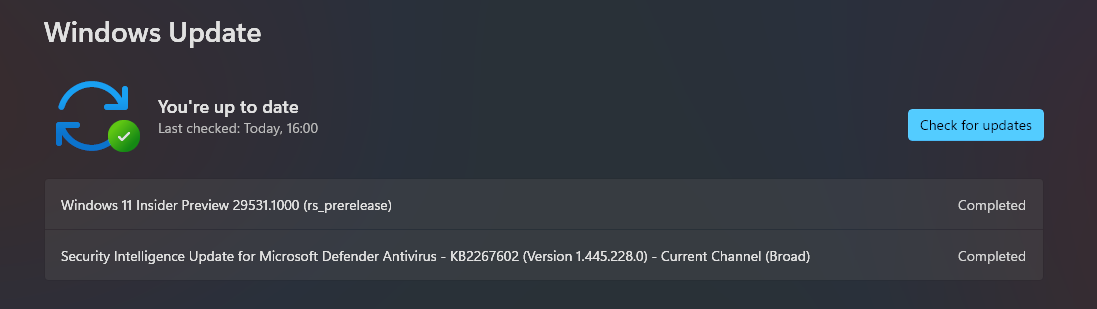
It's strange that Windows would do something like this...
In such a case, remember that after updating the system you should run the updater
and check whether you still have the latest versions of the INF files.
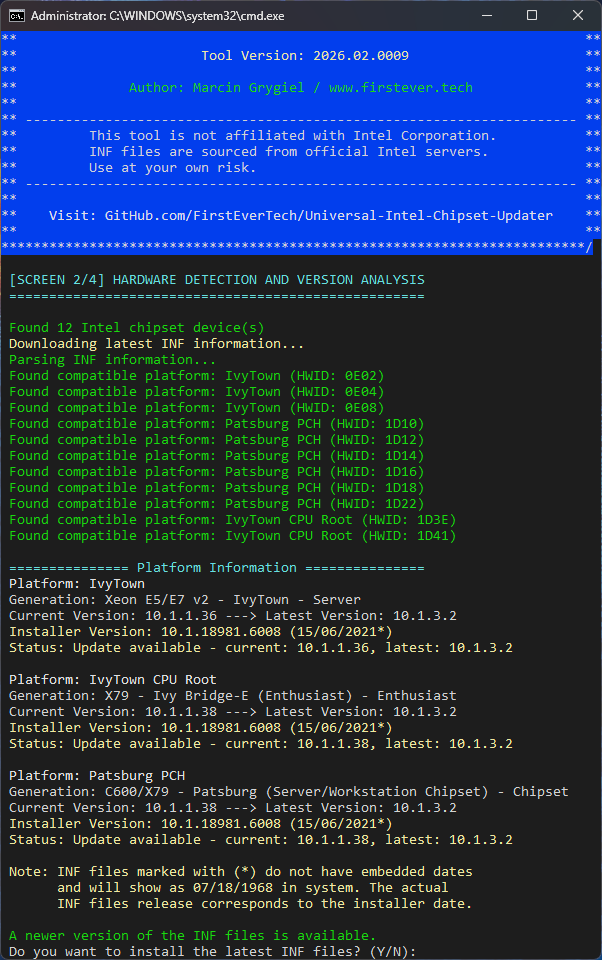
This isn't something I can "fix" and you'd have to ask Microsoft why they do this, but my updater reinstalls the latest versions.
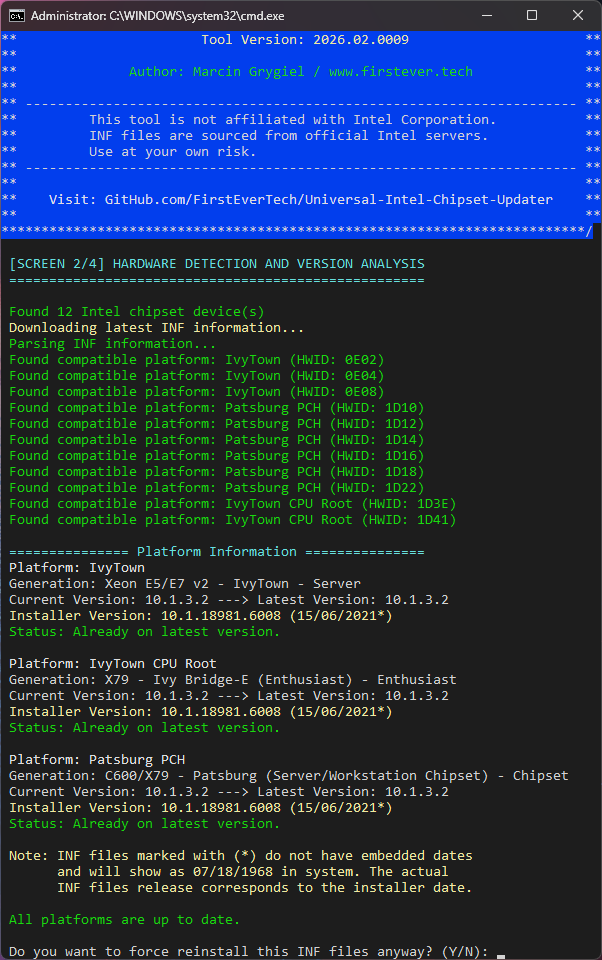
Back to the latest versions.
and noticed that the system had restored older versions of the INF files.
It's strange that Windows would do something like this...
In such a case, remember that after updating the system you should run the updater
and check whether you still have the latest versions of the INF files.
This isn't something I can "fix" and you'd have to ask Microsoft why they do this, but my updater reinstalls the latest versions.
Back to the latest versions.
Last edit: 7 months 1 day ago by FirstEver.
The following user(s) said Thank You: duttyend
Please Anmelden or Create an account to join the conversation.
- rvail
-

- Offline
- regular poster
-

Enregistré
- Posts: 36
- Thanks: 34
Re: Universal Intel Chipset Drivers Updater
6 months 4 weeks ago - 6 months 4 weeks ago
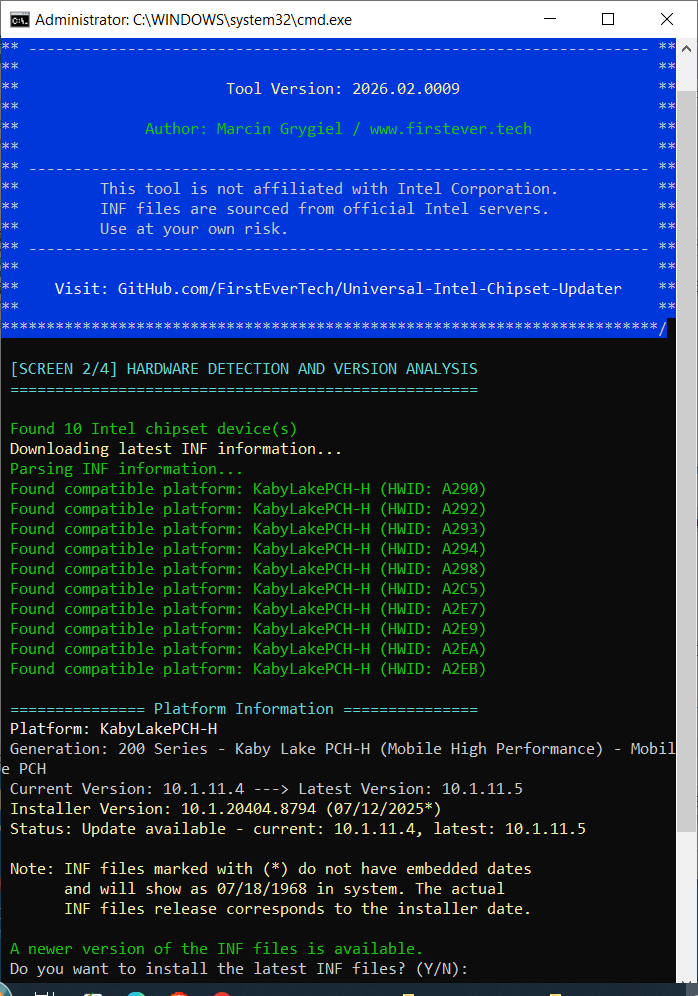
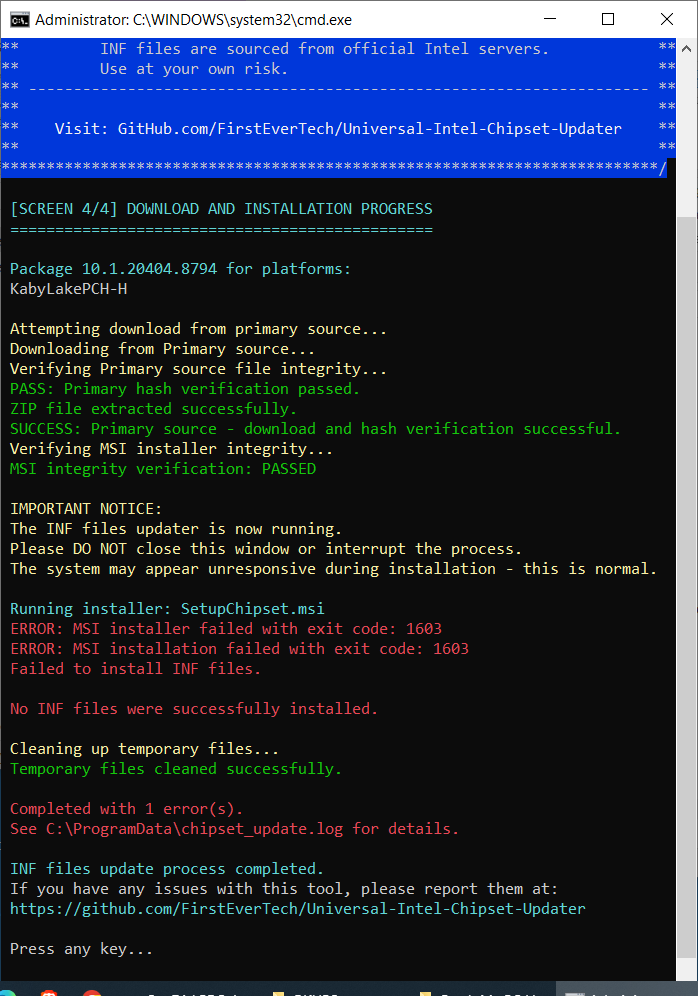
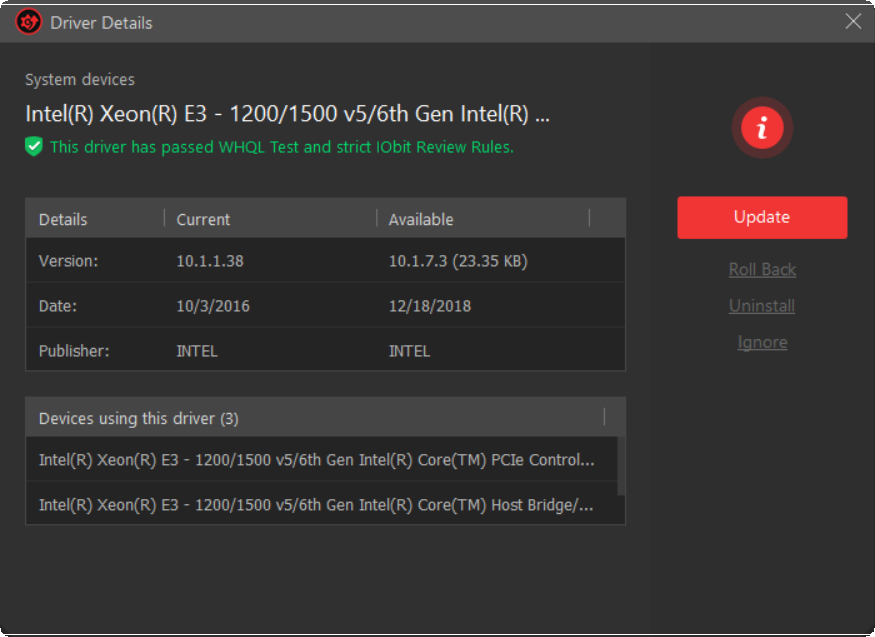
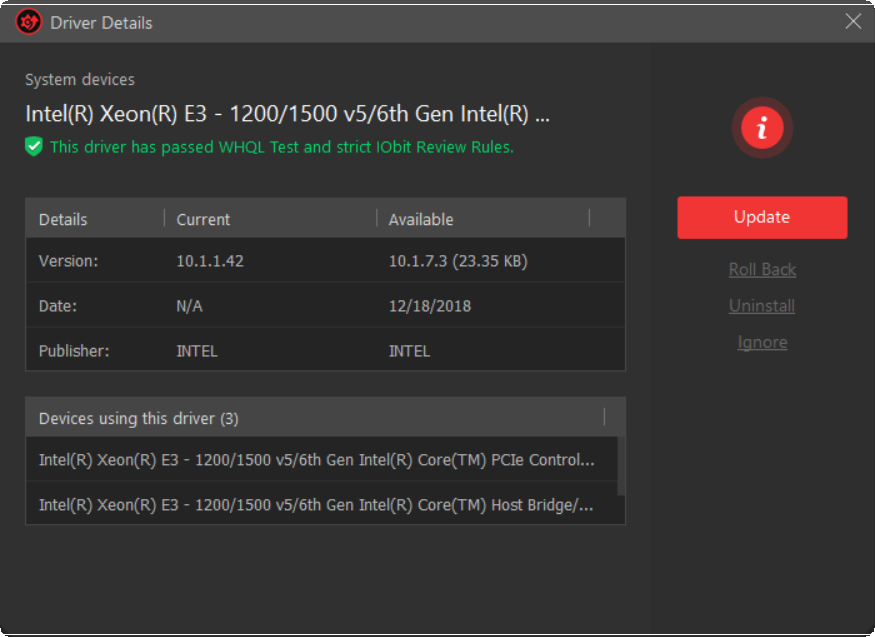
Getting errors on a Gigabyte Z270 board: + driver results from "IObit Driver Booster".(free version).
Last edit: 6 months 4 weeks ago by rvail.
The following user(s) said Thank You: duttyend
Please Anmelden or Create an account to join the conversation.
- FirstEver
-
Topic Author
- Offline
- The Best Poster
-
Enregistré
- Posts: 116
- Thanks: 201
Re: Universal Intel Chipset Drivers Updater
6 months 4 weeks ago - 6 months 4 weeks ago
Thank you for the information, I'll try to check it out.
1. Problem with the MSI installer.
Error 1603 occurred while attempting to install the new MSI version of the Intel Chipset Device Software.
This error was already reported by other user on the project GitHub: here .
Answer: I don't know why this error appears, but it's 100% due to an error in your system/software and not the updater itself.
2. Driver Booster detects a different version
INF version 10.1.7.3 appeared only in specific Intel installers, and only the first four (bold font) were released in 2018.
The same INF file version was included in various installers up to version 10.1.18739.8272 from September 2020.
10.1.17711.8088
10.1.17765.8094
10.1.17861.8101
10.1.17968.8131
10.1.18019.8144
10.1.18121.8164
10.1.18228.8176
10.1.18263.8193
10.1.18267.8194
10.1.18295.8201
10.1.18383.8213
10.1.18460.8229
10.1.18508.8239
10.1.18536.8242
10.1.18634.8254
10.1.18698.8258
10.1.18716.8265
10.1.18739.8272
*Driver Booster uses INF files from one of the first 4 installers on the list, but it is not the latest version.
I’m not sure which exact HWIDs are involved, but after checking all devices that used INF file version 10.1.7.3
(i.e., 1900, 1901, 1903, 1905, 1909, 190F, 1910, 1911, and 191F), the newest INF file version for this hardware in my database is 10.1.7.4,
included in the Intel Chipset Device Software installer 10.1.20404.8794 from December 2025.
Conclusion:
DriverBooster is incorrectly detecting the latest INF file version (it should be 10.1.7.4, not 10.1.7.3).
The only remaining question is why the Intel MSI installer is triggering error 1603 on your system.
Update:
I'm currently working on a fix for error 1603 in the Intel MSI installer... I should have it posted soon.
1. Problem with the MSI installer.
Error 1603 occurred while attempting to install the new MSI version of the Intel Chipset Device Software.
This error was already reported by other user on the project GitHub: here .
Answer: I don't know why this error appears, but it's 100% due to an error in your system/software and not the updater itself.
2. Driver Booster detects a different version
INF version 10.1.7.3 appeared only in specific Intel installers, and only the first four (bold font) were released in 2018.
The same INF file version was included in various installers up to version 10.1.18739.8272 from September 2020.
10.1.17711.8088
10.1.17765.8094
10.1.17861.8101
10.1.17968.8131
10.1.18019.8144
10.1.18121.8164
10.1.18228.8176
10.1.18263.8193
10.1.18267.8194
10.1.18295.8201
10.1.18383.8213
10.1.18460.8229
10.1.18508.8239
10.1.18536.8242
10.1.18634.8254
10.1.18698.8258
10.1.18716.8265
10.1.18739.8272
*Driver Booster uses INF files from one of the first 4 installers on the list, but it is not the latest version.
I’m not sure which exact HWIDs are involved, but after checking all devices that used INF file version 10.1.7.3
(i.e., 1900, 1901, 1903, 1905, 1909, 190F, 1910, 1911, and 191F), the newest INF file version for this hardware in my database is 10.1.7.4,
included in the Intel Chipset Device Software installer 10.1.20404.8794 from December 2025.
Conclusion:
DriverBooster is incorrectly detecting the latest INF file version (it should be 10.1.7.4, not 10.1.7.3).
The only remaining question is why the Intel MSI installer is triggering error 1603 on your system.
Update:
I'm currently working on a fix for error 1603 in the Intel MSI installer... I should have it posted soon.
Last edit: 6 months 4 weeks ago by FirstEver.
The following user(s) said Thank You: duttyend
Please Anmelden or Create an account to join the conversation.
- FirstEver
-
Topic Author
- Offline
- The Best Poster
-
Enregistré
- Posts: 116
- Thanks: 201
Re: Universal Intel Chipset Drivers Updater
6 months 4 weeks ago - 6 months 4 weeks ago
Why Error 1603 Occurs
The Error 1603 during installation of the Intel Chipset Device Software MSI package is typically caused by leftover fragments of a previous installation.
These remnants can include:
This leads to a rollback and the generic Error 1603.
Solution:
Intel Chipset Device Software Uninstaller Tool I have created a dedicated tool that completely cleans your system
of any Intel Chipset software installations, eliminating the root cause of error 1603.
Key Features
After running this tool, the system is free of any Intel Chipset installer traces, and future installations of the MSI package should proceed without error 1603.
Get the Tool
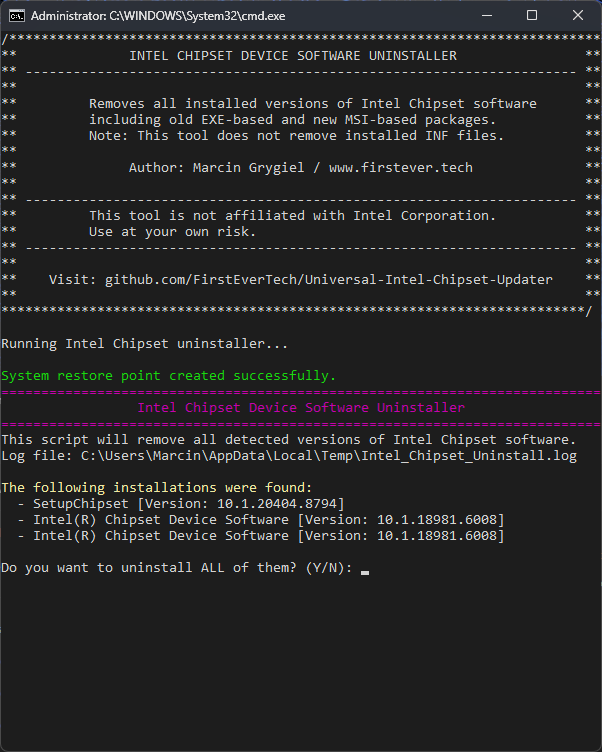
The tool consists of two files:
I didn't personally encounter error 1603, but I did find remnants of an incorrectly uninstalled version (10.1.2.19) in my registry.
I tested the tool on my own system, and it successfully uninstalled and cleaned up those leftovers.
However, that doesn't guarantee the new MSI installer will work – so please give it a try and report back.
Since the problem is caused by remnants of an older Intel Chipset installer, and I haven't personally experienced error 1603,
I can't be sure this tool will resolve it for everyone.
Marcin
The Error 1603 during installation of the Intel Chipset Device Software MSI package is typically caused by leftover fragments of a previous installation.
These remnants can include:
- Corrupted or incompatible uninstall data in the Windows registry
- Orphaned entries in the Windows Installer database
- Broken or missing uninstaller executables for older versions
This leads to a rollback and the generic Error 1603.
Solution:
Intel Chipset Device Software Uninstaller Tool I have created a dedicated tool that completely cleans your system
of any Intel Chipset software installations, eliminating the root cause of error 1603.
Key Features
- Detects all installed versions – both old EXE‑based (Intel(R) Chipset Device Software) and new MSI‑based (SetupChipset)
- Displays version information for each found product (e.g., 10.1.2.19)
- Performs silent uninstall using the correct commands (REMOVE=ALL for MSI packages)
- Removes orphaned registry entries – if an uninstaller executable is missing, the tool cleans up the dead registry key automatically
- Leaves INF files untouched – only the installer metadata is removed, so your hardware continues to work normally
- Creates a System Restore Point before any changes, giving you a safe rollback option
- Requires administrator privileges (auto‑elevates via batch wrapper)
- Logs all actions to %TEMP%\Intel_Chipset_Uninstall.log
After running this tool, the system is free of any Intel Chipset installer traces, and future installations of the MSI package should proceed without error 1603.
Get the Tool
The tool consists of two files:
- uninstall-intel-chipset.bat – easy‑to‑run batch wrapper
- uninstall-intel-chipset.ps1 – the PowerShell script that does the work
It would be best if rvail could test it on his computer and let us know whether error 1603 no longer occurs after using the updater.⚠️ Note: This tool is provided as‑is, without warranty. Always test in a non‑production environment first. It is not affiliated with Intel Corporation.
I didn't personally encounter error 1603, but I did find remnants of an incorrectly uninstalled version (10.1.2.19) in my registry.
I tested the tool on my own system, and it successfully uninstalled and cleaned up those leftovers.
However, that doesn't guarantee the new MSI installer will work – so please give it a try and report back.
Since the problem is caused by remnants of an older Intel Chipset installer, and I haven't personally experienced error 1603,
I can't be sure this tool will resolve it for everyone.
Cheers,In my case, IT support is not just about finding solutions or workarounds—it's about creating entire tools. 😄
Marcin
Last edit: 6 months 4 weeks ago by FirstEver.
The following user(s) said Thank You: duttyend, fikotr74, dev.asb
Please Anmelden or Create an account to join the conversation.
- rvail
-
- Offline
- regular poster
-
Enregistré
- Posts: 36
- Thanks: 34
Re: Universal Intel Chipset Drivers Updater
6 months 4 weeks ago
After a fresh re-install of Win 10 22H2 (using Rufus to create "Windows to Go", on an external SSD), your "Universal Intel Chipset Drivers Updater" worked without issue. However, attempting to use your latest "broken chipset installer fix": could not get it to function without showing errrors.
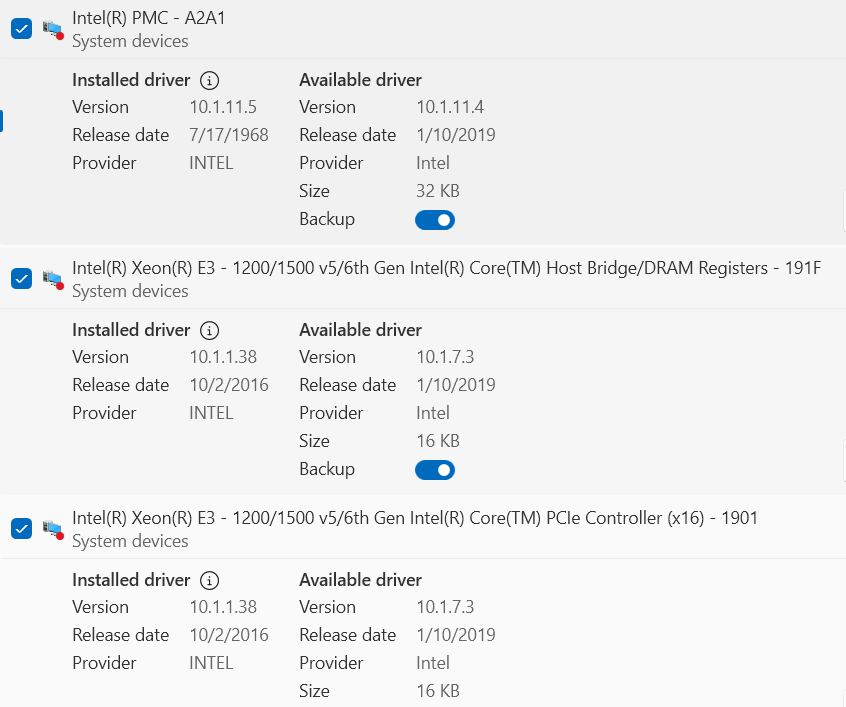
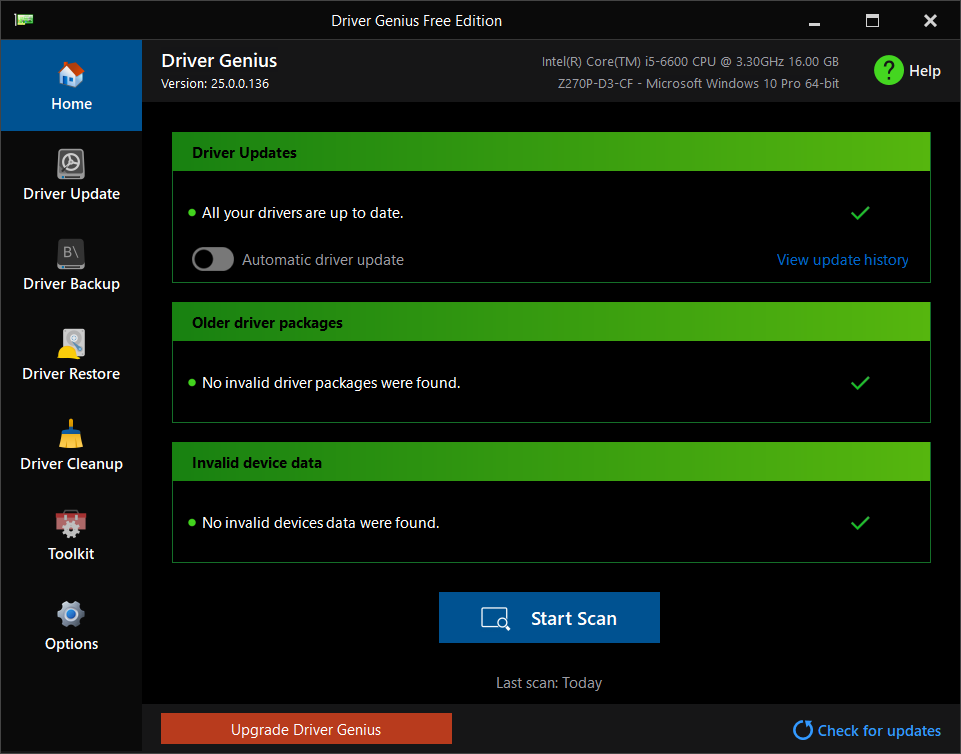
Note: Using the free software "DeviceRescue" ( www.carifred.com ), was able to obtain fully updated drivers for the existing (internal SSD) Win 10 installation. At least: Driver Genius (free) says all drivers are now up to date. But Driver Fusion (free) now says that 2x Intel CPU drivers need updating to version 10.1.73 (see attached screen captures). Plus: Driver Fusion says it recommends downgrading about a dozen chipset devices (downgrade from 10.1.11.5-dated 1968 to 10.1.11.4-dated 2019). Note: looked at your ' uninstall-intel-chipset.bat " file in Notepad, it seems overly complicated, even if I could get it to work.
Note: Using the free software "DeviceRescue" ( www.carifred.com ), was able to obtain fully updated drivers for the existing (internal SSD) Win 10 installation. At least: Driver Genius (free) says all drivers are now up to date. But Driver Fusion (free) now says that 2x Intel CPU drivers need updating to version 10.1.73 (see attached screen captures). Plus: Driver Fusion says it recommends downgrading about a dozen chipset devices (downgrade from 10.1.11.5-dated 1968 to 10.1.11.4-dated 2019). Note: looked at your ' uninstall-intel-chipset.bat " file in Notepad, it seems overly complicated, even if I could get it to work.
The following user(s) said Thank You: duttyend
Please Anmelden or Create an account to join the conversation.
Time to create page: 0.088 seconds