


Universal Intel Chipset Drivers Updater
- FirstEver
-
 Topic Author
- Offline
- The Best Poster
-

Enregistré
- Posts: 114
- Thanks: 198
Re: Universal Intel Chipset Drivers Updater
3 months 2 weeks ago - 3 months 2 weeks ago
UPDATE
Universal Intel Chipset Device Updater now supports Wildcat Lake platforms !
WildcatLakeSystem.inf version 10.1.59.12 from Intel Chipset Device Software 10.1.20524.8822.
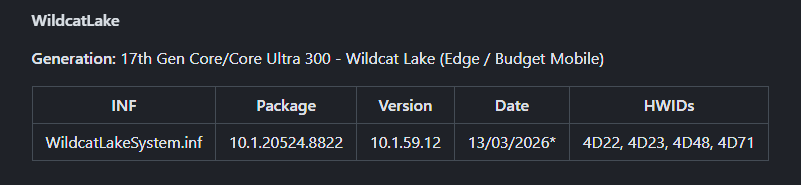
Universal Intel Chipset Device Updater now supports Wildcat Lake platforms !
WildcatLakeSystem.inf version 10.1.59.12 from Intel Chipset Device Software 10.1.20524.8822.
%PCI\VEN_8086&DEV_4D22Desc%=Needs_NO_DRV,PCI\VEN_8086&DEV_4D22
%PCI\VEN_8086&DEV_4D23Desc%=Needs_NO_DRV,PCI\VEN_8086&DEV_4D23
%PCI\VEN_8086&DEV_4D71Desc%=Needs_NO_DRV,PCI\VEN_8086&DEV_4D71
%PCI\VEN_8086&DEV_4D48&SUBSYS_FF008086Desc%=Needs_NO_DRV,PCI\VEN_8086&DEV_4D48&SUBSYS_FF008086
Last edit: 3 months 2 weeks ago by FirstEver.
The following user(s) said Thank You: duttyend, Ataemonus, fikotr74
Please Connexion or Create an account to join the conversation.
- FirstEver
-
Topic Author
- Offline
- The Best Poster
-
Enregistré
- Posts: 114
- Thanks: 198
Re: Universal Intel Chipset Drivers Updater
2 months 4 weeks ago - 2 months 4 weeks ago
Quick update
My open-source tools have just crossed 100,000 total downloads!
I’ve put together a short summary here: PATREON POST

If you’ve used Universal Intel Chipset Device Updater , Universal Intel Wi-Fi and Bluetooth Drivers Updater , or Adobe AVX2 Patch .
Thanks for the testing, feedback, and issue reports.
My open-source tools have just crossed 100,000 total downloads!
I’ve put together a short summary here: PATREON POST
If you’ve used Universal Intel Chipset Device Updater , Universal Intel Wi-Fi and Bluetooth Drivers Updater , or Adobe AVX2 Patch .
Thanks for the testing, feedback, and issue reports.
Last edit: 2 months 4 weeks ago by FirstEver.
The following user(s) said Thank You: admin, duttyend, fikotr74, Jarosław
Please Connexion or Create an account to join the conversation.
- FirstEver
-
Topic Author
- Offline
- The Best Poster
-
Enregistré
- Posts: 114
- Thanks: 198
Re: Universal Intel Chipset Drivers Updater
2 months 3 weeks ago - 2 months 3 weeks ago
Looking for old Intel Chipset installers (archival purposes)
I'm maintaining a database of Intel Chipset INF files and looking for the following old installers (full packages, not just INF):
These (except the last one) are very old versions – purely for archival completeness.
It's highly unlikely that scanning them will change anything in my INF database .
If you have any of these stashed away, please share a link or contact me .
Thanks!
Update
I guess I was looking too hard...
I'm maintaining a database of Intel Chipset INF files and looking for the following old installers (full packages, not just INF):
- 10.1.3
- 10.1.4
- 10.1.5 (have INF from a strange version 10.1.1.5002, not the Intel installer)
- 10.1.10 (have INF, not the Intel installer)
- 10.1.15
- 10.1.16
- 10.1.17
- 10.1.19
- 10.1.17500.8059
- 10.1.17667.8082
- 10.1.17667.8084
- 10.1.17851.8099
- 10.1.17883.8104
- 10.1.17996.8138
- 10.1.20524.8822 (have INF from Dell package, not the Intel installer)
These (except the last one) are very old versions – purely for archival completeness.
It's highly unlikely that scanning them will change anything in my INF database .
If you have any of these stashed away, please share a link or contact me .
Thanks!
Update
I guess I was looking too hard...
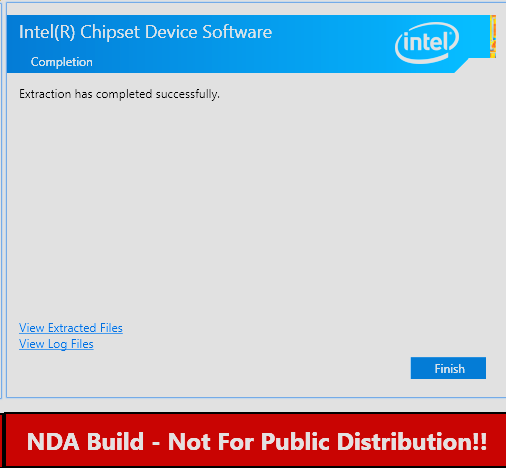
During scanning, additional HWIDs appeared that existed only in one legacy Intel installer. After analysis, it turned out to be an NDA build not intended for public use. The scanner script has been updated to automatically detect and discard such exceptions, ensuring the database relies exclusively on official public releases.
Last edit: 2 months 3 weeks ago by FirstEver.
The following user(s) said Thank You: duttyend, fikotr74
Please Connexion or Create an account to join the conversation.
- FirstEver
-
Topic Author
- Offline
- The Best Poster
-
Enregistré
- Posts: 114
- Thanks: 198
Re: Universal Intel Chipset Drivers Updater
2 months 3 weeks ago - 2 months 5 days ago
DATABASE INFs UPDATE
I managed to track down and integrate 18 additional installers into the database.
Even though it's just 18 new ones, the ripple effect is pretty substantial:
If you'd like to help, feel free to join " THE HUNT FOR MISSING INSTALLERS " !
For every installer you find, you'll earn points and appear on the Hunters Leaderboard — it's a fun little competition!
I managed to track down and integrate 18 additional installers into the database.
- 10.1.1.6
- 10.1.1.9
- 10.1.1.18
- 10.1.1.34
- 10.1.17415.8036
- 10.1.17464.8052
- 10.1.17479.8054
- 10.1.17541.8066
- 10.1.17661.8081
- 10.1.17695.8086
- 10.1.17730.8089
- 10.1.17809.8096
- 10.1.17833.8098
- 10.1.17854.8100
- 10.1.17870.8102
- 10.1.17969.8134
- 10.1.18010.8141
- 10.1.18015.8142
Even though it's just 18 new ones, the ripple effect is pretty substantial:
- +20% more INF files detected (from 5,538 to 6,645)
- +22.6% more total entries (from ~106K to over 130K)
- +25 unique HWIDs (now 3,002), which proves that adding archive installers is important
If you'd like to help, feel free to join " THE HUNT FOR MISSING INSTALLERS " !
For every installer you find, you'll earn points and appear on the Hunters Leaderboard — it's a fun little competition!
Last edit: 2 months 5 days ago by FirstEver.
The following user(s) said Thank You: duttyend
Please Connexion or Create an account to join the conversation.
- FirstEver
-
Topic Author
- Offline
- The Best Poster
-
Enregistré
- Posts: 114
- Thanks: 198
Re: Universal Intel Chipset Drivers Updater
2 months 2 weeks ago - 2 months 2 weeks ago
Release: v2026.07.0015
🆕 What's New
EOL Device Support
Multi-Signature Verification
Full Changelog: here
---
v2026.07.0015 - Fixed handling of EOL (End-Of-Life) chipset platforms.
Previously, HWIDs marked as EOL in the database (dropped from the latest INF package) were skipped, since $uniquePlatforms was keyed by platform name only. Now each platform can carry two independent package entries - "Platform::EOLPackage" and "Platform::MainPackage" - tracked separately via IsEOL flag parsed from the database (#### Platform EOL header or legacy "(EOL...)" marker in the Package column). Install order changed from descending to ascending by package version, so the EOL (older) installer runs first, followed by the current/main installer for the same platform. Devices whose HWID only exists in the EOL package receive the latest INF version available for that specific device; devices covered by the main package receive the newest INF for the whole platform. Verified on X79: no reboot required between the two installer runs, and the newer installer does not remove or override INF entries for HWIDs it no longer lists.
Simplified (using plain language):
The updater now correctly handles individual EOL (End-Of-Life) devices within an otherwise supported chipset platform. Previously, if a single device was marked EOL while the rest of the platform was still supported, that device got skipped. (Platforms fully EOL, e.g. X79, were already supported.) Now the updater installs the last available INF for that specific EOL device first, then installs the newest INF for the rest of the platform - so every device ends up with the best INF version actually available for it.
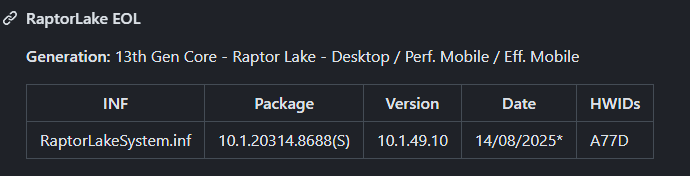
RaptorLake A77D (EOL) Example:
At this point, the project works flawlessly - the only remaining task is updating the INF database.
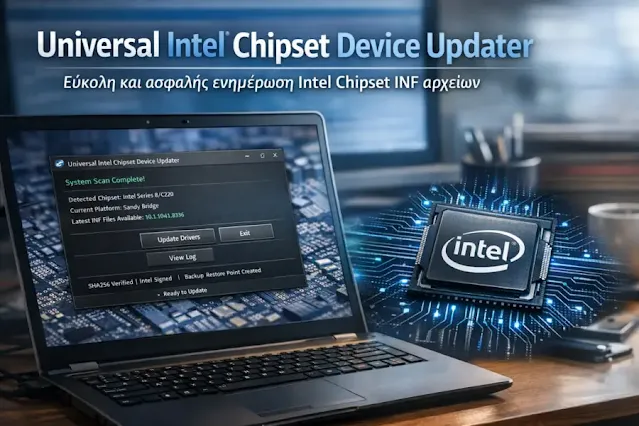
Someone "went wild" with AI and generated a nice GUI for my updater, but I'm not sure it makes sense to complicate a tool that already works well. A GUI would significantly bloat the whole application, and you could forget about the 0.7MB size for SFX file, or 0.1MB for PS1 script.
🆕 What's New
EOL Device Support
- The updater now correctly handles End-of-Life (EOL) platforms that have been split into separate sections in the database:
- Dual-mode EOL detection — The parser checks both the `Package` column (`(EOL)` suffix) and section headers (`#### Platform EOL`) for maximum backward compatibility
- Automatic installation ordering — EOL packages (older versions) are installed FIRST, followed by the latest (newer) packages. This prevents newer INF files from being overwritten by older ones, a critical issue when legacy HWIDs were removed from the latest Intel packages
- Normalized platform names — Platform names like `RaptorLake EOL` are automatically normalized to `RaptorLake` for cleaner display
- Clear EOL labels — Packages are displayed with `[EOL]` or `[EOL - legacy devices]` labels, making it obvious which packages are being installed
Multi-Signature Verification
- Intel has used different certificate subjects over the years for signing their installers. The updater now recognizes all of them:
- Intel Corporation — Latest certificate (used for current packages)
- Intel(R) Software and Firmware Products — Newer certificate (used for intermediate packages)
- Intel Corporation - Software and Firmware Products — Oldest certificate (used for legacy packages)
- Certificate expiration validation
- Signature algorithm verification (SHA256 preferred, SHA1 accepted for older packages)
- Clear error messages showing which signers are allowed
Full Changelog: here
---
v2026.07.0015 - Fixed handling of EOL (End-Of-Life) chipset platforms.
Previously, HWIDs marked as EOL in the database (dropped from the latest INF package) were skipped, since $uniquePlatforms was keyed by platform name only. Now each platform can carry two independent package entries - "Platform::EOLPackage" and "Platform::MainPackage" - tracked separately via IsEOL flag parsed from the database (#### Platform EOL header or legacy "(EOL...)" marker in the Package column). Install order changed from descending to ascending by package version, so the EOL (older) installer runs first, followed by the current/main installer for the same platform. Devices whose HWID only exists in the EOL package receive the latest INF version available for that specific device; devices covered by the main package receive the newest INF for the whole platform. Verified on X79: no reboot required between the two installer runs, and the newer installer does not remove or override INF entries for HWIDs it no longer lists.
Simplified (using plain language):
The updater now correctly handles individual EOL (End-Of-Life) devices within an otherwise supported chipset platform. Previously, if a single device was marked EOL while the rest of the platform was still supported, that device got skipped. (Platforms fully EOL, e.g. X79, were already supported.) Now the updater installs the last available INF for that specific EOL device first, then installs the newest INF for the rest of the platform - so every device ends up with the best INF version actually available for it.
RaptorLake A77D (EOL) Example:
- Installation of A77D (EOL) if this device was detected in the system.
- Installation of the remaining A70D, A72D, A74D devices for the same platform.
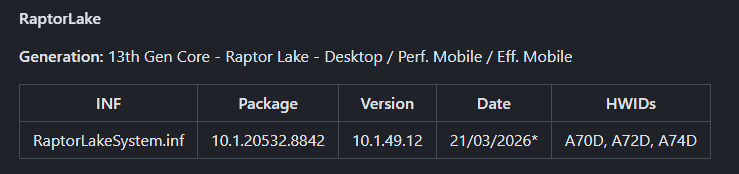
- We now have the latest INF for all devices within the same platform.
At this point, the project works flawlessly - the only remaining task is updating the INF database.
Someone "went wild" with AI and generated a nice GUI for my updater, but I'm not sure it makes sense to complicate a tool that already works well. A GUI would significantly bloat the whole application, and you could forget about the 0.7MB size for SFX file, or 0.1MB for PS1 script.
Last edit: 2 months 2 weeks ago by FirstEver.
The following user(s) said Thank You: duttyend
Please Connexion or Create an account to join the conversation.
Time to create page: 0.085 seconds