



Universal Intel Chipset Drivers Updater
- FirstEver
-
 Topic Author
- Offline
- The Best Poster
-

Enregistré
- 文章: 119
- Thanks: 206
Universal Intel Chipset Drivers Updater
11 個月 5 天 前 - 2 個月 1 星期 前
Universal Intel Chipset Device Updater
Project: github.com/FirstEverTech/Universal-Intel-Chipset-Updater
Download: ChipsetUpdater-2026.08.0018-Win10-Win11.exe
Version: 2026.08.0018
Release Date: August 13, 2026

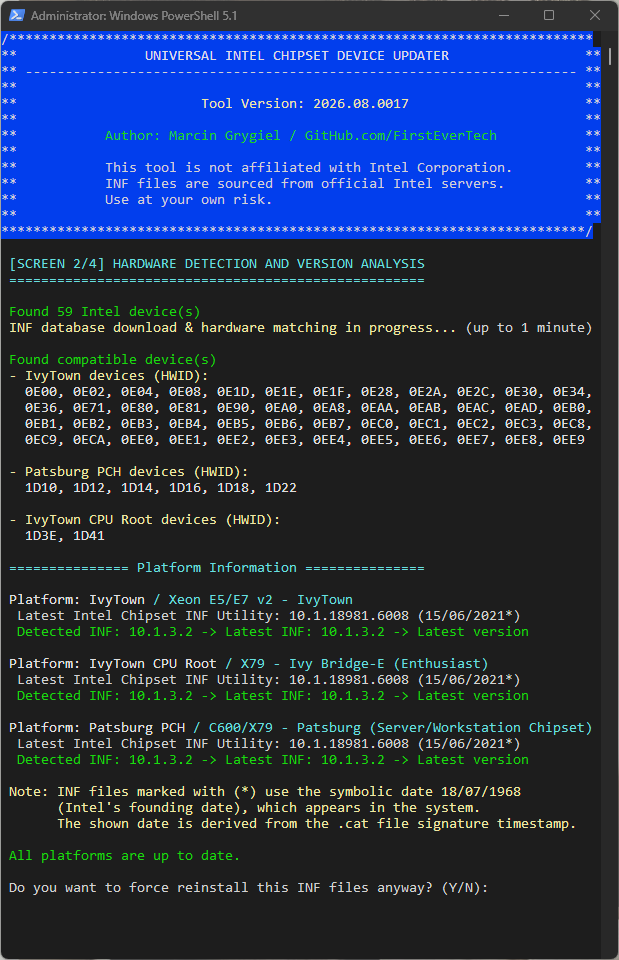
Universal Intel Chipset Device Updater is an advanced, security-focused tool that automatically detects your Intel hardware and installs the latest official chipset INF files with enterprise-grade safety measures. Supports all Intel platforms from Sandy Bridge (2nd Gen) to the latest Panther Lake (17th Gen Core/Core Ultra 300).
This project was built through a pragmatic collaboration between human expertise and AI-assisted tooling.
Why This Tool Exists
Intel's official Chipset Device Software has evolved over 25 years into a complex, bloated package. This tool simplifies the process by automatically detecting and installing only the INF files your system actually needs — nothing more, nothing less.
For a detailed technical breakdown and historical context, see:
→ The Whole Truth About Intel Chipset Device Software → Behind the Project: Making Of
Community & Project Maintenance
This project would not exist without the community. Intel has removed most historical chipset packages from public access.
Thanks to community mirrors and shared archives, I was able to obtain older Intel Chipset Device Software installers, analyze their INF contents, and build the INF scanner and database that power this updater.
Important to note:
This project has been reviewed by multiple AI systems across three independent cycles using structured security frameworks (OWASP, CWE, CVSS v3.1). These are code and architecture reviews, not formal penetration tests. Average score: 9.6/10 — with Claude (most critical reviewer) scoring 9.1/10 after three cycles starting from 8.3/10.
Score History at a Glance
For full score history across all audit cycles, methodology, and detailed audits, see AI_AUDITS.md .

Project implementation: Marcin Grygiel – tool logic, reverse engineering, testing, documentation
PowerShell code: Free versions of DeepSeek 70% / ChatGPT 10% / Claude 20%
⭐ If this project helped you, please click the " STAR " button at the top of this page.
Project: github.com/FirstEverTech/Universal-Intel-Chipset-Updater
Download: ChipsetUpdater-2026.08.0018-Win10-Win11.exe
Version: 2026.08.0018
Release Date: August 13, 2026
Universal Intel Chipset Device Updater is an advanced, security-focused tool that automatically detects your Intel hardware and installs the latest official chipset INF files with enterprise-grade safety measures. Supports all Intel platforms from Sandy Bridge (2nd Gen) to the latest Panther Lake (17th Gen Core/Core Ultra 300).
This project was built through a pragmatic collaboration between human expertise and AI-assisted tooling.
Why This Tool Exists
Intel's official Chipset Device Software has evolved over 25 years into a complex, bloated package. This tool simplifies the process by automatically detecting and installing only the INF files your system actually needs — nothing more, nothing less.
For a detailed technical breakdown and historical context, see:
→ The Whole Truth About Intel Chipset Device Software → Behind the Project: Making Of
Community & Project Maintenance
This project would not exist without the community. Intel has removed most historical chipset packages from public access.
Thanks to community mirrors and shared archives, I was able to obtain older Intel Chipset Device Software installers, analyze their INF contents, and build the INF scanner and database that power this updater.
Important to note:
- Adding support for new Intel Chipset INF releases is not automatic
- Each new Intel release must be analyzed and added to the project’s GitHub repository to keep the database up to date
- Community reports about newly released Intel chipset packages are extremely valuable
This project has been reviewed by multiple AI systems across three independent cycles using structured security frameworks (OWASP, CWE, CVSS v3.1). These are code and architecture reviews, not formal penetration tests. Average score: 9.6/10 — with Claude (most critical reviewer) scoring 9.1/10 after three cycles starting from 8.3/10.
Score History at a Glance
Code:
Auditor |11/25|02/26|03/26| Trend & Notes
-------------------------------------------------------------------------------------------------
ChatGPT | 9.4 | 9.6 | 9.7 | ↑ | Consistently high; tends toward optimistic scoring
Claude | 8.3 | 8.7 | 9.1 | ↑ | Most critical reviewer; lowest scores in the series
Copilot | 8.6 | 9.4 | 9.5 | ↑ | Largest single-cycle jump (+0.8); strong improvement recognition
DeepSeek | 8.7 | 9.2 | 9.4 | ↑ | Consistent mid-range scoring; balanced methodology
Gemini | 9.0 | 9.5 | 10.0| ↑ | Most generous reviewer; perfect score reflects lenient criteria
Grok | 9.7 | 9.8 | 9.9 | ↑ | Highest baseline; limited score differentiation between cycles
Average | 8.95| 9.37| 9.6 | ↑ |
For full score history across all audit cycles, methodology, and detailed audits, see AI_AUDITS.md .
Project implementation: Marcin Grygiel – tool logic, reverse engineering, testing, documentation
PowerShell code: Free versions of DeepSeek 70% / ChatGPT 10% / Claude 20%
⭐ If this project helped you, please click the " STAR " button at the top of this page.
Last edit: 2 個月 1 星期 前 by FirstEver.
The following user(s) said Thank You: THEBOSS619, duttyend, Ataemonus, fikotr74, oemuser, Hagifix, SAVAMUR, Tarek-Hasan
Please 登錄 or 新增帳號 to join the conversation.
- FirstEver
-
Topic Author
- Offline
- The Best Poster
-
Enregistré
- 文章: 119
- Thanks: 206
Re: Universal Intel Chipset Device Updater
11 個月 5 天 前 - 8 個月 2 星期 前
Update v10.1-2025.11.8 - Release Notes New Features & Improvements
🆕 New Features & Improvements
Project: github.com/FirstEverTech/Universal-Intel-Chipset-Updater
Download: ChipsetUpdater-10.1-2025.11.8-Win10-Win11.exe
Version: 10.1-2025.11.8
🆕 New Features & Improvements
- Enhanced platform detection: Added automatic detection for Intel platforms that use Windows 11 24H2 inbox drivers (e.g., Meteor Lake)
- Improved user communication: Clear informational messages when Windows inbox drivers are detected
- Smart exclusion system: Platforms with Package = None in the database are automatically excluded from updates
- Better date handling: Windows inbox driver dates now use digital signature dates from corresponding .cat files
- Updated parsing logic: Script now identifies Windows inbox-only platforms during hardware detection
- Enhanced error handling: Improved debug messages and logging for platform detection
- Streamlined user experience: Separate section for Windows inbox platforms in the output
- No INF database changes: This update only improves the detection and handling logic
- Backward compatible: Fully compatible with existing INF database format
- Future-proof: Automatically handles new platforms marked with Package = None
- Fixed potential false positives for unsupported platforms
- Improved handling of platforms without separate Intel Chipset Device Software packages
Project: github.com/FirstEverTech/Universal-Intel-Chipset-Updater
Download: ChipsetUpdater-10.1-2025.11.8-Win10-Win11.exe
Version: 10.1-2025.11.8
Last edit: 8 個月 2 星期 前 by FirstEver.
The following user(s) said Thank You: admin, THEBOSS619, duttyend, Ataemonus, fikotr74, oemuser, Jarosław
Please 登錄 or 新增帳號 to join the conversation.
- FirstEver
-
Topic Author
- Offline
- The Best Poster
-
Enregistré
- 文章: 119
- Thanks: 206
Re: Universal Intel Chipset Device Updater
8 個月 3 星期 前 - 7 個月 5 天 前
Update v10.1-2026.02.1 - Release Notes New Features & Improvements
🆕 Hardware-Accurate Platform Separation
Critical Fixes and Enhancements
Installer Enhancements
Technical Updates
Source Code
New Scripts
Updated Functions
Database Improvements
What Changed
Why It Matters
Bug Fixes
Files Included
What’s next:
The only idea I have left is to add command-line switches (for example /SILENT) so the tool can update everything automatically in the background — which would be especially useful for system administrators. Currently, the tool uses a self-signed certificate and I don’t really plan to move to a CA-signed one (DigiCert, Sectigo, GlobalSign, etc.), unless someone decides to sponsor it.
Project: github.com/FirstEverTech/Universal-Intel-Chipset-Updater
Download: ChipsetUpdater-10.1-2026.02.1-Win10-Win11.exe
Version: 10.1-2026.02.1
🆕 Hardware-Accurate Platform Separation
- Fixed Intel's oversimplified naming: Added Generate-HardwareAccurateMD.ps1 script that corrects Intel's platform grouping errors
- Proper hardware component separation: Meteor Lake platforms now correctly split into:
- MeteorLake SoC - CPU root devices
- MeteorLake PCH-N - Mobile low-power chipset
- MeteorLake PCH-H - Mobile high-performance chipset
- MeteorLake PCH-S - Desktop chipset
- X79 Platform correction: Now properly separates IvyTown CPU Root from Patsburg PCH
- X99 Platform refinement: Separates HaswellE/BroadwellE CPU Root from Wellsburg PCH
- Backward compatible: No changes needed to updater - works with existing intel-chipset-infs-latest.md format
Critical Fixes and Enhancements
- Extended installer support: Added full support for MSI installers (in addition to existing EXE support)
- MSI integrity verification: Added hash verification mechanism for MSI files from GitHub Archive repository
- Moved log file location: Log file chipset_update.log moved to C:\ProgramData\ to avoid deletion during cleanup
- Improved pause management: Added keyboard buffer flush before pauses to prevent screen "skipping"
- Fixed version display in header: Added $DisplayVersion with correct regex for proper version formatting in UI
Installer Enhancements
- Dual Installer Support: Script now automatically detects whether installer is EXE or MSI and applies appropriate installation method
- MSI Verification: For MSI installers, added hash verification instead of digital signature (MSI files don't have Intel signatures)
- Improved Error Handling: Better error messages for different installer types
- Archive Integration: Added $githubArchiveUrl for downloading MSI hash files
Technical Updates
Source Code
- Added variables:
- $DisplayVersion - for correct version formatting in UI
- $githubArchiveUrl - for archival MSI hash files
- Improved parsing: Fixed regex in Show-Header and Show-FinalCredits
- Extended debugging: Added additional debug messages for better process tracking
New Scripts
- Generate-HardwareAccurateMD.ps1: New standalone script that fixes Intel's platform naming in the generated database
- Generates: intel-chipset-infs-latest-v2.md (hardware-correct) and installer-list.csv
Updated Functions
- Install-ChipsetINF: Completely rewritten with support for both EXE and MSI
- Show-Header: Fixed version formatting
- Show-FinalCredits: Unified with Show-Header
- Write-Log: Changed log file location
Database Improvements
What Changed
- For 25 years, Intel has been grouping different hardware components under single platform names:
- Before: "MeteorLake" included SoC, PCH-N, PCH-H, and PCH-S devices mixed together
- After: Each hardware component gets its own correct platform name
- Result: Clear understanding of what INF files actually update which hardware
Why It Matters
- Accurate detection: Users can now see exactly which chipset component is being updated
- No confusion: No more wondering why "MeteorLake" INF updates both CPU and PCH devices
- Technical correctness: Hardware IDs are now properly separated by actual silicon boundaries
Bug Fixes
- MSI Installation: Fixed installation for packages distributed as MSI (newer Intel versions)
- Log Persistence: Log file is no longer deleted during temporary directory cleanup
- Keyboard Buffer: Fixed issue with screen "skipping" due to buffered keys
- Fixed Version Display: Fixed bug causing incorrect version display in header
Files Included
- universal-intel-chipset-updater.ps1 - Main updater script
- universal-intel-chipset-updater.bat - Launcher
- ChipsetUpdater-10.1-2026.02.1-Win10-Win11.exe - SFX package
What’s next:
The only idea I have left is to add command-line switches (for example /SILENT) so the tool can update everything automatically in the background — which would be especially useful for system administrators. Currently, the tool uses a self-signed certificate and I don’t really plan to move to a CA-signed one (DigiCert, Sectigo, GlobalSign, etc.), unless someone decides to sponsor it.
Project: github.com/FirstEverTech/Universal-Intel-Chipset-Updater
Download: ChipsetUpdater-10.1-2026.02.1-Win10-Win11.exe
Version: 10.1-2026.02.1
Last edit: 7 個月 5 天 前 by FirstEver.
The following user(s) said Thank You: duttyend, fikotr74, vukk
Please 登錄 or 新增帳號 to join the conversation.
- FirstEver
-
Topic Author
- Offline
- The Best Poster
-
Enregistré
- 文章: 119
- Thanks: 206
Re: Universal Intel Chipset Drivers Updater
8 個月 2 星期 前 - 7 個月 5 天 前
Update v10.1-2026.02.2 - Release Notes New Features & Improvements
🆕 Enhanced Pre-Launch System Checks
Installer Enhancements
Technical Updates
1. Batch Launcher
Updated Functions
Bug Fixes
Files Included
Important Notes
Summary
v10.1-2026.02.2 simplifies the launcher architecture by moving pre-checks to PowerShell, improving reliability and user experience. The BAT file now focuses on what it does best - elevation and script launching - while PowerShell handles all system validation. This improves compatibility with older Windows builds and provides clearer guidance for users with system limitations.
What’s next:
Project: github.com/FirstEverTech/Universal-Intel-Chipset-Updater
Download: ChipsetUpdater-10.1-2026.02.2-Win10-Win11.exe
Version: 10.1-2026.02.2
🆕 Enhanced Pre-Launch System Checks
- Moved to PowerShell Script: All pre-checks now run in PowerShell for better reliability
- Windows Build Validation: Checks Windows 10/11 build number
- Minimum supported: Windows 10 LTSC 2019 (build 17763, version 1809)
- Older builds trigger a warning about TLS 1.2 and limited GitHub connectivity
- .NET Framework Verification: Detects installed version
- Requires .NET 4.7.2+
- Warns if older or missing, to prevent hash verification failures
- GitHub Connectivity Test: Quick check before running updater
- Detects TLS negotiation issues
- Non-blocking, allows offline INF detection if GitHub is unreachable
- User Prompt on Warnings: Users can decide to continue despite warnings
- Simplified Batch Launcher
- Reduced Complexity: BAT file now focuses only on elevation and launching PowerShell
- Better Reliability: Eliminated potential issues with working directory and exit handling
- Cleaner Code: Removed duplicate pre-checks that are now in PowerShell
- Hash verification fix on older Windows 10 builds
- Previously failed on LTSB/LTSC versions due to TLS 1.2 defaults
- Improved BAT reliability:
- Correct working directory handling
- Proper administrator elevation
- Clean exit handling when new updater version launches
- Enhanced PowerShell error handling for better user experience
Installer Enhancements
- Dual Installer Support: Script now automatically detects whether installer is EXE or MSI and applies appropriate installation method
- MSI Verification: For MSI installers, added hash verification instead of digital signature (MSI files don't have Intel signatures)
- Improved Error Handling: Better error messages for different installer types
- Archive Integration: Added $githubArchiveUrl for downloading MSI hash files
Technical Updates
1. Batch Launcher
- Updated universal-intel-chipset-updater.bat to:
- Focus solely on elevation and launching PowerShell
- Handle clean exit when new version is launched
- Maintain compatibility with all Windows versions
- Removed duplicate pre-checks (now in PowerShell)
- NEW: Comprehensive pre-launch system checks in Show-Screen1 function
- IMPROVED: Enhanced error handling and logging
- UPDATED: Better user guidance for systems with warnings
- MAINTAINED: All existing hardware detection and INF installation logic
Updated Functions
- Install-Chipset INF: Completely rewritten with support for both EXE and MSI
- Show-Header: Fixed version formatting
- Show-FinalCredits: Unified with Show-Header
- Write-Log: Changed log file location
Bug Fixes
- Fixed hash verification failures on older Windows 10 LTSB/LTSC builds
- Fixed pre-check warnings not clearly informing user about TLS / .NET requirements
- Fixed working directory issues in BAT during elevation
- Fixed exit handling when auto-update triggers launch of new version
- Improved user experience for systems with limited connectivity
Files Included
- universal-intel-chipset-updater.ps1 - Main updater script (with enhanced pre-checks)
- universal-intel-chipset-updater.bat - Simplified launcher
- ChipsetUpdater-10.1-2026.02.2-Win10-Win11.exe - SFX package
Important Notes
- Minimum Requirements:
- Windows 10 LTSC 2019 (build 17763) or newer
- .NET Framework 4.7.2+
- Older LTSB/LTSC builds may still run, but GitHub hash verification could fail
- Adding support for new Intel Chipset INF releases remains manual
- Community reports of newly released Intel INF packages are highly encouraged
Summary
v10.1-2026.02.2 simplifies the launcher architecture by moving pre-checks to PowerShell, improving reliability and user experience. The BAT file now focuses on what it does best - elevation and script launching - while PowerShell handles all system validation. This improves compatibility with older Windows builds and provides clearer guidance for users with system limitations.
What’s next:
- Possible /SILENT command-line switches for fully unattended updates
- Continuous minor improvements for Windows compatibility and TLS reliability
Project: github.com/FirstEverTech/Universal-Intel-Chipset-Updater
Download: ChipsetUpdater-10.1-2026.02.2-Win10-Win11.exe
Version: 10.1-2026.02.2
Last edit: 7 個月 5 天 前 by FirstEver.
The following user(s) said Thank You: duttyend
Please 登錄 or 新增帳號 to join the conversation.
- FirstEver
-
Topic Author
- Offline
- The Best Poster
-
Enregistré
- 文章: 119
- Thanks: 206
Re: Universal Intel Chipset Drivers Updater
8 個月 2 星期 前 - 8 個月 2 星期 前
Someone from
WinClub
posted a screenshot showing that version 10.1.37.7 (for Alder Lake)
was detected, while my tool detects 10.1.37.5 from the 10.1.20404.8794 installer.
I’m guessing Microsoft added the newer version to the Windows Inbox Drivers
—the drivers built into Windows 11—or it was installed via Windows Update.
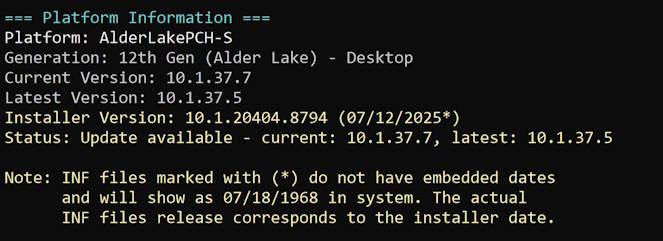
In short, my tool detected something newer than Intel officially lists on its website.
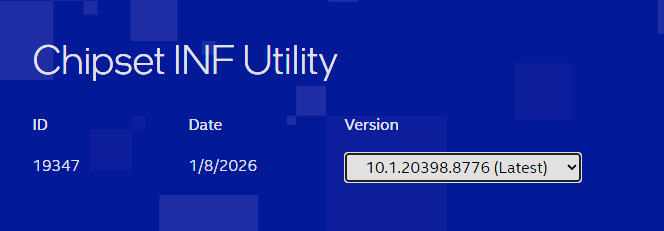
At the time of writing, Intel is providing an even older installer on its website— 10.1.20398.8776 .
In the future, I plan to add an exception so that if a newer INF file is already present, the tool will
prevent installation of older versions, even if they come from Intel’s latest available installers.
was detected, while my tool detects 10.1.37.5 from the 10.1.20404.8794 installer.
I’m guessing Microsoft added the newer version to the Windows Inbox Drivers
—the drivers built into Windows 11—or it was installed via Windows Update.
In short, my tool detected something newer than Intel officially lists on its website.
At the time of writing, Intel is providing an even older installer on its website— 10.1.20398.8776 .
In the future, I plan to add an exception so that if a newer INF file is already present, the tool will
prevent installation of older versions, even if they come from Intel’s latest available installers.
Last edit: 8 個月 2 星期 前 by FirstEver.
The following user(s) said Thank You: duttyend, fikotr74, virgolicidaniel
Please 登錄 or 新增帳號 to join the conversation.
建立頁面時間:0.087 秒