



Universal Intel Chipset Drivers Updater
- FirstEver
-
 Topic Author
- Offline
- The Best Poster
-

Enregistré
- 文章: 117
- Thanks: 202
Re: Universal Intel Chipset Drivers Updater
2 個月 2 星期 前 - 2 個月 1 星期 前
DATABASE UPDATE
Universal Intel Chipset Device Updater now supports Intel Chipset Device Software v10.1.20551.8850 installer.
You can find the latest INF version for your system in the intel-chipset-infs-latest.md file or just run the updater and it will do it for you.
The update uses a debloated msi version of the Intel installer without .NET Framework 4.7.2 (which cannot be installed on Windows 11 or new Windows 10 builds anyway).
Debloated MSI version: 11.4 MB (10.5%) vs. the 108 MB EXE version.
The total size of the required files for all supported platforms is just 2.8 MB, which compresses down to 0.5 MB.
Intel bundles its own branded installer along with an unnecessary .NET Framework installer, which brings the total size to 108 MB.

Universal Intel Chipset Device Updater now supports Intel Chipset Device Software v10.1.20551.8850 installer.
You can find the latest INF version for your system in the intel-chipset-infs-latest.md file or just run the updater and it will do it for you.
The update uses a debloated msi version of the Intel installer without .NET Framework 4.7.2 (which cannot be installed on Windows 11 or new Windows 10 builds anyway).
Debloated MSI version: 11.4 MB (10.5%) vs. the 108 MB EXE version.
The total size of the required files for all supported platforms is just 2.8 MB, which compresses down to 0.5 MB.
Intel bundles its own branded installer along with an unnecessary .NET Framework installer, which brings the total size to 108 MB.
Last edit: 2 個月 1 星期 前 by FirstEver.
The following user(s) said Thank You: admin, duttyend
Please 登錄 or 新增帳號 to join the conversation.
- FirstEver
-
Topic Author
- Offline
- The Best Poster
-
Enregistré
- 文章: 117
- Thanks: 202
Re: Universal Intel Chipset Drivers Updater
2 個月 5 天 前 - 2 個月 5 天 前
Future Updates
I'd like to share a preview of what I'm currently working on for Universal Intel Chipset Device Updater , along with another open-source project currently under development.
Universal Intel Chipset Device Updater.
The next major release will introduce two new features:
The -download option is intended for users who simply want to obtain the latest official Intel Chipset Device Software installer without performing an installation.
The updater will:
-offline (-o)
The -offline feature is a much more ambitious project. Its goal is to build a complete offline Intel chipset INF installer entirely on your own PC, similar in concept to how UUP Dump creates the latest Windows installation media. The process is considerably more complex than downloading a single installer. Each Intel chipset package contains INF files for dozens of Intel platforms, but no single installer contains the newest INF files for every supported Intel device. To solve this, my database generation scripts analyse every Intel chipset release and determine the minimum set of installer packages required to reconstruct the latest complete INF repository. At the time of writing, this requires 19 different Intel chipset installer versions.
The updater will then:
Another Open-Source Project
I'm also testing another open-source project, this time focused on Windows 11.
The goal is to perform a direct in-place upgrade from Windows 7 x64 (build 7600) to the latest Windows 11 26H1 (build 28000) release.
Key features include:
Out of curiosity, I also experimented with something much more extreme:
For now, the project's official target remains Windows 7 x64 and newer.
I don't think even Microsoft expected that it would one day be possible to upgrade Windows 7 from 2009 directly to the latest Windows 11 from 2026.
I'd like to share a preview of what I'm currently working on for Universal Intel Chipset Device Updater , along with another open-source project currently under development.
Universal Intel Chipset Device Updater.
The next major release will introduce two new features:
- -download (-dl)
- -offline (-o)
The -download option is intended for users who simply want to obtain the latest official Intel Chipset Device Software installer without performing an installation.
The updater will:
- Detect your Intel platform.
- Identify the correct chipset package.
- Download the latest official Intel installer available for your platform.
- Save it directly to your Downloads folder.
-offline (-o)
The -offline feature is a much more ambitious project. Its goal is to build a complete offline Intel chipset INF installer entirely on your own PC, similar in concept to how UUP Dump creates the latest Windows installation media. The process is considerably more complex than downloading a single installer. Each Intel chipset package contains INF files for dozens of Intel platforms, but no single installer contains the newest INF files for every supported Intel device. To solve this, my database generation scripts analyse every Intel chipset release and determine the minimum set of installer packages required to reconstruct the latest complete INF repository. At the time of writing, this requires 19 different Intel chipset installer versions.
The updater will then:
- Download every required official Intel installer.
- Extract only the INF and CAT files.
- Process every package from the oldest release to the newest.
- Automatically replace older INF files with newer revisions whenever they exist.
- Download the latest platform-specific INF packages from the Microsoft Update Catalog when Intel distributes them only as MSI installers.
- Merge everything into a single offline repository.
- Generate an installation script.
- Package everything into a standalone archive saved in your Downloads folder.
Another Open-Source Project
I'm also testing another open-source project, this time focused on Windows 11.
The goal is to perform a direct in-place upgrade from Windows 7 x64 (build 7600) to the latest Windows 11 26H1 (build 28000) release.
Key features include:
- Direct in-place upgrade from Windows 7.
- No TPM 2.0 requirement.
- No Secure Boot requirement.
- Support for otherwise unsupported hardware.
- Upgrade directly to the latest Windows 11 26H1 release.
Out of curiosity, I also experimented with something much more extreme:
- Windows Vista (64-bit) → Windows 11 (26H1)
- Windows XP (64-bit) → Windows 11 (26H1)
For now, the project's official target remains Windows 7 x64 and newer.
I don't think even Microsoft expected that it would one day be possible to upgrade Windows 7 from 2009 directly to the latest Windows 11 from 2026.
Last edit: 2 個月 5 天 前 by FirstEver.
The following user(s) said Thank You: admin, duttyend, Ataemonus, Tarek-Hasan
Please 登錄 or 新增帳號 to join the conversation.
- Tom
-

- Offline
- The Best Poster
-
Enregistré
- 文章: 508
- Thanks: 680
Re: Universal Intel Chipset Drivers Updater
2 個月 4 天 前I am not sure whether it's desirable upgrading Windows 7x64 to an ARM version for the Snapdragon Elite X2. Why not try to get to 26H2 Build 26300?Another Open-Source Project
I'm also testing another open-source project, this time focused on Windows 11.
The goal is to perform a direct in-place upgrade from Windows 7 x64 (build 7600) to the latest Windows 11 26H1 (build 28000) release.
Cheers
Tom
Please 登錄 or 新增帳號 to join the conversation.
- FirstEver
-
Topic Author
- Offline
- The Best Poster
-
Enregistré
- 文章: 117
- Thanks: 202
Re: Universal Intel Chipset Drivers Updater
2 個月 4 天 前 - 2 個月 4 天 前
I'm not talking about ARM.
So far I've managed to successively update Windows 7 Build 7600 to the latest Windows 11 Build 28000. With older systems like XP, you already have to get very creative to install a Windows 11 image. On my normal machine I use the Canary channel — currently 29617 — but that Insider channel wasn't recognized back in the Windows 7 era — it simply didn't exist. That's why I'm only able to install stable builds.
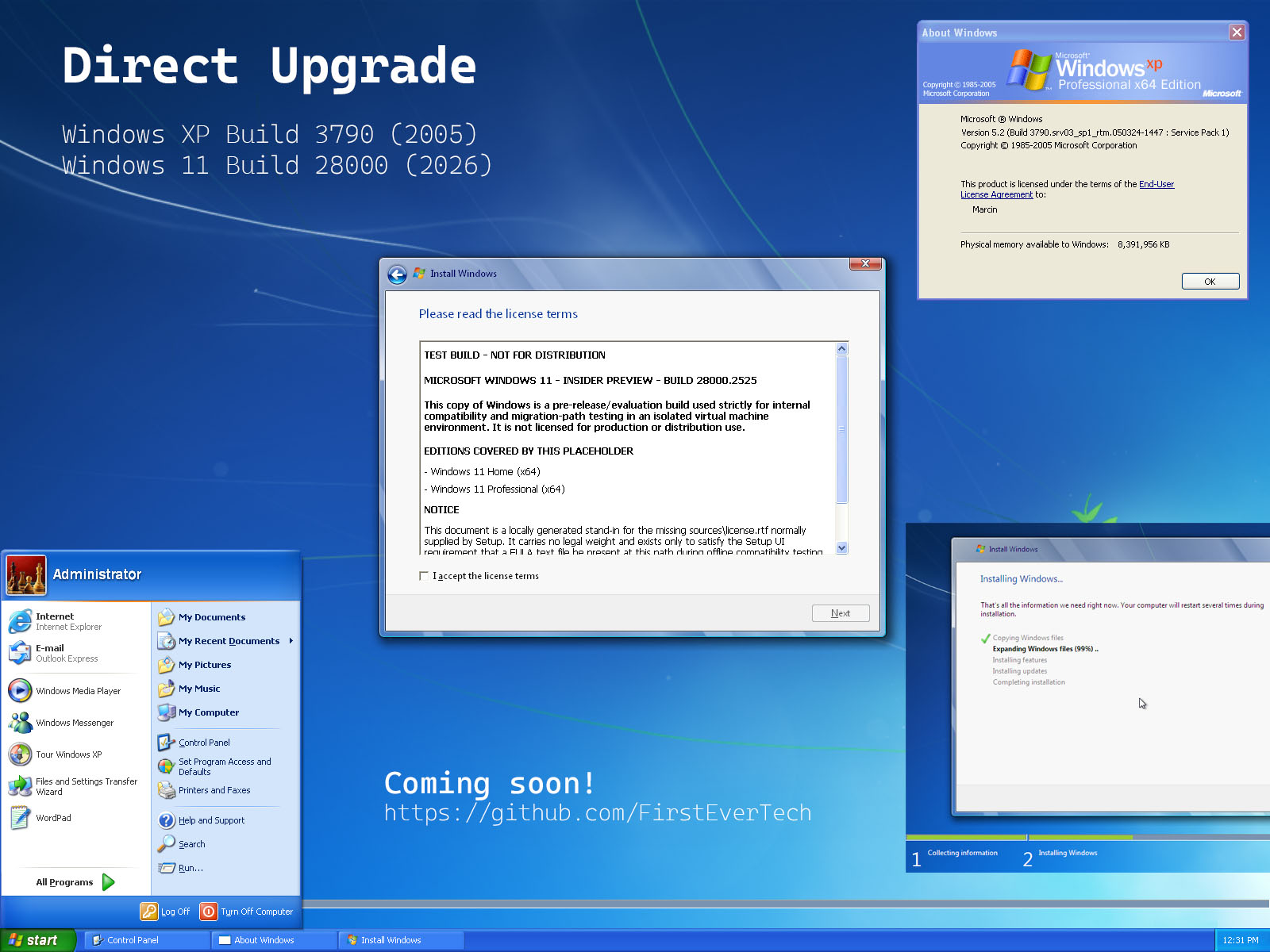
I don't know why anyone would do a direct upgrade from Windows 7 to the latest Windows 11, but it is possible.
---
UPDATE
I guess I'm too stubborn and managed to update Windows XP 5.2 Build 3790 directly to the latest Windows 11 26H2 Build 28000 (21-year gap)!
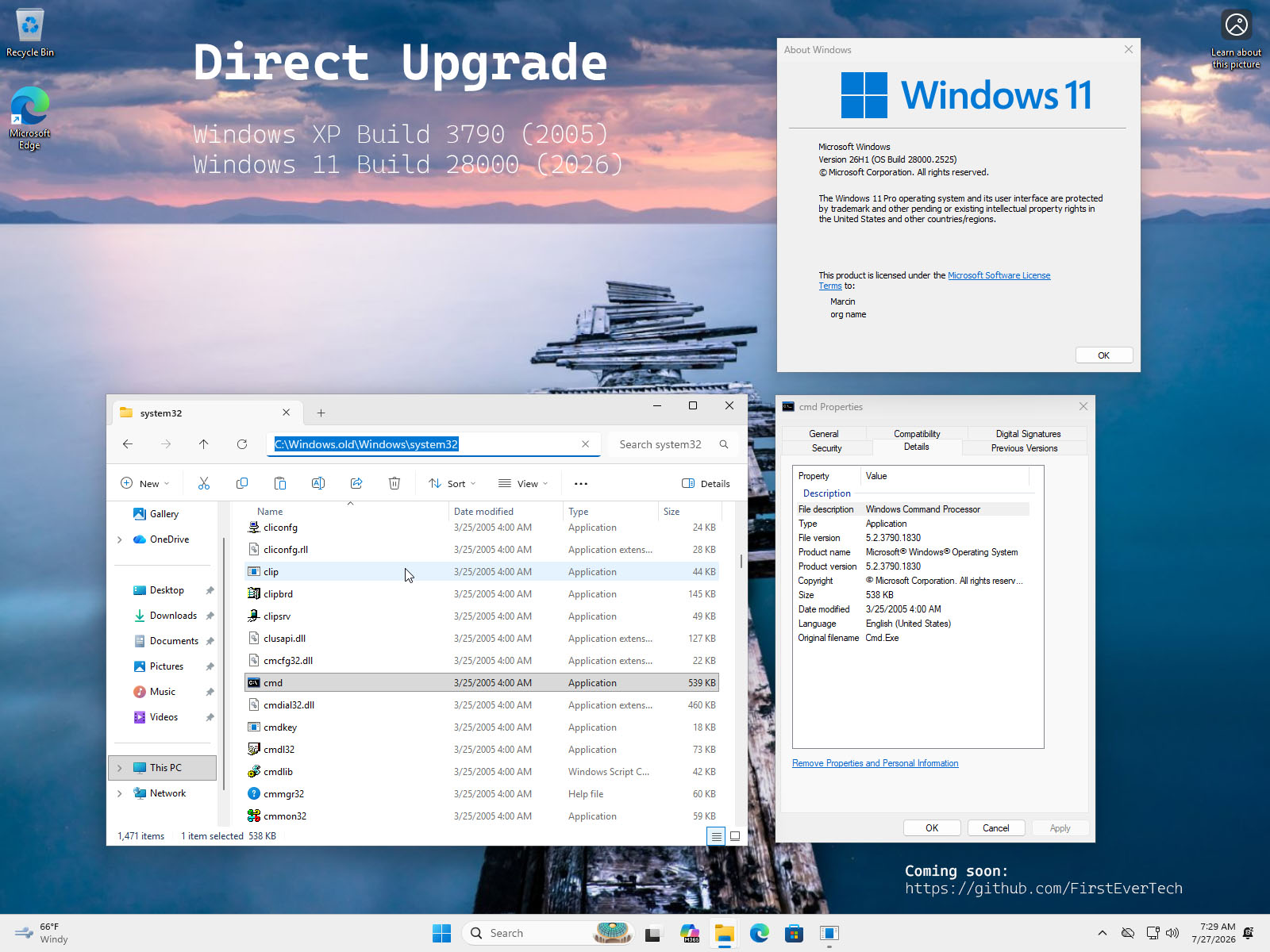
So far I've managed to successively update Windows 7 Build 7600 to the latest Windows 11 Build 28000. With older systems like XP, you already have to get very creative to install a Windows 11 image. On my normal machine I use the Canary channel — currently 29617 — but that Insider channel wasn't recognized back in the Windows 7 era — it simply didn't exist. That's why I'm only able to install stable builds.
I don't know why anyone would do a direct upgrade from Windows 7 to the latest Windows 11, but it is possible.
---
UPDATE
I guess I'm too stubborn and managed to update Windows XP 5.2 Build 3790 directly to the latest Windows 11 26H2 Build 28000 (21-year gap)!
Last edit: 2 個月 4 天 前 by FirstEver.
The following user(s) said Thank You: duttyend, fikotr74
Please 登錄 or 新增帳號 to join the conversation.


建立頁面時間:0.084 秒