



Universal Intel Chipset Drivers Updater
- FirstEver
-
 Topic Author
- Away
- The Best Poster
-

Enregistré
- 文章: 117
- Thanks: 202
Re: Universal Intel Chipset Drivers Updater
1 個月 4 星期 前 - 1 個月 4 星期 前
Your system is not working properly, and you should consider reinstalling it. And I mean a clean installation without keeping any installed programs. From experience, I know that the system doesn't corrupt itself on its own — we have to help it do that, for example, by installing a bunch of mostly unnecessary programs.
It would be best if you install the latest official package from Intel and then just drop the subject, because this is NOT a driver — 99.99% of the time, you're only changing the device names, and it has ABSOLUTELY NO impact on performance or hardware stability.
People have convinced themselves that the Intel Chipset Device Software is a driver, but that's complete nonsense — even Intel calls this package the Chipset INF Utility, because it's hard to come up with a name for something that mostly just serves to rename devices. The truth is that every Windows system already has drivers for Intel chipsets, and it only needs to change the names of those devices. And yes, I'm aware of the power profiles, but they don't affect maximum performance — they only affect battery life.
I am 100% convinced that my updater will correctly install all INF files if you were to run it on a freshly installed Windows 11 system.
If you have any issues with my updater (and they are not Windows Installer (*.msi) or Intel installation errors), then share the log from the Updater so I can check it.
Best regards!
It would be best if you install the latest official package from Intel and then just drop the subject, because this is NOT a driver — 99.99% of the time, you're only changing the device names, and it has ABSOLUTELY NO impact on performance or hardware stability.
People have convinced themselves that the Intel Chipset Device Software is a driver, but that's complete nonsense — even Intel calls this package the Chipset INF Utility, because it's hard to come up with a name for something that mostly just serves to rename devices. The truth is that every Windows system already has drivers for Intel chipsets, and it only needs to change the names of those devices. And yes, I'm aware of the power profiles, but they don't affect maximum performance — they only affect battery life.
I am 100% convinced that my updater will correctly install all INF files if you were to run it on a freshly installed Windows 11 system.
If you have any issues with my updater (and they are not Windows Installer (*.msi) or Intel installation errors), then share the log from the Updater so I can check it.
Best regards!
Last edit: 1 個月 4 星期 前 by FirstEver.
Please 登錄 or 新增帳號 to join the conversation.
- Tarek-Hasan
-

- Offline
- Newbie
-

Enregistré
- 文章: 2
- Thanks: 2
Re: Universal Intel Chipset Drivers Updater
1 個月 4 星期 前Hi @rvail,Thanks much for the updated (August 2026) utility.
Note: the Driver Genius (free version) includes a useful function that continues working even after the initial 5 day "trial period" after first software installation.
It can detect and optionally clean out "Older driver packages" & "Invalid device data".
So: you may want to run the Driver Genius utility after having run the "Universal Intel Chipset Drivers Updater" & rebooting the PC.
Another free driver updater tool "Driver Fusion" detects certain device drivers that Driver Genius doesn't.
But: Driver Genius includes a unique obsolete driver cleanup function, as described above.
You can use Driver Store Explorer for detecting and removing Older driver packages and it's open-source. Also, there's Display Driver Uninstaller (DDU) for removing graphics and audio drivers.
The following user(s) said Thank You: duttyend
Please 登錄 or 新增帳號 to join the conversation.
- FirstEver
-
Topic Author
- Away
- The Best Poster
-
Enregistré
- 文章: 117
- Thanks: 202
Re: Universal Intel Chipset Drivers Updater
1 個月 4 星期 前 - 1 個月 4 星期 前
Hi @Tarek-Hasan, I appreciate the suggestion, but Driver Store Explorer and DDU are not the right tools for this problem.
The error we're dealing with is exit code 1618
Removing driver packages (INF/.sys/.dll files) won't fix:
Even if @rvail removes all Intel drivers from the system, the 1618 error will still occur because Windows Installer is blocked.
The real solution is to:
If @rvail tries to run SetupChipset.msi manually from
The error we're dealing with is exit code 1618
which is a Windows Installer (msiexec.exe) issue - not a driver file issue.(ERROR_INSTALL_ALREADY_RUNNING),
Removing driver packages (INF/.sys/.dll files) won't fix:
- A locked/corrupted Windows Installer service state
- A stuck msiexec.exe mutex
- Corrupted registry entries related to Intel Chipset Device Software installations
Even if @rvail removes all Intel drivers from the system, the 1618 error will still occur because Windows Installer is blocked.
The real solution is to:
- Check for stuck msiexec.exe processes
- Reset Windows Installer service
- Check if Windows Update or another installation is running in the background
If @rvail tries to run SetupChipset.msi manually from
and it still doesn't open, it confirms the problem is with Windows Installer, not with the drivers themselves.C:\WINDOWS\Temp\IntelChipset\10.1.20551.8850-Consumer\
Last edit: 1 個月 4 星期 前 by FirstEver.
Please 登錄 or 新增帳號 to join the conversation.
- FirstEver
-
Topic Author
- Away
- The Best Poster
-
Enregistré
- 文章: 117
- Thanks: 202
Re: Universal Intel Chipset Drivers Updater
1 個月 3 星期 前 - 1 個月 3 星期 前
I've created a dedicated script that should resolve both Error 1618 and Error 1603 (Windows Installer related issues).
Please follow these steps:
1. Download the script: unblock_windows_instaler.ps1
2. Run it in an elevated PowerShell prompt (Admin):
4. This time, the installation should complete successfully without any errors.
First run...
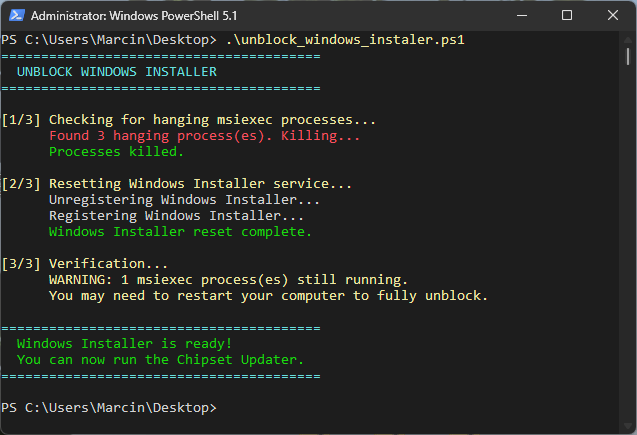
Second run...
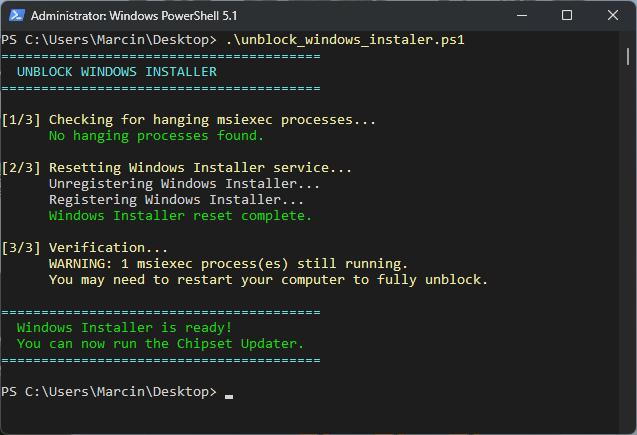
Let me know if error 1603 or 1618 still appears.
Please follow these steps:
1. Download the script: unblock_windows_instaler.ps1
2. Run it in an elevated PowerShell prompt (Admin):
3. Once the script completes, run the Universal Intel Chipset Device Updater again..\unblock_windows_installer.ps1
4. This time, the installation should complete successfully without any errors.
First run...
Second run...
Let me know if error 1603 or 1618 still appears.
Last edit: 1 個月 3 星期 前 by FirstEver.
The following user(s) said Thank You: duttyend, fikotr74, virgolicidaniel
Please 登錄 or 新增帳號 to join the conversation.
- FirstEver
-
Topic Author
- Away
- The Best Poster
-
Enregistré
- 文章: 117
- Thanks: 202
Re: Universal Intel Chipset Drivers Updater
1 個月 3 星期 前 - 1 個月 3 星期 前
How to Extract INF/CAT Files from New Intel Chipset Device Software Installers
Starting with Intel Chipset Device Software version 10.1.20378.8757, Intel changed the installer packaging. The traditional extraction method (SetupChipset.exe /extract) no longer provides access to the chipset INF and CAT files.
The extracted package contains only:
Conclusion
As demonstrated above, the Intel Chipset Device Software installer can be executed even on systems without Intel chipset hardware. The installation process stages the available INF packages into the Windows Driver Store, and the actual device matching and driver installation are handled later by the Windows Plug and Play subsystem when compatible hardware is detected.
This confirms that there is no real-time hardware detection performed by the Intel installer itself to decide which chipset INF files should be installed. The installer simply registers the driver packages, while Windows automatically selects and applies the appropriate INF when a matching device appears in the system.
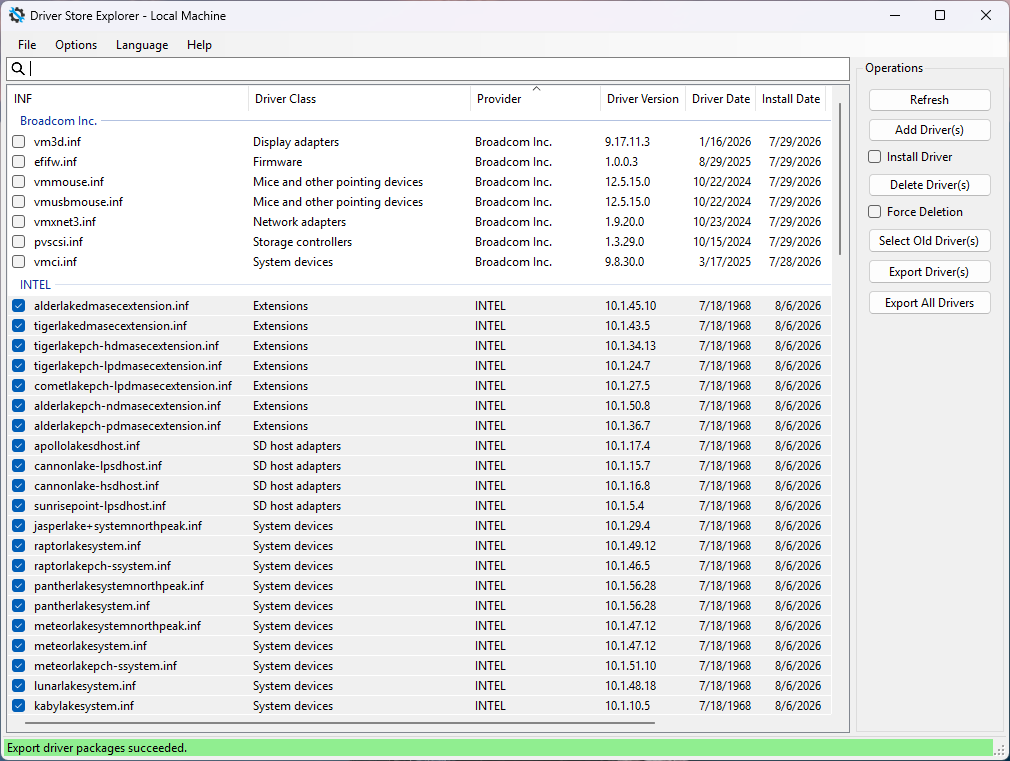
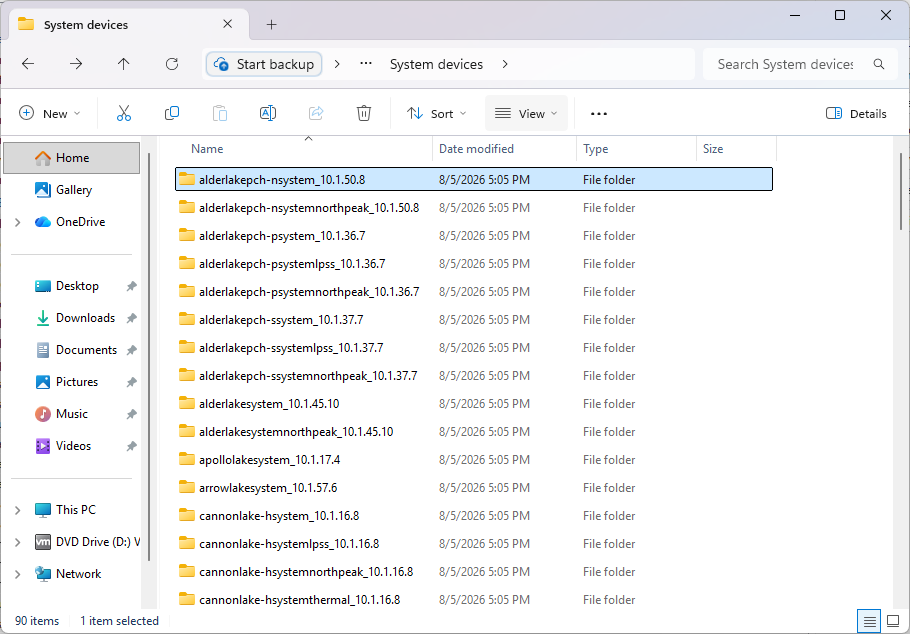
Exporting them with Driver Store Explorer provides a reliable way to recover the original files for further analysis or integrations in my project.
@fikotr74 Thank you for the suggestions.
Starting with Intel Chipset Device Software version 10.1.20378.8757, Intel changed the installer packaging. The traditional extraction method (SetupChipset.exe /extract) no longer provides access to the chipset INF and CAT files.
The extracted package contains only:
- SetupChipset.msi
- SetupChipsetx64.msi
- SetupChipset1.cab
- .NET Framework 4.7.2 offline installer
- SetupChipset1.cab contains only license files and readme.txt.
- msiexec /a (administrative installation) extracts only licenses and documentation.
- The MSI package does not expose the driver payload through standard extraction methods.
- 7-Zip and Resource Hacker also do not reveal the embedded INF/CAT files.
- Create a clean virtual machine (e.g. VMware Workstation with Windows 11).
- Install the Intel Chipset Device Software from which you want to obtain the INF and CAT files.
- Download, extract and run Driver Store Explorer (RAPR).
- Click Refresh to scan all installed driver packages.
- Sort the list by the Provider column. All Intel packages will appear in a separate INTEL group (Install date will be the same).
- Select all Intel entries and click Export Driver(s).
- Choose an output folder. Driver Store Explorer will export all original INF and CAT files (along with any associated files) to the selected directory.
Conclusion
As demonstrated above, the Intel Chipset Device Software installer can be executed even on systems without Intel chipset hardware. The installation process stages the available INF packages into the Windows Driver Store, and the actual device matching and driver installation are handled later by the Windows Plug and Play subsystem when compatible hardware is detected.
This confirms that there is no real-time hardware detection performed by the Intel installer itself to decide which chipset INF files should be installed. The installer simply registers the driver packages, while Windows automatically selects and applies the appropriate INF when a matching device appears in the system.
Exporting them with Driver Store Explorer provides a reliable way to recover the original files for further analysis or integrations in my project.
@fikotr74 Thank you for the suggestions.
Last edit: 1 個月 3 星期 前 by FirstEver.
The following user(s) said Thank You: duttyend, fikotr74
Please 登錄 or 新增帳號 to join the conversation.
建立頁面時間:0.137 秒