



NVME USB drives Realtek RTL9210/RTL9220 Firmware Version 1.xx
- Alien Invader
-

- Fuera de línea
- Poster 2
-

Enregistré
- Mensajes: 7
- Thanks: 3
Re: NVME USB drives Realtek RTL9210/RTL9220 Firmware Version 1.xx
3 años 5 meses antes - 3 años 5 meses antes
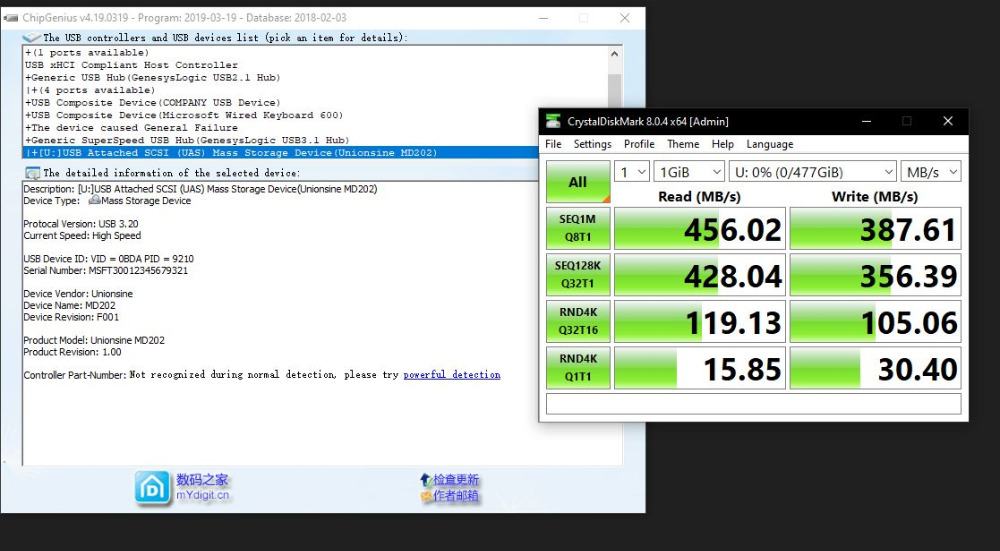
TiX which mainboard you have ? It seems to me that you are connected to a 5Gbit port, the name for 10Gbit should be different on chipgenius as I have the same 5Gbit connection and same HIGH SPEED indication.
My screenshot is with a M2 SATA on USB 3.0 5Gbit port (Z97)
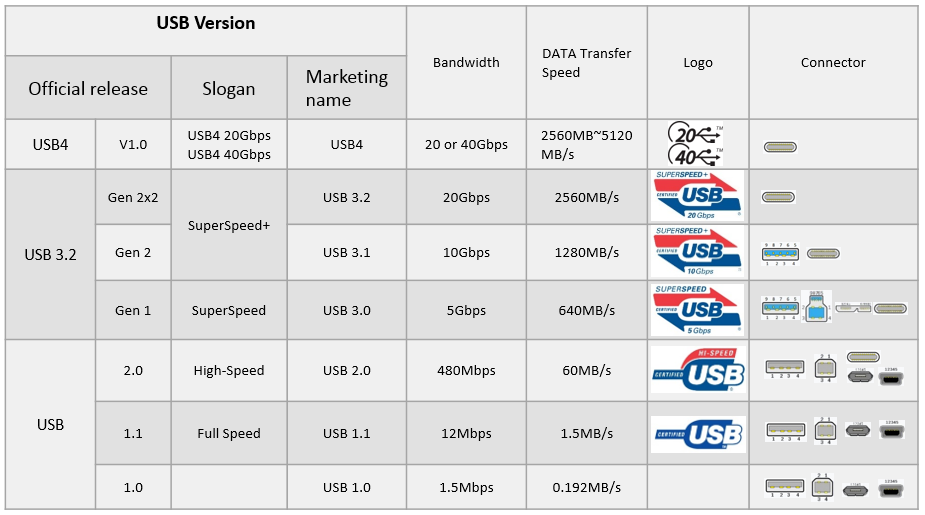
*As the 2nd image says USB 3.2 Gen1 is in fact 5Gbit so the speed you have is pretty normal. The 10Gbit ones are called 3.2 Gen2.
My screenshot is with a M2 SATA on USB 3.0 5Gbit port (Z97)
*As the 2nd image says USB 3.2 Gen1 is in fact 5Gbit so the speed you have is pretty normal. The 10Gbit ones are called 3.2 Gen2.
Última Edición: 3 años 5 meses antes por Alien Invader.
Por favor, Conectar o Crear cuenta para unirse a la conversación.
- kufa
-

- Fuera de línea
- Newbie
-

Enregistré
- Mensajes: 1
- Thanks: 1
Re: NVME USB drives Realtek RTL9210/RTL9220 Firmware Version 1.xx
3 años 5 meses antes
For anyone who has this case, I've written an answer file that works perfectly for it.
Inateck FE2025
Inateck.cfg
;Configure Start
;=================FW Configure=================
U2PHY = 02 f4 9b e0 e1
U3PHY = 02 d4 09 00 d5 00 80
VID = 0xbda
PID = 0x9210
MANUFACTURE = "Inateck"
PRODUCT = "FE2025"
SCSI_PRODUCT = "RTL9210B NVME"
SCSI_VENDOR = "Realtek"
;"0123" for Dec, "0x0123" for Hex, max 12 digits
;SN von Gehäuse anpassen - Adjust SN of Enclosure
SERIAL = "2F22AKA1"
DISK_HOTPLUG = 0x0
LED = 0x2
PINMUX1 = 0x0
PINMUX2 = 0x0
U2_MAXPWR = 0xfa
U3_MAXPWR = 0x0
ASPMDIS = 0x0
;10 minutes of idle time will disable disk power
;Anpassen mit aus (false) oder Zeit in minuten. z.b. 10
;Adjust with off (false) or time in minutes. E.g. 10
DISK_IPS_THRES = false
;EN_UPS = n/a
;PD = n/a
HW_LED_CFG = false
CUSTOMIZED_LED is 15 bytes = 0x80000081
CUSTOMIZED_LED = 07 00
SUSPEND_LED_OFF = 0x0
FAN = false
DIS_SHOW_EMPTY_DISK = false
FORCE_SATA_NORMAL_DMA = false
UART_DBG_PIN = 0x5
FINGER_PRINT_EN = false
;=================Tool Configure=================
DISCONN_FORCE_USB2 = 0x0
FORMAT_DISK = n
INC_SERIAL = false
;PARTITION: GPT, MBR
PARTITION = "GPT"
;FORMAT: NTFS, exFAT
FORMAT = "exFAT"
;LABEL max allowed - characters
LABEL = "Inateck m2"
Boot Mode = false
FW Ver = 1
FW Build Date = 2023
IC Ver = 0xa0010002
Disconn_ForceUSB2 = 0x0
Inateck FE2025
Inateck.cfg
Advertencia: Spoiler!
;Configure Start
;=================FW Configure=================
U2PHY = 02 f4 9b e0 e1
U3PHY = 02 d4 09 00 d5 00 80
VID = 0xbda
PID = 0x9210
MANUFACTURE = "Inateck"
PRODUCT = "FE2025"
SCSI_PRODUCT = "RTL9210B NVME"
SCSI_VENDOR = "Realtek"
;"0123" for Dec, "0x0123" for Hex, max 12 digits
;SN von Gehäuse anpassen - Adjust SN of Enclosure
SERIAL = "2F22AKA1"
DISK_HOTPLUG = 0x0
LED = 0x2
PINMUX1 = 0x0
PINMUX2 = 0x0
U2_MAXPWR = 0xfa
U3_MAXPWR = 0x0
ASPMDIS = 0x0
;10 minutes of idle time will disable disk power
;Anpassen mit aus (false) oder Zeit in minuten. z.b. 10
;Adjust with off (false) or time in minutes. E.g. 10
DISK_IPS_THRES = false
;EN_UPS = n/a
;PD = n/a
HW_LED_CFG = false
CUSTOMIZED_LED is 15 bytes = 0x80000081
CUSTOMIZED_LED = 07 00
SUSPEND_LED_OFF = 0x0
FAN = false
DIS_SHOW_EMPTY_DISK = false
FORCE_SATA_NORMAL_DMA = false
UART_DBG_PIN = 0x5
FINGER_PRINT_EN = false
;=================Tool Configure=================
DISCONN_FORCE_USB2 = 0x0
FORMAT_DISK = n
INC_SERIAL = false
;PARTITION: GPT, MBR
PARTITION = "GPT"
;FORMAT: NTFS, exFAT
FORMAT = "exFAT"
;LABEL max allowed - characters
LABEL = "Inateck m2"
Boot Mode = false
FW Ver = 1
FW Build Date = 2023
IC Ver = 0xa0010002
Disconn_ForceUSB2 = 0x0
El siguiente usuario dijo gracias: admin
Por favor, Conectar o Crear cuenta para unirse a la conversación.
- TiX
-
- Fuera de línea
- Poster 2
-
Enregistré
- Mensajes: 5
- Thanks: 0
Re: NVME USB drives Realtek RTL9210/RTL9220 Firmware Version 1.xx
3 años 5 meses antesUsing a MSI katana gf66 notebook the mainboard is "msi MS-1584"TiX which mainboard you have ? It seems to me that you are connected to a 5Gbit port, the name for 10Gbit should be different on chipgenius as I have the same 5Gbit connection and same HIGH SPEED indication.
My screenshot is with a M2 SATA on USB 3.0 5Gbit port (Z97)
*As the 2nd image says USB 3.2 Gen1 is in fact 5Gbit so the speed you have is pretty normal. The 10Gbit ones are called 3.2 Gen2.
Por favor, Conectar o Crear cuenta para unirse a la conversación.
- admin
-
 Autor del tema
- Ausente
- Admin
-

Administrateur
- Fdrsoft (Admin)
- Mensajes: 695
- Thanks: 470
Re: NVME USB drives Realtek RTL9210/RTL9220 Firmware Version 1.xx
3 años 5 meses antes
Thx Kufa
Very useful for those who don't know image missing /media/kunena/emoticons/wink.png
Very useful for those who don't know image missing /media/kunena/emoticons/wink.png
Asus Z890 ProArt, Intel Cpu Core Ultra 7 265K, Memoires 32Go Corsair DDR5 (6000Mhz CL30), Water-cooling Thermaright, nVidia Geforce RTX4060, Alimentation Gigabyte 850W, Samsung SSD 990 Pro, SSD9100 Pro, Steelserie Pro , Souris Razer, Boitier HUMMER, HP Steelserie, Free Fibre Ultra (8Go/8Go), Lan 10Gb, Cable CAT8/7, Switch 10/5/2.5Gbps, Casque Philips Fedelis.
Por favor, Conectar o Crear cuenta para unirse a la conversación.
- admin
-
Autor del tema
- Ausente
- Admin
-
Administrateur
- Fdrsoft (Admin)
- Mensajes: 695
- Thanks: 470
Re: NVME USB drives Realtek RTL9210/RTL9220 Firmware Version 1.xx
3 años 5 meses antes
" Using a MSI katana gf66 notebook the mainboard is "msi MS-1584" "
If your box is well connected in USB 3.2, try to see if your disk, what model is it?
Otherwise you can try to update but I don't know if that solves your problem, to see image missing /media/kunena/emoticons/1.png
If your box is well connected in USB 3.2, try to see if your disk, what model is it?
Otherwise you can try to update but I don't know if that solves your problem, to see image missing /media/kunena/emoticons/1.png
Asus Z890 ProArt, Intel Cpu Core Ultra 7 265K, Memoires 32Go Corsair DDR5 (6000Mhz CL30), Water-cooling Thermaright, nVidia Geforce RTX4060, Alimentation Gigabyte 850W, Samsung SSD 990 Pro, SSD9100 Pro, Steelserie Pro , Souris Razer, Boitier HUMMER, HP Steelserie, Free Fibre Ultra (8Go/8Go), Lan 10Gb, Cable CAT8/7, Switch 10/5/2.5Gbps, Casque Philips Fedelis.
Por favor, Conectar o Crear cuenta para unirse a la conversación.
Tiempo de carga de la página: 0.027 segundos