




NVME USB drives Realtek RTL9210/RTL9220 Firmware Version 1.xx
- admin
-
 Autor do tópico
- Em linha
- Admin
-

Administrateur
- Fdrsoft (Admin)
- Mensagens: 683
- Thanks: 450
Re: NVME USB drives Realtek RTL9210/RTL9220 Firmware Version 1.xx
1 ano 1 mês atrás
If you want to maximize performance, always plug into a USB-C port (3.2 x 2 speed 20Gbps).
I have three SSD enclosures (2 x 40Gbps & 1 x 20Gbps).
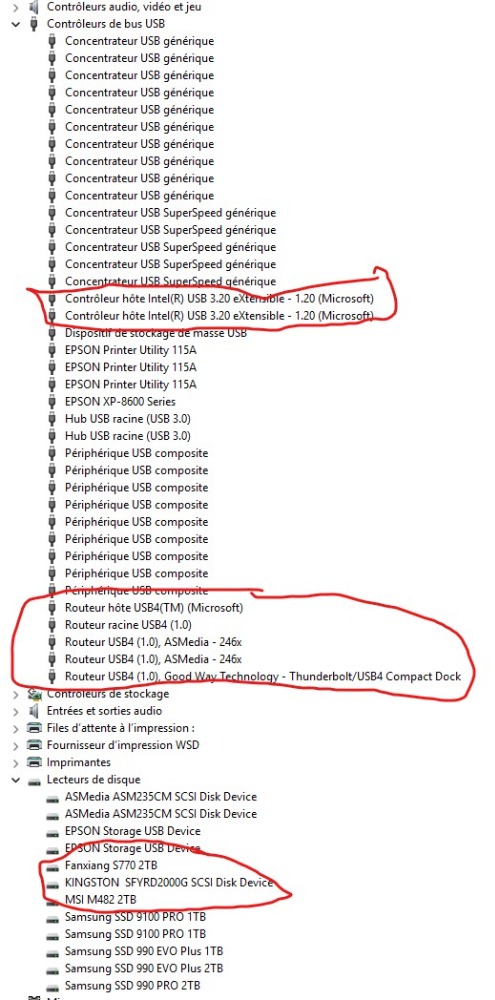
I have three SSD enclosures (2 x 40Gbps & 1 x 20Gbps).
Asus Z890 ProArt, Intel Cpu Core Ultra 7 265K, Memoires 32Go Corsair DDR5 (6000Mhz CL30), Water-cooling Thermaright, nVidia Geforce RTX4060, Alimentation Gigabyte 850W, Samsung SSD 990 Pro, SSD9100 Pro, Steelserie Pro , Souris Razer, Boitier HUMMER, HP Steelserie, Free Fibre Ultra (8Go/8Go), Lan 10Gb, Cable CAT8/7, Switch 10/5/2.5Gbps, Casque Philips Fedelis.
Por favor Iniciar sessão ou Criar uma conta para se juntar à conversa.
- White-Panda
-

- Desligado
- Newbie
-

Enregistré
- Mensagens: 3
- Thanks: 0
Re: NVME USB drives Realtek RTL9210/RTL9220 Firmware Version 1.xx
8 meses 5 dias atrás - 8 meses 5 dias atrás
Hi, I have an issue with the Acasis TBU405M1 SSD enclosure (JHL7440/RTL9210B) not showing the disk in Windows 11 file explorer, after waking from sleep. I need to unplug the ssd enclosure and plug in again for the SSD to be detected.
I am using the Acasis TBU405M1 (JHL7440 for Thunderbolt, RTL9210B for USB 3) enclosure with the Kingston KC3000 2TB ssd. The SSD works fine with my Macbook Pro 16 M1 Pro, no issues detecting when waking from sleep (this is using the JHL7440 thunderbolt chip). When I use it with my Windows 11 desktop (Asrock B760M Pro-A WiFi) using its USB 3 type C 5GBPS port, I will get the issue of SSD not detected after waking from sleep a few times. The first few times that the PC wakes from sleep, the SSD can be detected in File Explorer, but eventually after 1 week of sleeping and waking, the SSD will no longer be detected in File Explorer. I will then need to unplug and plug in the ssd again and it is instantly detected in File Explorer.
I have also tried updating the firmware but this issue still occurs.
On the original firmware 1.32.24, when the SSD is not detected in File Explorer, in device manager the Acasis enclosure shows up as "Windows has stopped this device because it has reported problems. (Code 43) The USB set address request failed."
I updated to the latest 1.34.39 firmware, and when the SSD is not detected in File Explorer, device manager no longer shows "Windows has stopped this device because it has reported problems. (Code 43) The USB set address request failed." However, USB tree view shows that the enclosure is running at USB 2 speeds. I updated the firmware following the guide at github.com/bensuperpc/rtl9210?tab=readme-ov-file#firmware . I used the config file based on the original config dump github.com/bensuperpc/rtl9210/blob/main/.../Acasis_TBU405M1.cfg
Additional notes: when the PC is sleeping, my other USB HDD are turned off (no vibration) and my HP P900 SSD is also cold to the touch. However, the Acasis TBU405M1 enclosure is very warm, and warmer than when using with the Macbook Pro.
I also notice that the Acasis TBU405M1 enclosure is cool when the PC is awake (crystal disk info 32c) but very warm when the PC is sleeping (39c when checking right after waking)
If anyone has any idea how to fix the issue of RTL9210B ssd enclosure not detected after sleep, that will be deeply appreciated. Thanks
I am using the Acasis TBU405M1 (JHL7440 for Thunderbolt, RTL9210B for USB 3) enclosure with the Kingston KC3000 2TB ssd. The SSD works fine with my Macbook Pro 16 M1 Pro, no issues detecting when waking from sleep (this is using the JHL7440 thunderbolt chip). When I use it with my Windows 11 desktop (Asrock B760M Pro-A WiFi) using its USB 3 type C 5GBPS port, I will get the issue of SSD not detected after waking from sleep a few times. The first few times that the PC wakes from sleep, the SSD can be detected in File Explorer, but eventually after 1 week of sleeping and waking, the SSD will no longer be detected in File Explorer. I will then need to unplug and plug in the ssd again and it is instantly detected in File Explorer.
I have also tried updating the firmware but this issue still occurs.
On the original firmware 1.32.24, when the SSD is not detected in File Explorer, in device manager the Acasis enclosure shows up as "Windows has stopped this device because it has reported problems. (Code 43) The USB set address request failed."
I updated to the latest 1.34.39 firmware, and when the SSD is not detected in File Explorer, device manager no longer shows "Windows has stopped this device because it has reported problems. (Code 43) The USB set address request failed." However, USB tree view shows that the enclosure is running at USB 2 speeds. I updated the firmware following the guide at github.com/bensuperpc/rtl9210?tab=readme-ov-file#firmware . I used the config file based on the original config dump github.com/bensuperpc/rtl9210/blob/main/.../Acasis_TBU405M1.cfg
Additional notes: when the PC is sleeping, my other USB HDD are turned off (no vibration) and my HP P900 SSD is also cold to the touch. However, the Acasis TBU405M1 enclosure is very warm, and warmer than when using with the Macbook Pro.
I also notice that the Acasis TBU405M1 enclosure is cool when the PC is awake (crystal disk info 32c) but very warm when the PC is sleeping (39c when checking right after waking)
If anyone has any idea how to fix the issue of RTL9210B ssd enclosure not detected after sleep, that will be deeply appreciated. Thanks
Ultima edição : 8 meses 5 dias atrás por White-Panda. Motivo: add info on temp
Por favor Iniciar sessão ou Criar uma conta para se juntar à conversa.
- admin
-
Autor do tópico
- Em linha
- Admin
-
Administrateur
- Fdrsoft (Admin)
- Mensagens: 683
- Thanks: 450
Re: NVME USB drives Realtek RTL9210/RTL9220 Firmware Version 1.xx
8 meses 5 dias atrás
Hi, check if you have the latest BIOS and also if firmware is available for your motherboard.
Also check the SSD firmware.
It's also possible to configure the SSD's sleep mode via the Realtek RTL9210 firmware, as it's not normal for it to overheat unless you're using Intel JHL7440.
Also check the SSD firmware.
It's also possible to configure the SSD's sleep mode via the Realtek RTL9210 firmware, as it's not normal for it to overheat unless you're using Intel JHL7440.
Asus Z890 ProArt, Intel Cpu Core Ultra 7 265K, Memoires 32Go Corsair DDR5 (6000Mhz CL30), Water-cooling Thermaright, nVidia Geforce RTX4060, Alimentation Gigabyte 850W, Samsung SSD 990 Pro, SSD9100 Pro, Steelserie Pro , Souris Razer, Boitier HUMMER, HP Steelserie, Free Fibre Ultra (8Go/8Go), Lan 10Gb, Cable CAT8/7, Switch 10/5/2.5Gbps, Casque Philips Fedelis.
Por favor Iniciar sessão ou Criar uma conta para se juntar à conversa.
- White-Panda
-
- Desligado
- Newbie
-
Enregistré
- Mensagens: 3
- Thanks: 0
Re: NVME USB drives Realtek RTL9210/RTL9220 Firmware Version 1.xx
8 meses 5 dias atrás - 8 meses 5 dias atrás
I am using the latest BIOS 8.01 on the Asrock B760M Pro-A WiFi
I might check the SSD firmware later, because it is a bit troublesome. I need to connect the Kingston SSD to my PC using NVME, without the enclosure.
Could you explain what you mean:
It's also possible to configure the SSD's sleep mode via the Realtek RTL9210 firmware, as it's not normal for it to overheat unless you're using Intel JHL7440.
With my desktop, the ACASIS enclosure is definitely using the RTL9210, as the desktop has no thunderbolt and USB tree view shows the Product ID is 9210
I might check the SSD firmware later, because it is a bit troublesome. I need to connect the Kingston SSD to my PC using NVME, without the enclosure.
Could you explain what you mean:
It's also possible to configure the SSD's sleep mode via the Realtek RTL9210 firmware, as it's not normal for it to overheat unless you're using Intel JHL7440.
With my desktop, the ACASIS enclosure is definitely using the RTL9210, as the desktop has no thunderbolt and USB tree view shows the Product ID is 9210
Ultima edição : 8 meses 5 dias atrás por White-Panda. Motivo: rephrase
Por favor Iniciar sessão ou Criar uma conta para se juntar à conversa.
- admin
-
Autor do tópico
- Em linha
- Admin
-
Administrateur
- Fdrsoft (Admin)
- Mensagens: 683
- Thanks: 450
Re: NVME USB drives Realtek RTL9210/RTL9220 Firmware Version 1.xx
8 meses 5 dias atrás
I was saying that the Intel JHL7440 chipset already gets hot even in sleep mode.
Otherwise, via the configuration file (*.cfg), you can configure sleep mode and other options; Shonk knows more about this than I do.
Otherwise, via the configuration file (*.cfg), you can configure sleep mode and other options; Shonk knows more about this than I do.
Asus Z890 ProArt, Intel Cpu Core Ultra 7 265K, Memoires 32Go Corsair DDR5 (6000Mhz CL30), Water-cooling Thermaright, nVidia Geforce RTX4060, Alimentation Gigabyte 850W, Samsung SSD 990 Pro, SSD9100 Pro, Steelserie Pro , Souris Razer, Boitier HUMMER, HP Steelserie, Free Fibre Ultra (8Go/8Go), Lan 10Gb, Cable CAT8/7, Switch 10/5/2.5Gbps, Casque Philips Fedelis.
Por favor Iniciar sessão ou Criar uma conta para se juntar à conversa.
Tempo para criar a página: 0.080 segundos