



Intel Chipset Installation Utility and Driver 10.1.20524.8822 (21.05.2026)
- FirstEver
-

- Away
- Big Poster
-

Enregistré
- 帖子: 63
- Thanks: 121
Re: Intel Chipset Installation Utility and Driver 10.1.20524.8822 (21.05.2026)
1 天 19 �时 � - 1 天 1 �时 �
"For older Intel Gen's HP made simply" – what do you mean by "simply"?
That's how I see it:
Regards
Marcin
That's how I see it:
- If someone has a system with an Intel chipset, how are they supposed to know which installer to use: sp173080 vs sp173237, or any other number HP assigned? Nobody knows what's inside unless they read the Release Notes.
- Even if we download the correct installer for our hardware, we're installing everything blindly because there's no information anywhere about the versions of the included INF files. You have to unpack it and check yourself – brilliant!
Regards
Marcin
Last edit: 1 天 1 �时 � by FirstEver.
The following user(s) said Thank You: fikotr74
Please 登录 or 注册一个帐号 to join the conversation.
- josefrancklin
-

- Offline
- poster 3
-

Enregistré
- 帖子: 11
- Thanks: 9
Re: Intel Chipset Installation Utility and Driver 10.1.20524.8822 (21.05.2026)
1 天 47 分钟 �
Off topic: if you want create your own Chipset pack installer starting SandyBridge, find these specific versions and merge all drivers in this order, overwriting when prompted:
10.1.17903.8106
10.1.19913.8607
10.1.20266.8668
10.1.20314.8688
10.1.20490.8818
10.1.20524.8822
By last, delete common*.* and null*.* as they are uninteresting.
10.1.17903.8106
10.1.19913.8607
10.1.20266.8668
10.1.20314.8688
10.1.20490.8818
10.1.20524.8822
By last, delete common*.* and null*.* as they are uninteresting.
The following user(s) said Thank You: fikotr74
Please 登录 or 注册一个帐号 to join the conversation.
- FirstEver
-
- Away
- Big Poster
-
Enregistré
- 帖子: 63
- Thanks: 121
Re: Intel Chipset Installation Utility and Driver 10.1.20524.8822 (21.05.2026)
22 �时 3 分钟 � - 17 �时 13 分钟 �
Hi Jose...
Why are you suggesting installation of Intel Chipset Device Software versions newer than 10.1.18981.6008 for SandyBridge platforms – after all, newer installers no longer contain INF files for this platform?
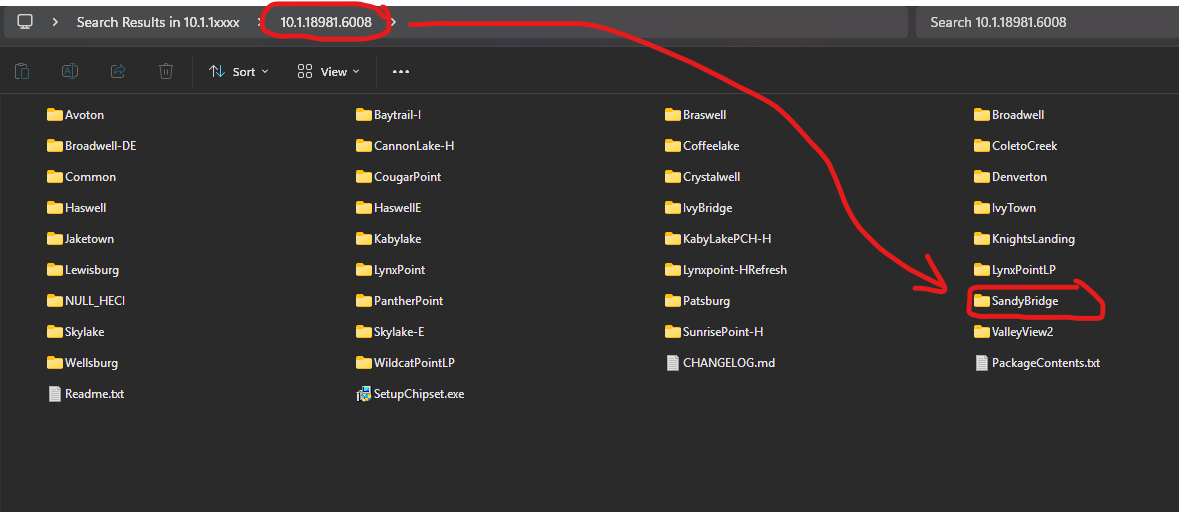
All Intel packages above this version will install as well, but I won't update any INF to SandyBridge because they simply don't have them.
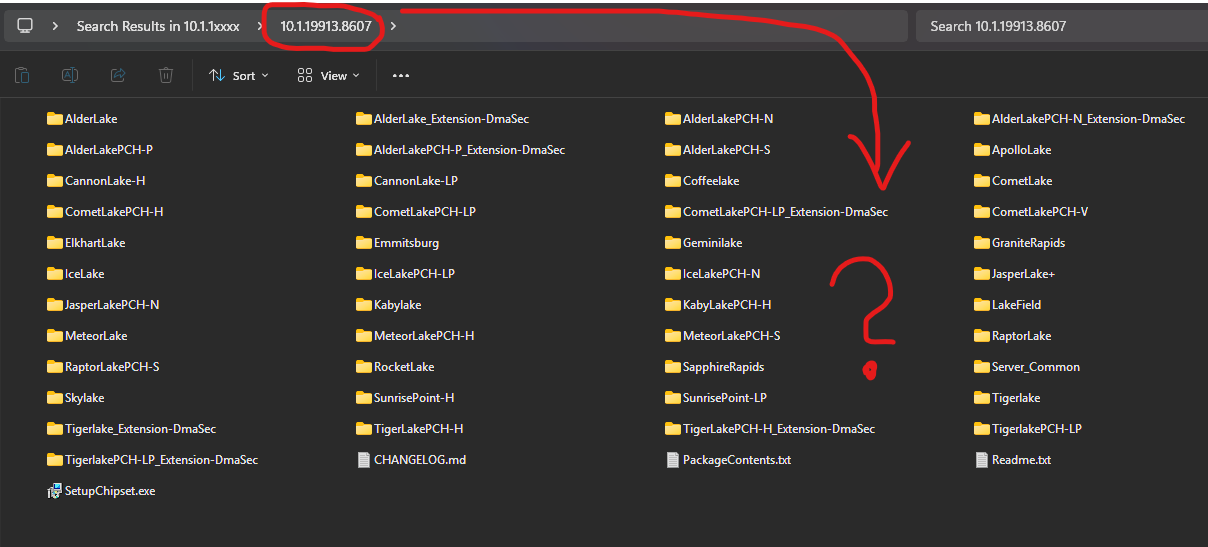
I know... because I scanned all possible Intel packages - HERE .
The reason I created my updater was that installing newer Intel packages often only updates the installer entry in the list of installed programs, while the actual INFs remain unchanged. In practice, nothing gets updated except the installer itself.
Have a nice weekend!
Why are you suggesting installation of Intel Chipset Device Software versions newer than 10.1.18981.6008 for SandyBridge platforms – after all, newer installers no longer contain INF files for this platform?
All Intel packages above this version will install as well, but I won't update any INF to SandyBridge because they simply don't have them.
I know... because I scanned all possible Intel packages - HERE .
The reason I created my updater was that installing newer Intel packages often only updates the installer entry in the list of installed programs, while the actual INFs remain unchanged. In practice, nothing gets updated except the installer itself.
Have a nice weekend!
Last edit: 17 �时 13 分钟 � by FirstEver.
Please 登录 or 注册一个帐号 to join the conversation.
- josefrancklin
-
- Offline
- poster 3
-
Enregistré
- 帖子: 11
- Thanks: 9
Re: Intel Chipset Installation Utility and Driver 10.1.20524.8822 (21.05.2026)
9 �时 23 分钟 � - 9 �时 17 分钟 �Why are you suggesting installation of Intel Chipset Device Software versions newer than 10.1.18981.6008 for SandyBridge platforms
Purpose of my reply was only help people (like me) that are not authorized to use third party installers at enterprise environment. Of course sandybridge doesn't exist in recent packages, it's the reason I posted "merge" and "overwrite when prompted", some files exist only in selected packages.
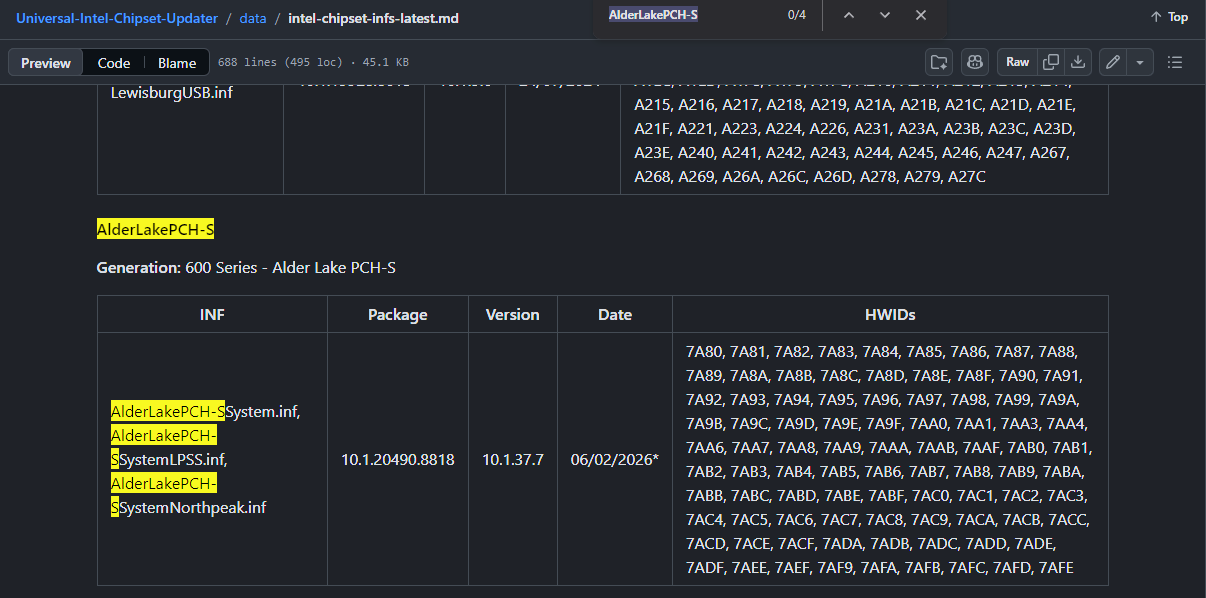
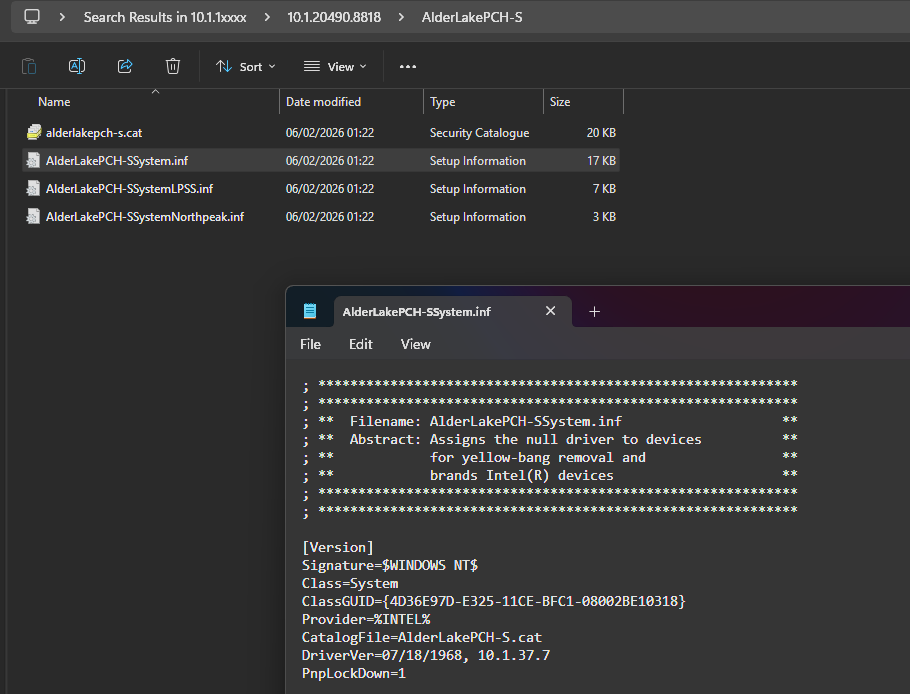
I've read carefully your project documentation and don't find any mention to AlderLakePCH-S version 10.1.37.5, is this specific version also being checked? I ask this because it has a specific HWID that's missing from most recent 10.1.37.7 version.
Best regards.
Last edit: 9 �时 17 分钟 � by josefrancklin.
Please 登录 or 注册一个帐号 to join the conversation.
- FirstEver
-
- Away
- Big Poster
-
Enregistré
- 帖子: 63
- Thanks: 121
Re: Intel Chipset Installation Utility and Driver 10.1.20524.8822 (21.05.2026)
1 �时 28 分钟 � - 59 分钟 �
I fully understand that my unsigned script may not be suitable for enterprise use, but AI audits indicate that it has much more advanced security features than the official installers.
I understand that my project might be a bit overkill, but then people in corporations might benefit from it in other ways. In short, I build an up-to-date database of all INF files—which is available here . My updater uses this database to detect and install the latest possible official Intel installer, which contains the necessary INF files. If someone doesn't want to use my script, they can always look in the database and find out which Intel installer they need, then find it online and implement it in their MDM tools.
A quick tip regarding your case with AlderLakePCH-S.
And here's proof of what Intel Chipset Device Software 10.1.20490.8818 contains - and whether it includes INF for AlderLakePCH-S version 10.1.37.7.
I hope this helps you... even Intel doesn't have a database like the one I created.
My solution can be compared to a bazooka for killing a fly, because the problem with INF files is actually insignificant – they change only the device names in Device Manager 80% of the time (15% is driver mapping and 5% is system configuration DMA/ACPI/Registry). These are not drivers, I even created an article dedicated to this topic here . Even Intel doesn't take these files "seriously" because it sets the date as the day Intel was founded (this tells you that these files are less important). I just wanted to show how to professionally solve the problem of installing new INF files - it was a fun project to exercise my brain.
Regards
Marcin
- self-check SHA256 check
- post-download SHA256 check of the official Intel installers
- pre-install signature check of the official Intel installers
- moreover, the script is open-source and you can check its code
I understand that my project might be a bit overkill, but then people in corporations might benefit from it in other ways. In short, I build an up-to-date database of all INF files—which is available here . My updater uses this database to detect and install the latest possible official Intel installer, which contains the necessary INF files. If someone doesn't want to use my script, they can always look in the database and find out which Intel installer they need, then find it online and implement it in their MDM tools.
A quick tip regarding your case with AlderLakePCH-S.
- Open my database and search (Ctrl+F) for the AlderLakePCH-S platform
- You will see the Intel installer version (Package) which contains all the latest INF files for that platform.
And here's proof of what Intel Chipset Device Software 10.1.20490.8818 contains - and whether it includes INF for AlderLakePCH-S version 10.1.37.7.
I hope this helps you... even Intel doesn't have a database like the one I created.
My solution can be compared to a bazooka for killing a fly, because the problem with INF files is actually insignificant – they change only the device names in Device Manager 80% of the time (15% is driver mapping and 5% is system configuration DMA/ACPI/Registry). These are not drivers, I even created an article dedicated to this topic here . Even Intel doesn't take these files "seriously" because it sets the date as the day Intel was founded (this tells you that these files are less important). I just wanted to show how to professionally solve the problem of installing new INF files - it was a fun project to exercise my brain.
Regards
Marcin
Last edit: 59 分钟 � by FirstEver.
Please 登录 or 注册一个帐号 to join the conversation.
创建页面时间:0.079秒