



Universal Intel Chipset Drivers Updater
- Tom
-

- Offline
- The Best Poster
-

Enregistré
- Posts: 511
- Thanks: 687
Re: Universal Intel Chipset Drivers Updater
2 months 1 day ago
Don't want to diminish your work, but wouldn't it be more useful first to confirm whether the same issue happens with the original installer to eliminate a possible root cause?
Cheers
Tom
Cheers
Tom
The following user(s) said Thank You: duttyend
Please Log in or Create an account to join the conversation.
- FirstEver
-
 Topic Author
- Offline
- The Best Poster
-
Enregistré
- Posts: 118
- Thanks: 204
Re: Universal Intel Chipset Drivers Updater
2 months 8 hours ago - 2 months 8 hours agoHi Tom,Don't want to diminish your work, but wouldn't it be more useful first to confirm whether the same issue happens with the original installer to eliminate a possible root cause?
Cheers
Tom
Good question, but in this case testing with the original Intel installer won't eliminate the root cause – because my updater doesn't install INF files directly. It simply downloads and runs Intel's official Chipset Device Software installer. The same Intel executable does the actual work, so the audio issue happens exactly the same way when you run Intel's own installer manually.
The problem is Intel's INF package containing cAVS (*SystemcAVS.inf) – it breaks audio on some OEM systems. My updater currently doesn't warn or block it, but the upcoming version (2026.08.0018) will add a warning and automatically abort installation in silent mode. I can't fully fix this without physical access to a cAVS machine to analyze setupapi.dev.log and device binding changes.
Today I was cleaning out a cabinet and found an H110 chipset board. I had to scratch my head for a while because the hardware seemed completely dead – zero reaction to anything. Turned out it was a mining board with very strict voltage-related safeguards. If the RTC battery voltage drops below ~2.0V, many cheap controllers on these boards treat it as a "critical power rail error" and block POST. For comparison, most standard motherboards will start even without a battery.
After replacing the battery, everything booted fine. I also found a small bug in the updater code on H110 – if the updater detected only one HWID within the platform, instead of displaying the full ID (e.g., 1910 or 590F), it showed just the first digit (1 or 5). This has also been fixed in the new version 2026.08.0018.
Cheers
Marcin
Last edit: 2 months 8 hours ago by FirstEver.
The following user(s) said Thank You: duttyend
Please Log in or Create an account to join the conversation.
- josefrancklin
-

- Offline
- poster 4
-

Enregistré
- Posts: 15
- Thanks: 17
Re: Universal Intel Chipset Drivers Updater
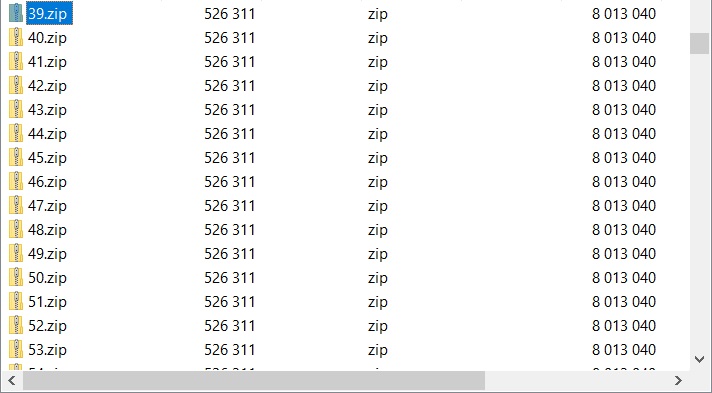
1 month 4 weeks ago7-Zip and Resource Hacker also do not reveal the embedded INF/CAT files.
With 7-Zip, right-click SetupChipset.exe, choose Open archive > #:e
When 7-Zip open, scroll down and locate several zip files, choose someone (i.e. attachment) and you can view and extract inf/cat files inside Drivers folder.
on an old gigabyte motherboard with Skylale chipset, version 2026.08.0017 totally disables internal audio (realtek), I had to use Windows 11 restore point
Same behavior here after finished installing Bluetooth 24.60.0 using default Intel installer (because Intel disabled the IT Professionals Bluetooth version).
In my case there's no need to use Restore Point, just went do Device Manager, right-click on "Intel® Smart Sound Technology BUS" under "Other devices" and reinstalled drivers.
The following user(s) said Thank You: duttyend, fikotr74, Tarek-Hasan
Please Log in or Create an account to join the conversation.
- FirstEver
-
Topic Author
- Offline
- The Best Poster
-
Enregistré
- Posts: 118
- Thanks: 204
Re: Universal Intel Chipset Drivers Updater
1 month 4 weeks agoThank you for your reply. I just want to make sure I understand the exact steps you took—when you reinstalled the driver for the "Intel® Smart Sound Technology BUS" via Device Manager, did you use a dedicated installer downloaded from Intel’s website, or did you simply let Windows pick a driver from its own built-in list (i.e., the driver that was already present in the system) and reinstall it that way? I’m asking because I want to replicate the fix as precisely as possible.In my case there's no need to use Restore Point, just went do Device Manager, right-click on "Intel® Smart Sound Technology BUS" under "Other devices" and reinstalled drivers.
The following user(s) said Thank You: duttyend, fikotr74
Please Log in or Create an account to join the conversation.
- Tarek-Hasan
-

- Offline
- Newbie
-

Enregistré
- Posts: 2
- Thanks: 2
Re: Universal Intel Chipset Drivers Updater
1 month 4 weeks ago - 1 month 3 weeks ago
Hi @josefrancklin,
Thanks for the tip. For a cleaner result, I first extracted using UniExtract2. Then extracted SetupChipset.msi and SetupChipsetx64.msi using the method you mentioned.
Thanks for the tip. For a cleaner result, I first extracted using UniExtract2. Then extracted SetupChipset.msi and SetupChipsetx64.msi using the method you mentioned.
Last edit: 1 month 3 weeks ago by Tarek-Hasan.
The following user(s) said Thank You: fikotr74
Please Log in or Create an account to join the conversation.
Time to create page: 0.085 seconds